DP-700 Episode 10: Streaming I, Engines & Eventstream

PowerBI consultant ·
It is 8:40 on a Monday morning in Pune. The first commuters are unlocking bikes, and your phone is already buzzing.
Karan, ops lead: Meera, the dashboards are an hour behind, a station near Baner ran empty and nobody noticed, and finance wants four years of billing history next to live trips. Where do we even start?
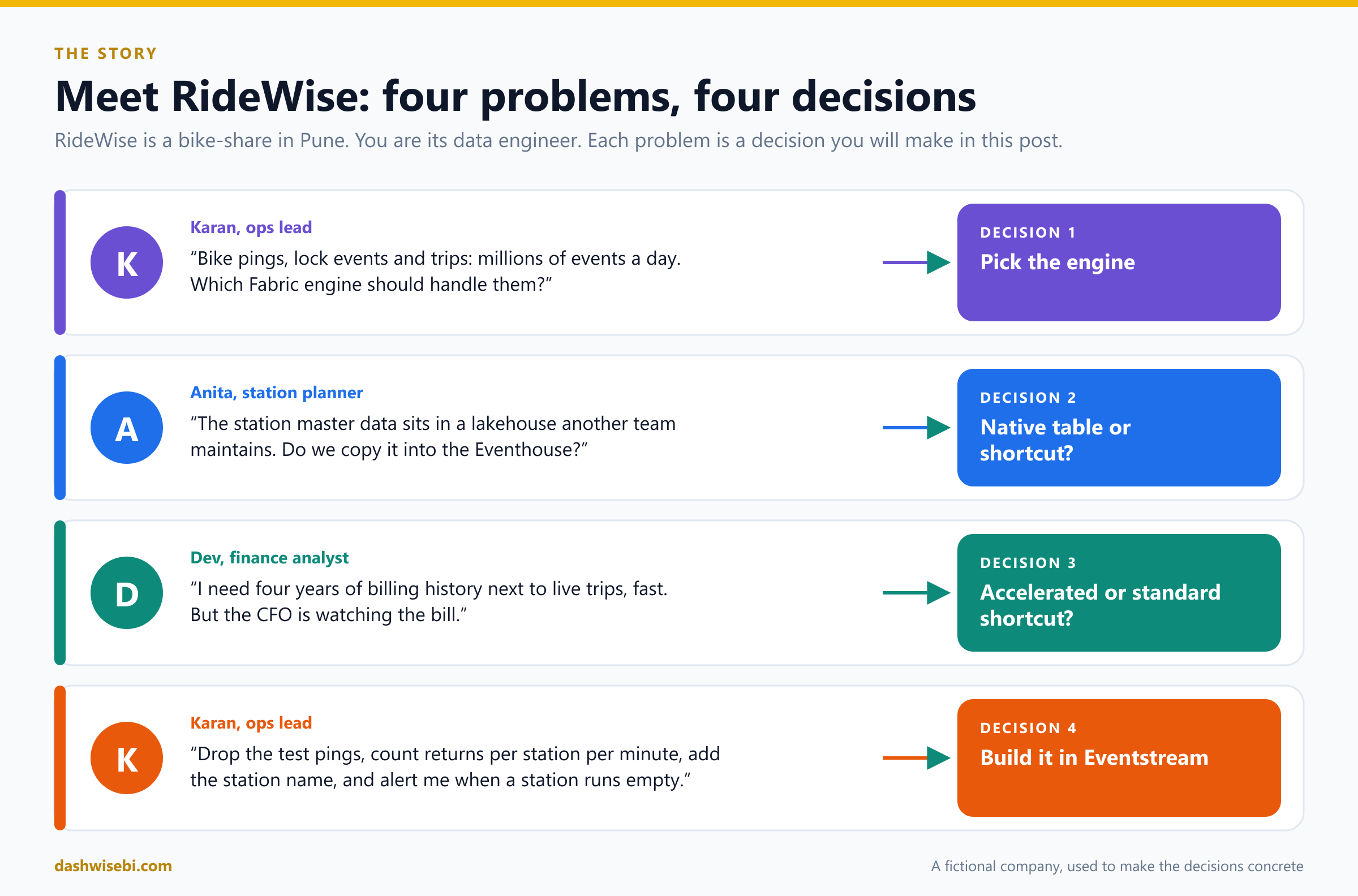
You are Meera, the data engineer at RideWise, a (fictional) bike-share. For the next hour you will make four decisions. They are the four topics of this episode:
- Choose an appropriate streaming engine
- Choose between native tables and OneLake shortcuts in Real-Time Intelligence
- Choose between Query acceleration for OneLake shortcuts and standard OneLake shortcuts in Real-Time Intelligence
- Process data by using Eventstream
This post works differently from the earlier episodes. Instead of a reference list, it is a working day. Each chapter follows the same rhythm:
- The problem. Someone brings you a request.
- Pause and decide. Try the choice yourself first. The answer is hidden behind a click, so you can test your instinct before you read the reasoning.
- Why. The facts behind the decision, with diagrams and code.
- Exam lens. What the DP-700 is likely to ask about it, and the traps.
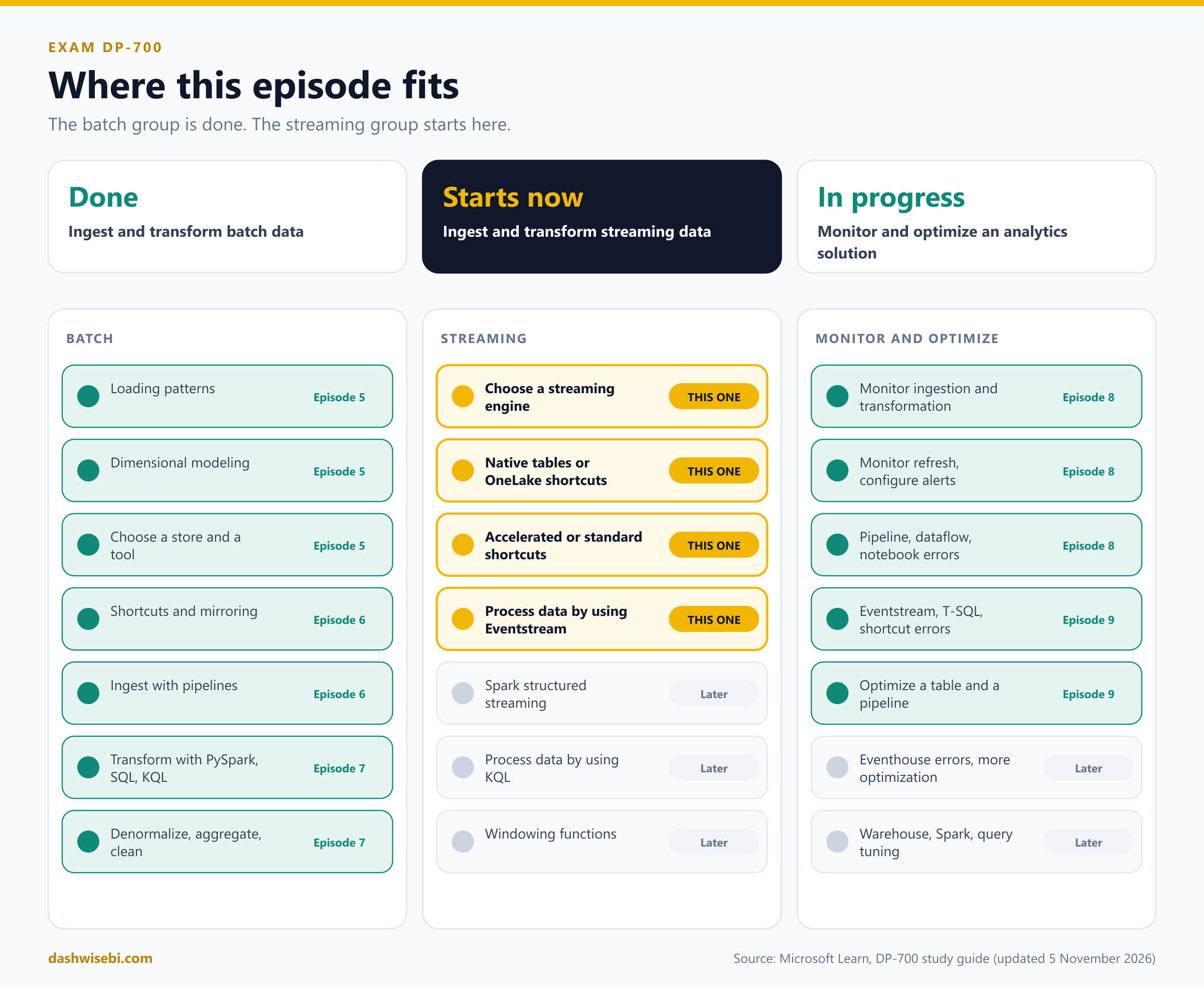
A note on wording. The study guide Microsoft updated on 5 November 2026 puts these topics in the group Ingest and transform streaming data. The rest of that group (Spark structured streaming, KQL and windowing functions) comes in Streaming II. Several features here are in preview, and I will label them each time. Before an exam, check the live documentation for their status.
Chapter 1. Karan asks: which engine?
Karan puts three coffee cups on your desk. “Three of your teammates, three different answers,” he says.
Priya, analyst: Just use Eventstream. I can click it together, no code.
Imran, data scientist: No. Spark. I need Python libraries and state across events.
Sunil, ops engineer: Put it in an Eventhouse and write KQL. Fast, simple.
Before you read the explanation, play judge. Here are four small requests that landed on your desk this morning.
Pause and decide. Marketing wants every bike ping copied into Fabric today, shaped lightly, and stored both for live queries and in a lakehouse for history. Nobody on the team writes code. Which engine?
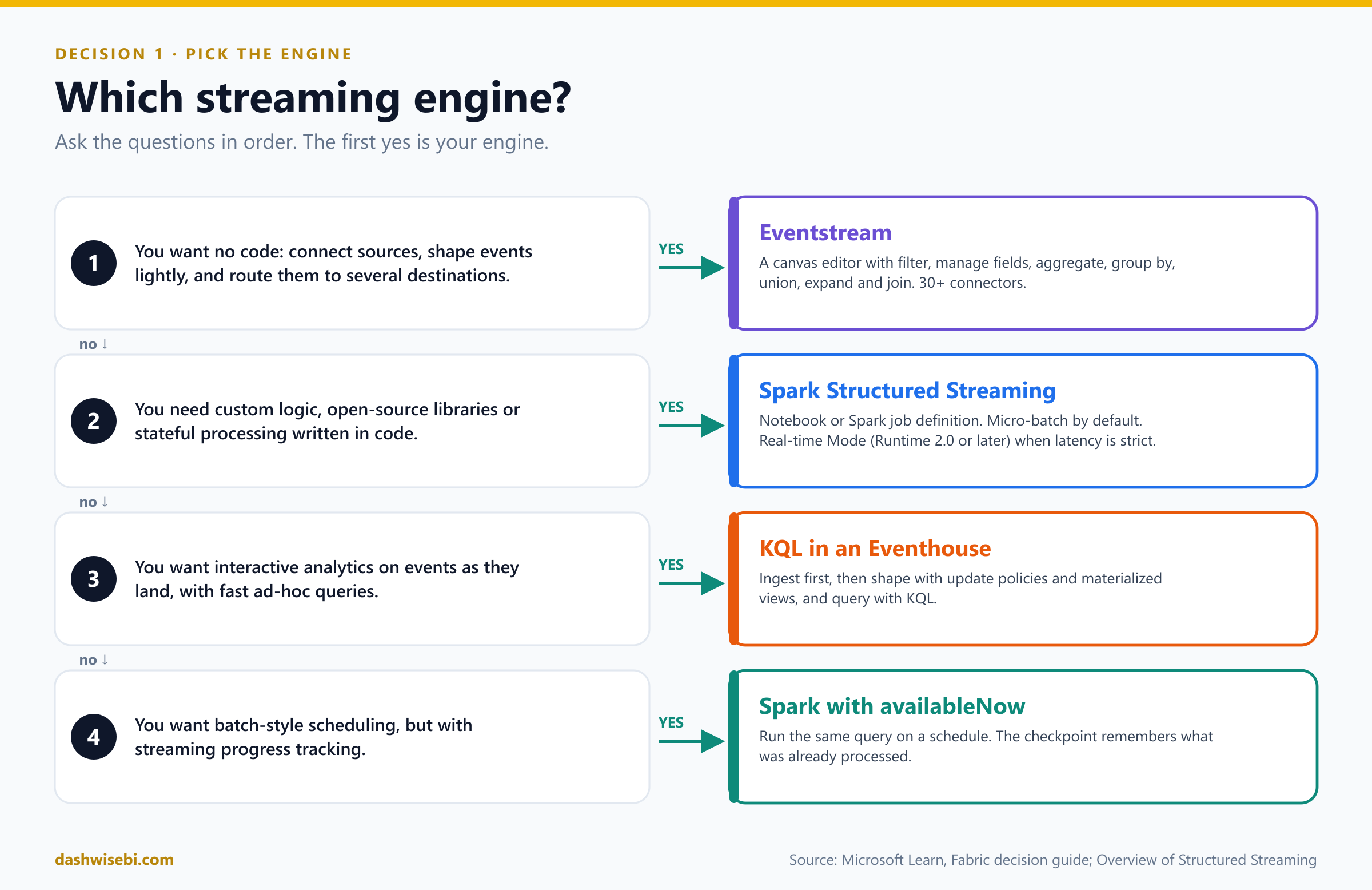
Eventstream. It is the no-code option: connect the source, add a few operators, and send the same stream to several destinations at once (an Eventhouse for live queries and a lakehouse for history). The Fabric decision guide describes it as no code or low code, with a canvas as the interface and SQL, JSON and messaging as the skill set.
Pause and decide. Imran wants to flag riders whose pattern over their last 20 trips looks suspicious, using a Python library, and he needs the result within a second or two. Which engine?
Spark Structured Streaming. The need is custom code, open-source libraries and stateful logic. For the tight latency, Spark has Real-time Mode, which needs Fabric Runtime 2.0 or later. Without a strict latency target, the default micro-batch model is the place to start.
Pause and decide. Sunil wants to type a query and see the last ten minutes of pings across all stations in a few seconds, again and again, all day. Which engine?
KQL in an Eventhouse. The Eventhouse is built for interactive analytics on event data. Remember the catch: it is a store and query engine. Something has to deliver the events to it, and in practice that is often an eventstream.
Pause and decide. Every hour a partner drops a new batch of files into a folder. Finance wants each file processed exactly once, even if the job restarts, but is happy with a schedule. Which engine?
Spark Structured Streaming with the availableNow trigger. It processes everything available, commits its progress to the checkpoint, and stops. A scheduler starts it again later, and the checkpoint remembers which files were already handled. It is a good fit for batch-style jobs that need streaming bookkeeping.
Why: three engines, one decision
Microsoft's Fabric decision guide compares the options on a few simple properties. For streaming, two of its columns matter: Eventstream and Spark. The Eventhouse completes the picture as the place where streaming data is stored and queried.
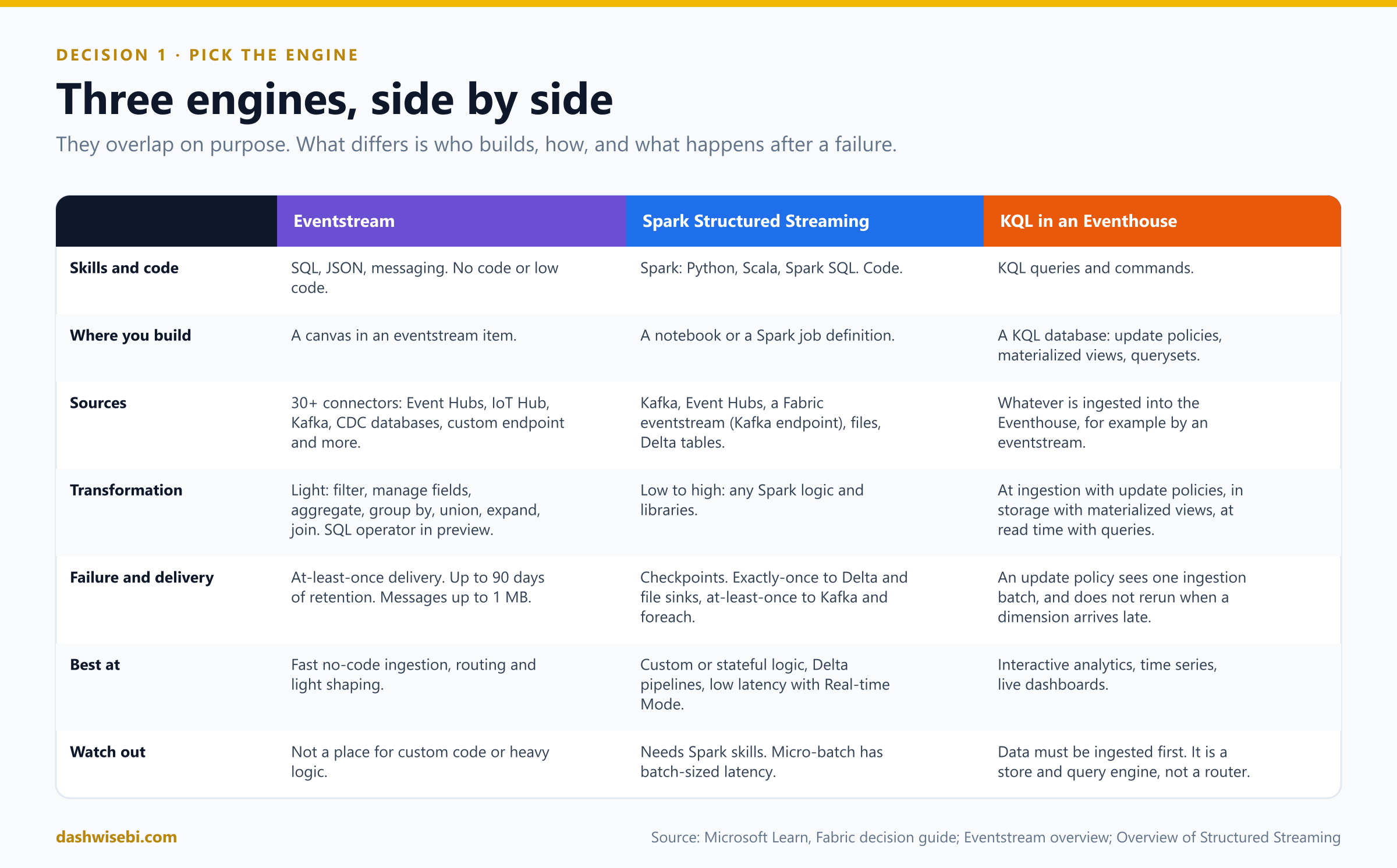
Eventstream: the no-code router
- It brings events into Fabric, transforms them lightly, and routes them to destinations. The decision guide lists its data volume as medium to high, its transformation complexity as low, and its sources as databases with change data capture, Kafka, messaging systems that support publish and subscribe, and other event streams.
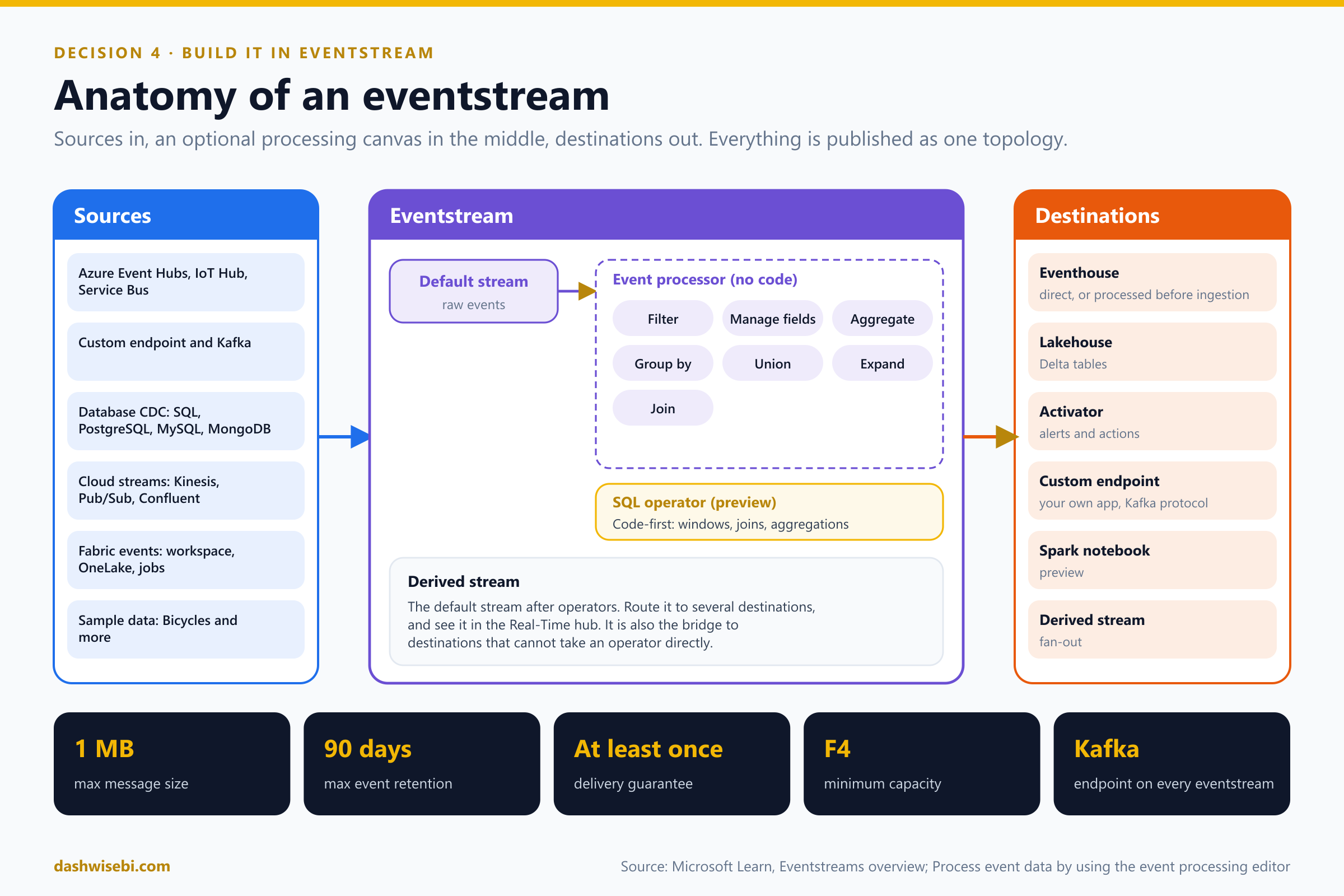
- Under the hood, creating an eventstream creates an Azure Event Hubs namespace for you, and every eventstream exposes a Kafka-compatible endpoint. Existing Kafka producers can be repointed with a connection string change.
- Limits to remember: a message can be up to 1 MB, events are retained for up to 90 days, delivery is at least once, and the feature needs at least F4 capacity.
Spark Structured Streaming: the code-first engine
Structured Streaming treats an input stream as an unbounded table that new rows are appended to. You write normal DataFrame code, and Spark runs it again and again as data arrives.
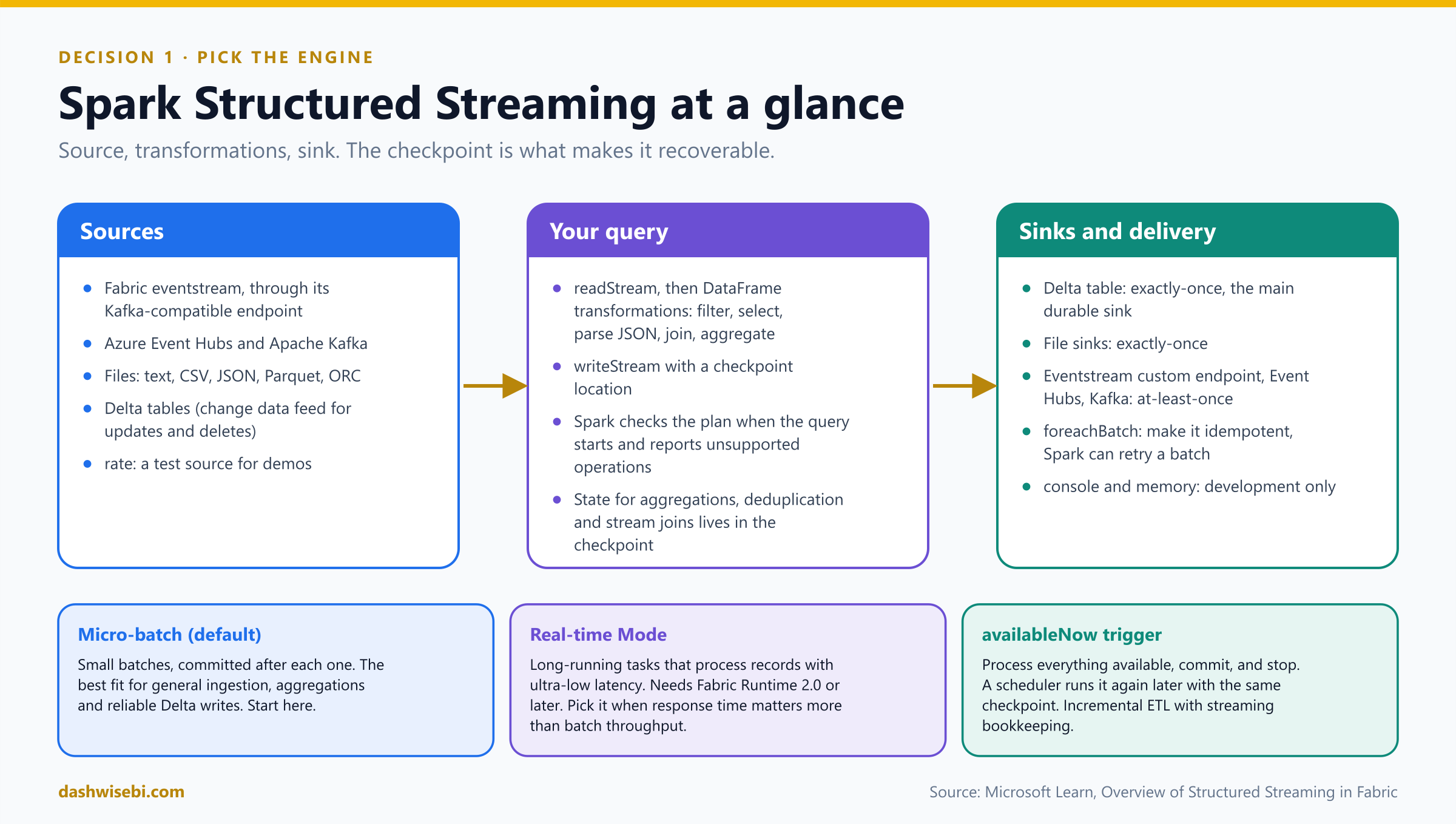
Here is the minimal pattern from the Microsoft documentation: read a test stream, add a column, and write it to a Delta table.
from pyspark.sql.functions import col

streaming_df = (
    spark.readStream
    .format("rate")                       # a test source that generates rows
    .option("rowsPerSecond", 1000)
    .load()
    .select(
        col("timestamp"),
        col("value"),
        (col("value") % 10).alias("bucket")
    )
)

query = (
    streaming_df.writeStream
    .format("delta")
    .option("checkpointLocation", "Files/checkpoints/rate_to_delta")
    .outputMode("append")
    .toTable("rate_stream_delta")
)

query.awaitTermination()readStreamandwriteStreamare the streaming twins ofreadandwrite. Theratesource is for demos and tests. In RideWise, the source would be the eventstream, read through its Kafka-compatible endpoint.checkpointLocationis the heart of recovery. It stores the query's progress, offsets and state in durable storage. If the query stops and restarts with the same checkpoint, Spark resumes from the last committed progress. Keep one checkpoint per query and never share it between different query definitions.- The query runs continuously because it has no trigger.
awaitTermination()keeps a notebook or job alive for it.start()andtoTable()return immediately, so without it a triggered job can reach a terminal state while the query runs in the background.
To turn the same query into a scheduled, bounded job, add one line before toTable. Everything else stays the same:
(streaming_df.writeStream
    .format("delta")
    .option("checkpointLocation", "Files/checkpoints/rate_to_delta")
    .trigger(availableNow=True)          # process what is there, commit, stop
    .toTable("rate_stream_delta"))
Delivery guarantees matter on the exam. Exactly-once processing needs a replayable source, a durable checkpoint and an idempotent or transactional sink such as Delta Lake. Delta and file sinks give exactly-once writes. Kafka and foreach sinks give at-least-once, so make custom writes idempotent. foreachBatch is the escape hatch for Delta merges or multiple destinations, and Spark can retry a micro-batch, so the logic must tolerate that.
The Eventhouse: where the events live
An Eventhouse stores events and answers KQL queries fast. You shape data there with update policies and materialized views, as you saw in Episode 7. Streaming KQL gets its own episode soon.
They work as a team
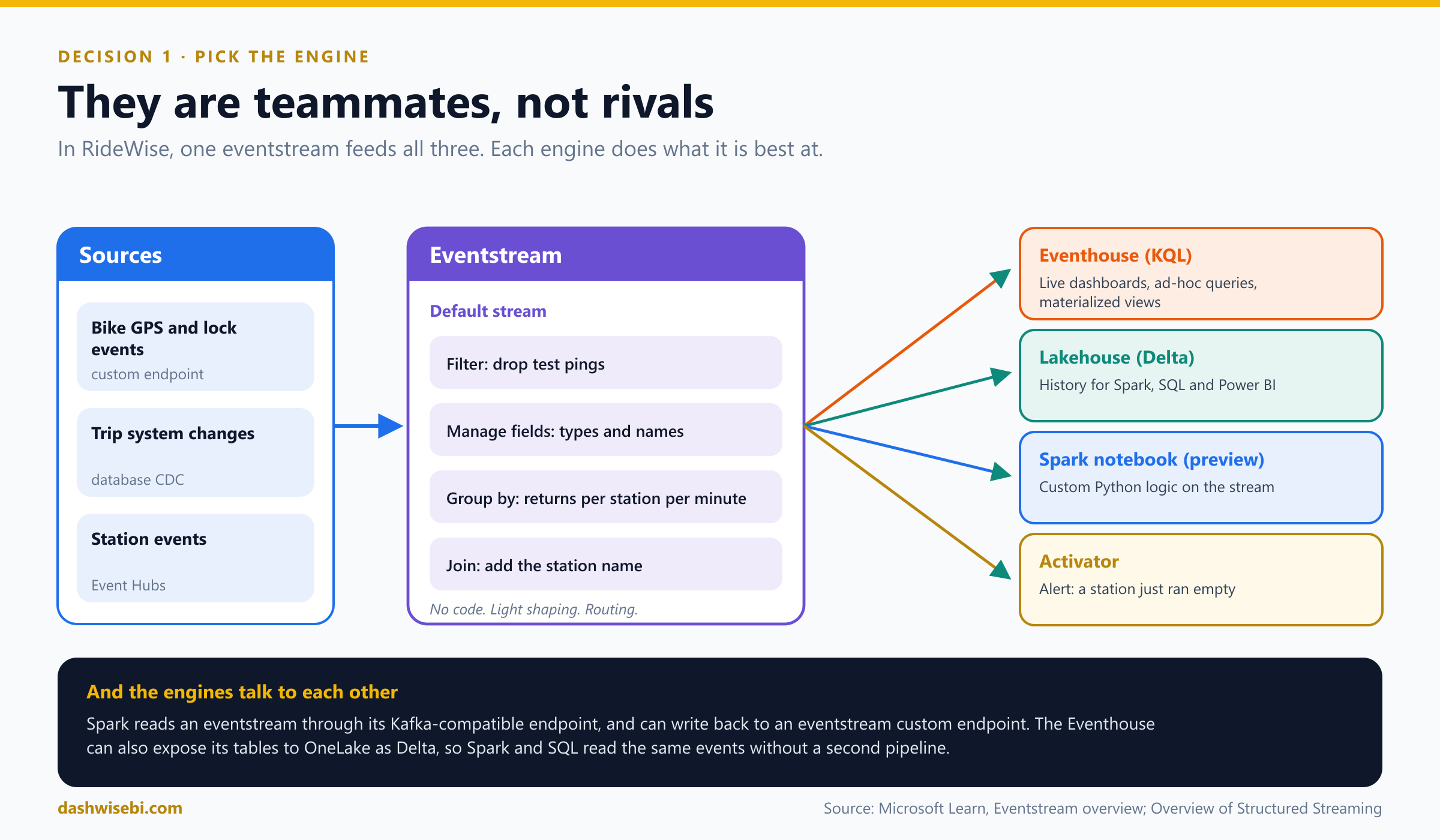
- Spark can read from an eventstream (through the Kafka-compatible endpoint) and write back to an eventstream custom endpoint.
- An eventstream can send events straight to a Spark notebook destination, which starts a Structured Streaming job (this destination is in preview).
- An eventstream can write to an Eventhouse and a lakehouse at the same time, and each destination receives the stream without interfering with the others.
You turn to the three coffee cups. “You were all right,” you say. “Eventstream brings events in and routes them. Spark handles the logic that needs code. The Eventhouse answers Sunil's queries. We will use all three.”
Exam lens
- “No code, light transformation, many destinations” points to Eventstream. “Custom code, libraries, state” points to Spark. “Interactive analytics over events” points to the Eventhouse and KQL.
- Micro-batch is the default Spark model. Real-time Mode is for strict latency and needs Runtime 2.0 or later.
- availableNow is how you run a streaming query on a schedule.
- Eventstream delivery is at-least-once, so duplicates are possible and you deduplicate downstream (see Episode 7).
Chapter 2. Anita asks: copy it or point to it?
Anita from station planning drops by with her laptop open. “The station master data (names, capacities, wards) lives in a lakehouse that the data platform team maintains. They update it every night. Do I need you to copy it into the Eventhouse?”
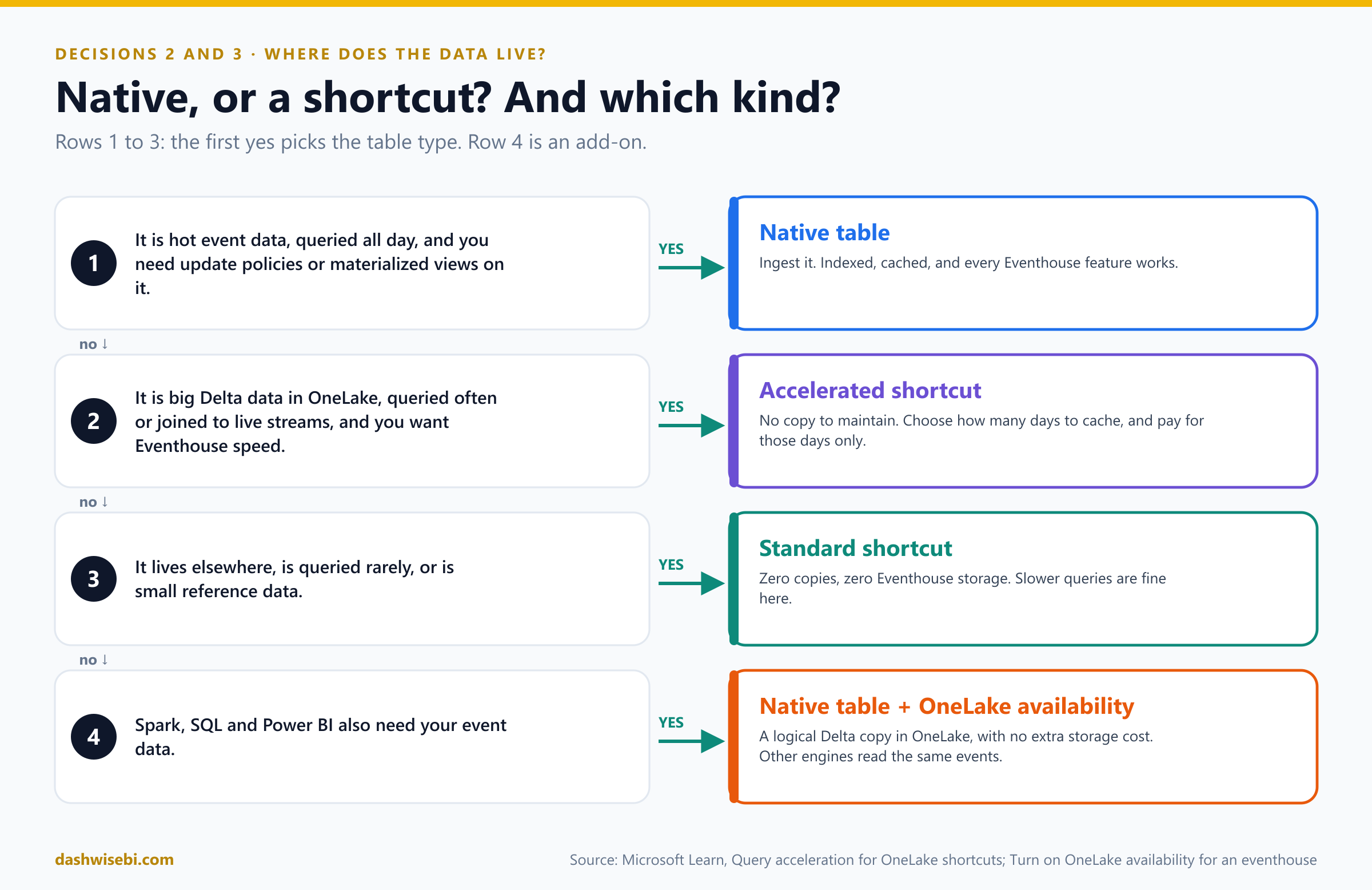
This is the second decision: should data be a native table in the Eventhouse, or a OneLake shortcut?
Pause and decide. The station master table is small, maintained by another team and changes nightly. The live ping data is huge and queried all day. What goes where?
Pings: native table. Station master: shortcut. Ingest the hot, high-volume events so they are indexed and cached, and so update policies and materialized views work on them. Keep the master data where its owner maintains it, and point to it, so there is no second copy to keep in sync. (Decision 3 will ask whether to accelerate that shortcut.)
Why: what a shortcut is, and what it is not
A OneLake shortcut in a KQL database lets you query data in other Fabric items or external storage without moving it. The shortcut appears under Shortcuts in the database, and you query it as an external table with the external_table() function. (If you need a refresher on shortcuts in general, see Episode 6.)
- Sources. Internal OneLake resources (KQL databases, lakehouses, warehouses) and external storage (Azure Data Lake Storage, Amazon S3, Google Cloud Storage).
- One table or folder per shortcut. You create shortcuts one at a time, and you cannot rename a shortcut created in a KQL database. You also cannot create a shortcut over a table that has an asterisk (
*) in any column name. - Schema sync. Column additions, deletions, renames and type changes in the source table are reflected in the shortcut automatically. It is on by default. You can turn it off with
AutoUpdateSchema=falseon the external table. - Types. Delta types map to Eventhouse types. For example
dateandtimestamp_ntzbecomedatetime, andstruct,arrayandmapbecomedynamic.
Anita's query looks like this. The first part reads the shortcut. The second joins live trips (a native table) to it:
// A shortcut is read like an external table
external_table('StationMaster')
| where City == "Pune"
| take 10

// Join live trips (native) to the shortcut
Trips
| where Timestamp > ago(10m)
| join kind=leftouter (
    external_table('StationMaster')
    | project StationId, StationName, Capacity
  ) on StationId
| summarize Returns = count() by StationName, Capacity
Notice kind=leftouter. As you learned in Episode 7, the default KQL join is innerunique, so say what you mean.
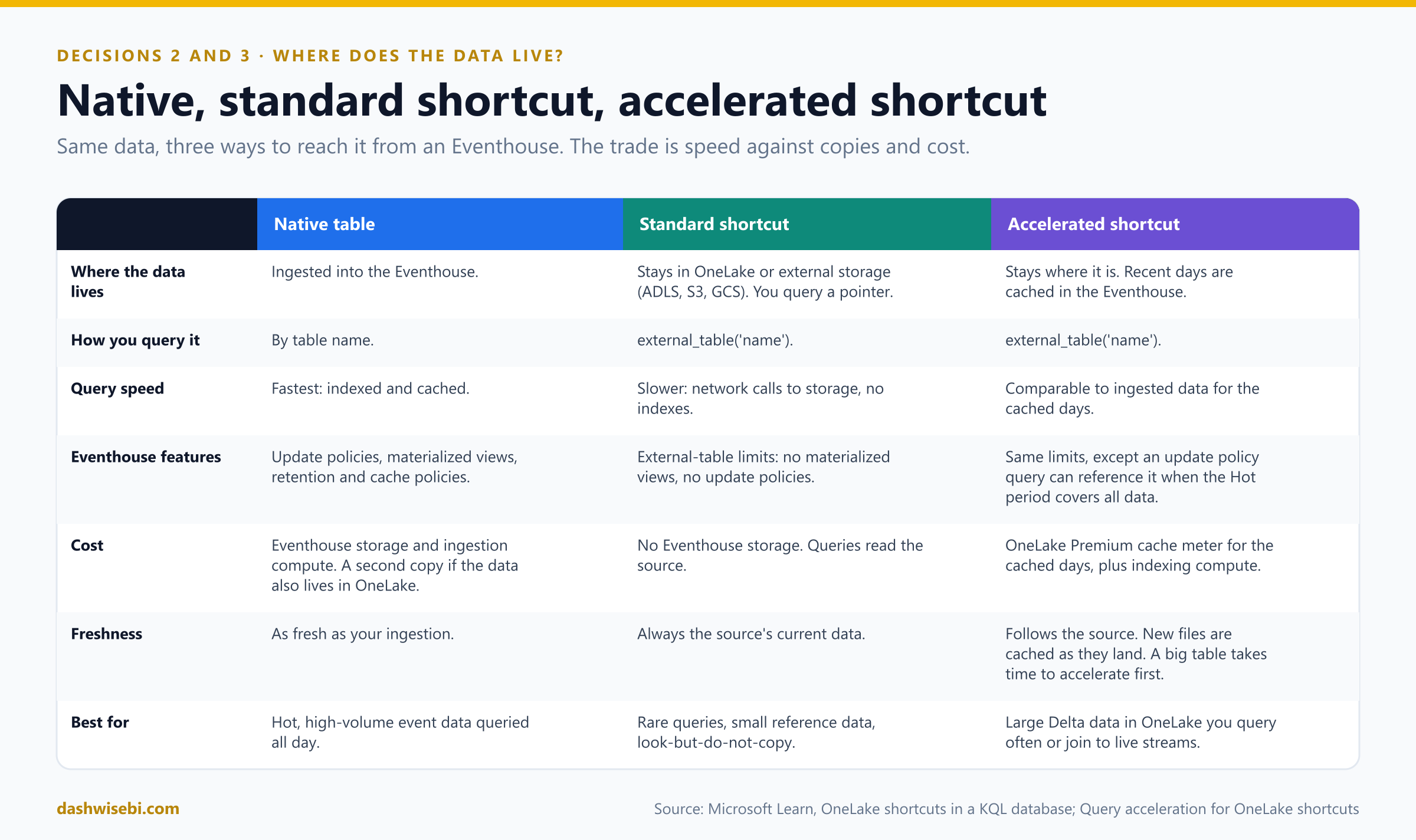
The trade is simple. Native data is ingested, indexed and cached, so queries are fastest and every Eventhouse feature works, but you pay for storage and ingestion and you hold a second copy. A shortcut avoids the copy and the pipeline, but queries over it “can be less performant than on data that is ingested directly to Eventhouses” because of network calls to fetch data from storage, the absence of indexes, and more.
The other direction: OneLake availability
Sometimes the question is reversed: your events need to be readable by Spark, SQL and Power BI. Turn on OneLake availability for the KQL database or a table, and you get a logical copy in Delta Lake format that other Fabric engines can read, with no extra storage cost. Some details are exam-friendly:
- It works at the database or table level. At the database level, new tables are included automatically, and you can apply it to existing tables for a historic backfill.
- The database's retention policy also applies to the OneLake copy.
- The Eventhouse batches writes into well-sized Parquet files, so data can take a while to appear: the default write delay is up to 3 hours, or until files of sufficient size (typically 200 to 256 MB) exist, and you can set it between 5 minutes and 3 hours.
- While it is on, you cannot rename tables, alter a column type, apply row-level security, or delete, truncate or purge data. Turn it off, make the change, and turn it on again. Turning it off soft-deletes the OneLake data, and turning it back on restores everything, including history.
Exam lens
- Shortcut: no copy, no pipeline, always current, but slower and with external-table limits (no materialized views, no update policies).
- Native: fast and full-featured, but it costs storage and ingestion.
- You query shortcuts with
external_table(). - “Other engines need the Eventhouse data” points to OneLake availability.
Chapter 3. Dev asks: can it be fast and cheap?
Dev, the finance analyst, arrives with a spreadsheet and a worried look. “I need four years of billing history next to live trips, fast. But I heard that caching costs money, and the CFO reads the capacity bill.”
Your shortcut is slower than a native table, and sometimes that matters. The fix is query acceleration. It is not free, so decide carefully.
Pause and decide. Three shortcuts: (a) the small station master, joined to every live query; (b) four years of billing history, mostly queried for the last 90 days; (c) a yearly audit archive, queried twice a year. Which ones do you accelerate?
(a) Yes. (b) Yes, but only the last ~90 days. (c) No. Microsoft's own guidance says dimension data is a good case: it is small, so the extra cost is typically minimal, and it makes joins and enrichment fast. For the billing history, the policy caches only a number of days that you choose, so cache just the window people query and leave the rest in storage. The audit archive is rarely read, so a standard shortcut is the right, cheapest choice.
Why: how acceleration works
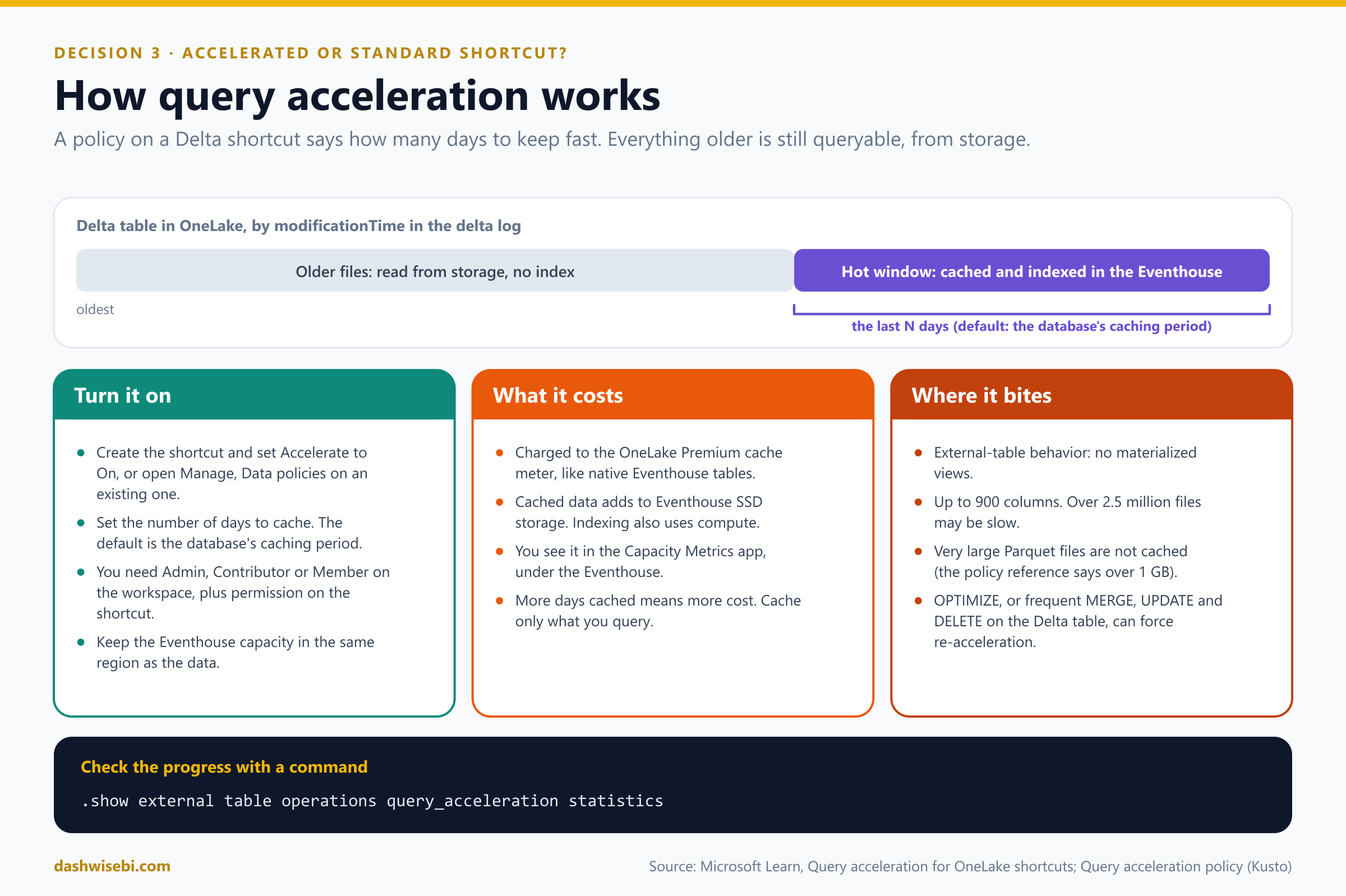
Query acceleration is a policy on top of an external Delta table. It defines the number of days of data to cache for high-performance queries. It caches data as it lands in OneLake, including existing data and new updates, so performance is comparable to data ingested into the Eventhouse. You do not manage an ingestion pipeline or a duplicate copy. It is supported for Delta tables from OneLake shortcuts, ADLS, Amazon S3, Google Cloud Storage and Azure blob external tables.
Turning it on
- When you create the shortcut, set Accelerate to On. Or, for an existing shortcut, open Manage, Data policies and switch Query acceleration on.
- Enter the number of days to cache. The caching period counts from the
modificationTimein the Delta log, and the default is the caching period of the database that holds the shortcut. - You need the Admin, Contributor or Member workspace role, plus the relevant OneLake security permissions on the shortcut. Keep the Eventhouse capacity in the same region as the data if you have compliance requirements.
The first acceleration takes longer for bigger tables. To watch its progress, run this command in a KQL queryset:
.show external table operations query_acceleration statisticsThe policy also has its own commands (.alter, .alter-merge, .delete and .show query acceleration policy), and the policy has a Hot property that controls how much is cached.
The price
- Accelerated data is charged under the OneLake Premium cache meter, like native Eventhouse tables. Indexing activity can also count toward capacity unit use.
- It adds to your Eventhouse SSD storage. More days cached means more cost.
- You can see the charges in the Fabric Capacity Metrics app, under the Eventhouse where the accelerated shortcut lives.
Where it bites
- An accelerated shortcut still behaves like an external table, with the same limitations and capabilities. Materialized views are not supported.
- At most 900 columns. Performance over tables with more than 2.5 million data files may not be optimal. Delta tables with checkpoint V2 are not supported.
- The feature assumes static advanced features (column mapping and partitions do not change). To change them, disable the policy first, change, then re-enable it. Schema changes need a matching
.alterof the external table schema, and a breaking change can restart acceleration from scratch. - Very large Parquet files are not cached. The policy reference says files over 1 GB; an older overview says 6 GB. Plan for the smaller number.
- Known issues: running
OPTIMIZEon the Delta table means the optimized data must be re-accelerated, and frequentMERGE,UPDATEorDELETEoperations can force re-acceleration of the touched files. If most files are touched, that is like re-accelerating the whole table. Manual edits to the Delta table are not allowed.
A wrinkle: update policies
The older overview says update policies are not supported on accelerated shortcuts. The newer policy reference describes a way: an update policy query may reference an accelerated external table through external_table(), to enrich or join data at ingestion. The conditions are that the acceleration policy is enabled and the Hot period covers all data, which currently means a value of at least 100 years (for example "Hot": "36500.00:00:00"). The documentation disagrees on whether this is generally available or still preview, so check the live pages before you rely on it.
Dev reads the cost card twice. “So I pick the number of days,” he says. “Exactly,” you answer. “And I check the Metrics app after a week.”
Exam lens
- Standard shortcut: zero copies and no Eventhouse storage, but slower. Accelerated: near-native speed for the cached days, paid for on the OneLake Premium cache meter.
- Acceleration works on Delta tables, and you control cost with the number of days cached.
- Accelerated shortcuts keep external-table limits, so no materialized views.
- Dimension data is the textbook case for acceleration, and rarely queried archives are the textbook case for standard shortcuts.
Chapter 4. Karan again: build it
By 11:00 the decisions are made, and Karan is back with his list.
Karan: Drop the test pings. Count returns per station per minute. Add the station name. Keep the raw pings for ad-hoc queries. And alert me when a station runs empty.
That is a job for an eventstream. Here is the build log. Follow along with the Bicycles sample data source, which Fabric offers for practice, and your field names will differ from mine.
The build log
- Create the eventstream in a workspace with at least F4 capacity. Fabric also creates an event hub for the default stream.
- Add a source. For RideWise it is a custom endpoint that the bikes' gateway writes to, or an Azure Event Hubs source. For practice, add the Bicycles sample data. A source is a connector: Fabric offers more than 30 of them, including Event Hubs, IoT Hub, Kafka, change data capture from several databases, Amazon Kinesis and Google Pub/Sub.
- Enter Edit mode and hover over the line between the stream and the destination. Select + to insert an operator. Make sure the upstream node has a schema.
- Filter out the test pings: keep events where the position fields are not null.
- Manage fields: cast and rename. You can also add new fields with built-in string, date and time, and math functions. Select Refresh to see the test result, and check the Authoring errors tab for mistakes.
- Group by station, over a one-minute time window, to count returns.
- Join with the station reference data to add the station name (details below).
- Attach destinations. Raw pings go to an Eventhouse with direct ingestion. The aggregated counts go to a lakehouse, and to an Activator that watches for empty stations.
- Publish, then watch the Live view. Select a node to see its data preview, and the data insights, runtime logs and workspace monitoring from Episode 9.
Why: the seven operators
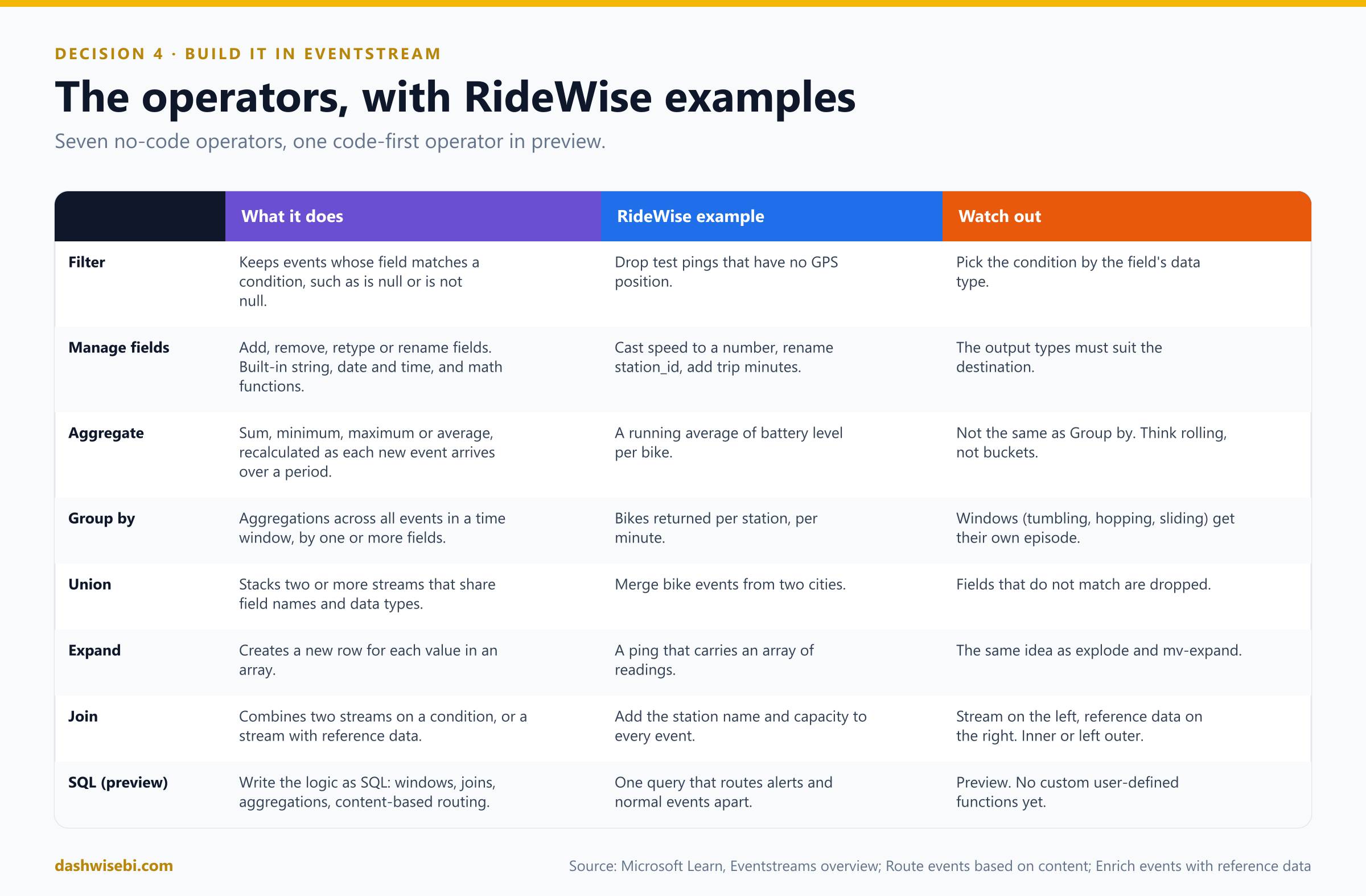
- Aggregate or Group by? Aggregate recalculates a sum, minimum, maximum or average every time a new event occurs over a period of time. Group by calculates aggregations across all events within a time window, with more aggregation options and more complex time windows. The window types you will meet are tumbling, hopping and sliding (the Fabric API also lists session and snapshot). Windows get their own episode.
- Union connects two or more nodes and stacks events with shared fields (same name and data type) into one table. Fields that do not match are dropped.
- Expand creates a new row for each value in an array, the same idea as
explodein Spark andmv-expandin KQL. - SQL operator (preview) is the code-first alternative for windows, joins, aggregations and content-based routing from a single query. Eventstream does not yet support custom user-defined functions in it.
Why: the Join, with reference data
To add the station name, you do not touch the source. You add the station table as reference data: a static or slowly changing dataset that adds context to events.
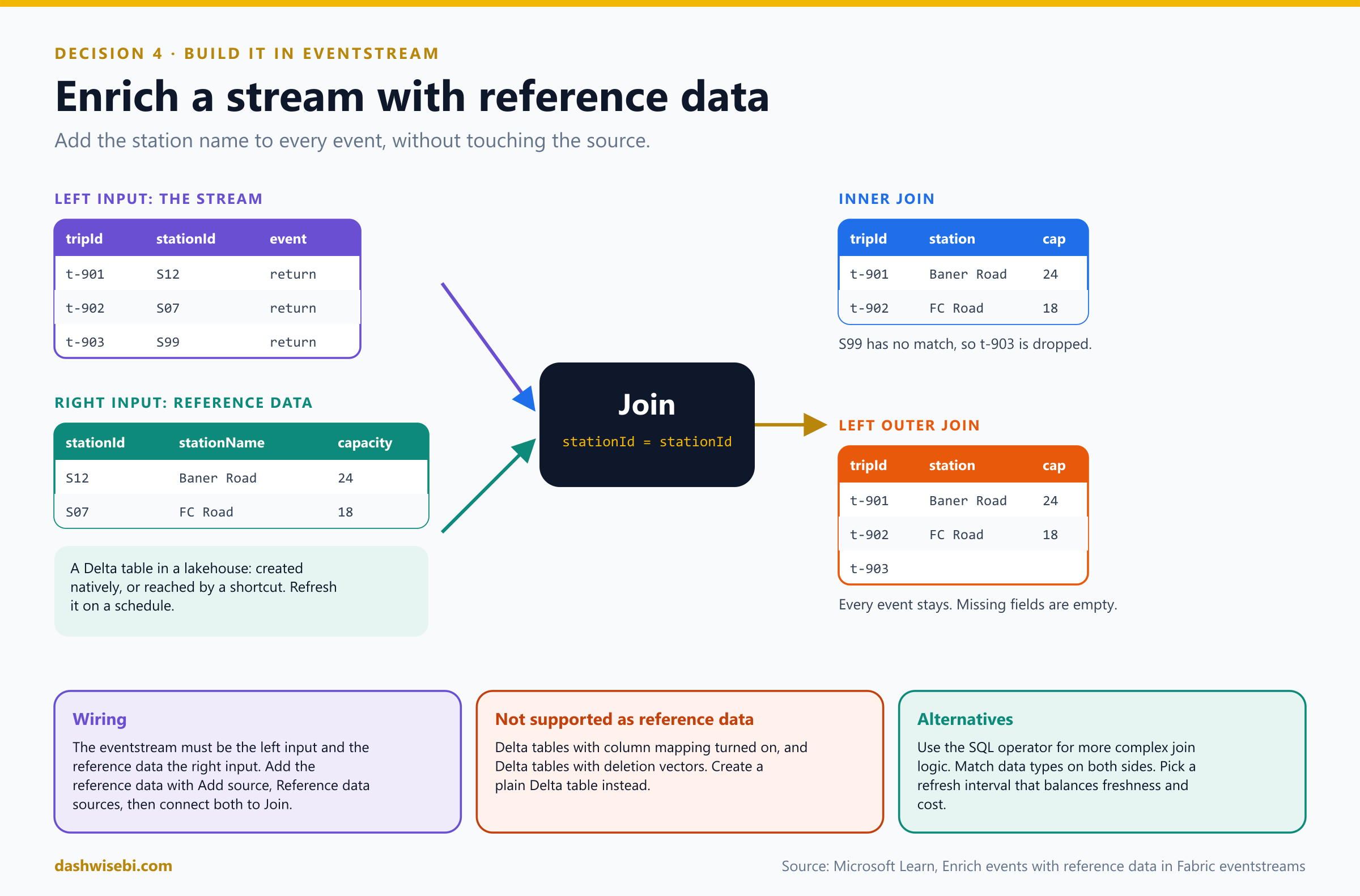
- The reference data is a Delta table in a Fabric lakehouse. It can be created natively in the lakehouse or reached by a shortcut (this is where Chapters 2 and 3 meet Chapter 4). Add it with Add source, Reference data sources, choose the columns, and optionally set it to refresh periodically on a schedule you pick.
- In the Join, the event stream must be the left input and the reference data the right input. Match a field from the stream to a column from the reference table, and choose Inner (only events with a match) or Left outer (every event, with empty reference fields when there is no match).
- Delta tables with column mapping turned on, or with deletion vectors, are not supported as reference data. Create a plain Delta table instead. Join keys need compatible data types.
Why: two ways into an Eventhouse
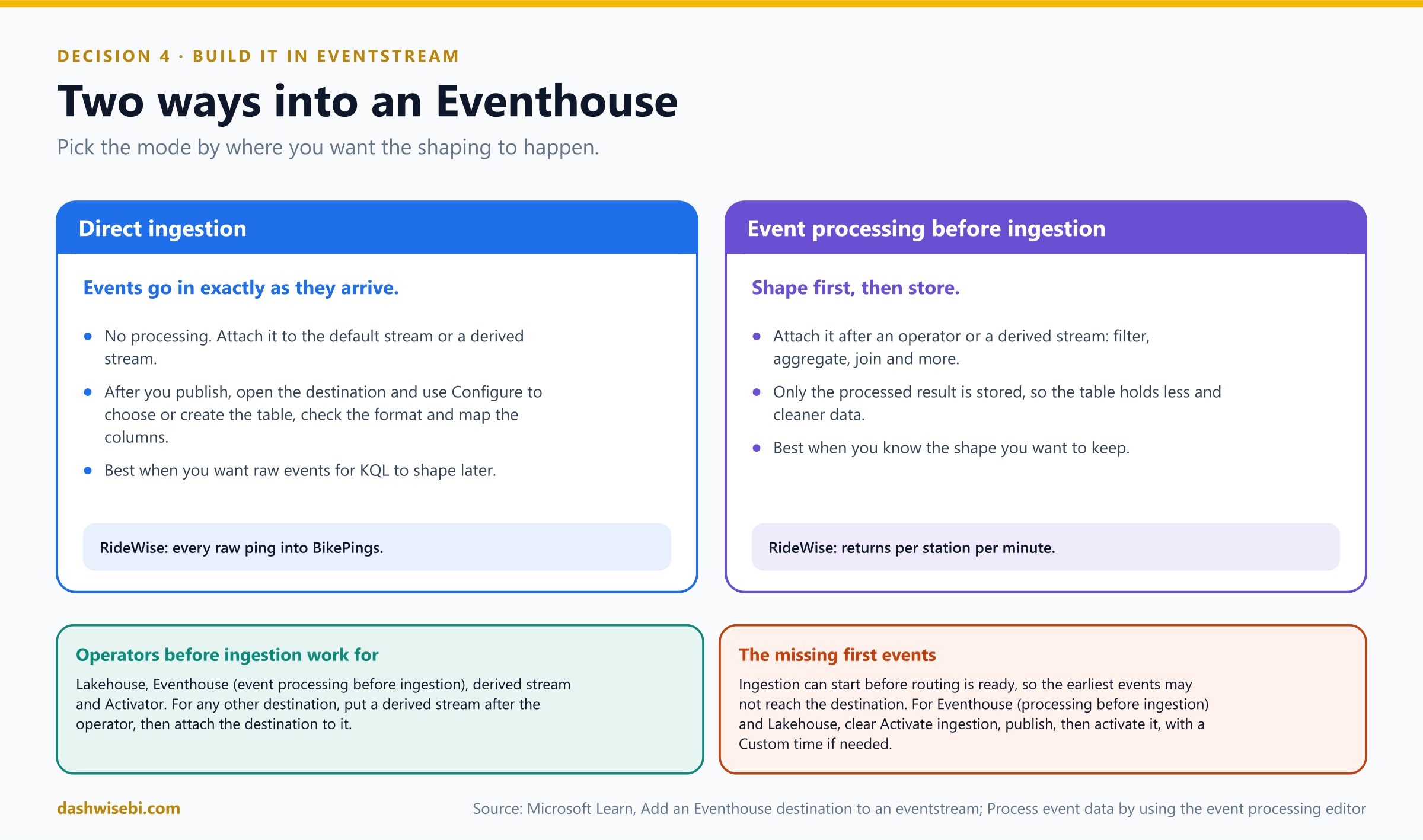
Karan wants both the raw pings and the per-minute counts, so RideWise uses both modes:
- Direct ingestion for the raw pings. After you publish, open the destination in Live view and use Configure. The Eventhouse opens a Get data screen where you pick or create a table, check the format, and map columns.
- Event processing before ingestion for anything that comes after an operator or a derived stream. Only the processed result is stored.
Which destinations accept an operator in front of them? A lakehouse, an Eventhouse (with event processing before ingestion), a derived stream and Activator. For anything else, put a derived stream after your operator, then attach the destination to that derived stream. A derived stream is the default stream after processing. You can route it to several destinations and see it in the Real-Time hub.
Pause and decide. Karan also wants the filtered pings sent to a partner's own application through a custom endpoint. You added a Filter. Can you connect the custom endpoint directly after it?
Not directly. Custom endpoint is one of the destinations that does not take an operator in front of it. Add a derived stream as the output of the Filter, then attach the custom endpoint to the derived stream.
Pause and decide. You publish the eventstream. An hour later, the first few minutes of data from the database change-data-capture source are missing from the lakehouse table. What happened, and what do you do next time?
Ingestion can start faster than routing is ready, so some early data stays in the eventstream and is never routed to the destination. A common example is the initial snapshot from a CDC source. When you configure an Eventhouse (event processing before ingestion) or a Lakehouse destination, clear Activate ingestion, publish, and then activate ingestion manually. You can use a Custom time to pick an earlier start so that the early data is processed too.
Things worth knowing
- Delivery is at least once. A restart can deliver an event twice, so deduplicate downstream.
- Pause and resume. A derived stream can be paused and resumed without affecting the other inputs and outputs.
- Schemas. The Schema Registry (event schema sets) is generally available. The schema-aware eventstream experience, with the Classifier workflow and mixed processing of schematized and untyped events, is in preview.
- DeltaFlow (preview) turns raw change-data-capture events from several databases into analytics-ready streams with automatic schema registration, and creates destination tables for you.
- When to keep Azure services. If you need to tune partitions and throughput units yourself, need dedicated capacity at very high scale, or depend on JavaScript user-defined functions in Stream Analytics, the Azure services still give more control than the Eventstream SaaS experience.
At 14:05 a text arrives from Karan. “Baner station just pinged me before it ran empty. Whoever built this, thank you.” You smile, and then you look at the clock. It is time for the review.
Exam lens
- Operators: Filter, Manage fields, Aggregate, Group by, Union, Expand, Join, plus the preview SQL operator.
- Union needs shared field names and types, and drops the rest.
- Join with reference data: stream on the left, a lakehouse Delta table on the right, inner or left outer.
- Direct ingestion versus event processing before ingestion, and the derived stream as a bridge.
- Missing first events: clear Activate ingestion, publish, then activate.
The review: nine quick calls
Karan's boss joins the call and fires questions at you. Answer each one in your head first, then open it.
Pause and decide. 1. A team with no coding skills wants events from an Event Hub in a lakehouse and an Eventhouse, lightly cleaned. Which engine?
Eventstream. No code, light transformation, several destinations.
Pause and decide. 2. A stateful fraud rule needs a Python library and a latency of about a second. Which engine and mode?
Spark Structured Streaming in Real-time Mode, which needs Fabric Runtime 2.0 or later. Use micro-batch if there is no strict latency target.
Pause and decide. 3. New files land every hour. Each must be processed once, and a restart must not reprocess anything. How?
A Structured Streaming query with the availableNow trigger and a checkpoint, started by a scheduler.
Pause and decide. 4. Small dimension data in a lakehouse is joined to live events all day. Copy it, or point to it?
Point to it with a shortcut and accelerate it. No copy to maintain, and because dimension data is small, the acceleration cost is typically minimal.
Pause and decide. 5. Only per-minute totals should be stored in the Eventhouse, not the raw events. What do you configure?
A Group by operator, then an Eventhouse destination with event processing before ingestion.
Pause and decide. 6. The processed stream must go to a custom application. How do you wire it?
Add a derived stream after the operator, then attach the custom endpoint to it.
Pause and decide. 7. The first events from a CDC source never reach the lakehouse. What is the fix?
Clear Activate ingestion on the destination, publish, then activate ingestion, optionally with a Custom time that is earlier.
Pause and decide. 8. The Join with the reference table fails to accept a Delta table that has deletion vectors. What do you do?
These tables are not supported as reference data. Create a Delta table without deletion vectors (and without column mapping) and use that one.
Pause and decide. 9. Spark, SQL and Power BI also need the events that live in the Eventhouse. Which feature avoids a second pipeline?
OneLake availability. It exposes a logical Delta copy of the KQL database or table in OneLake, with no extra storage cost.
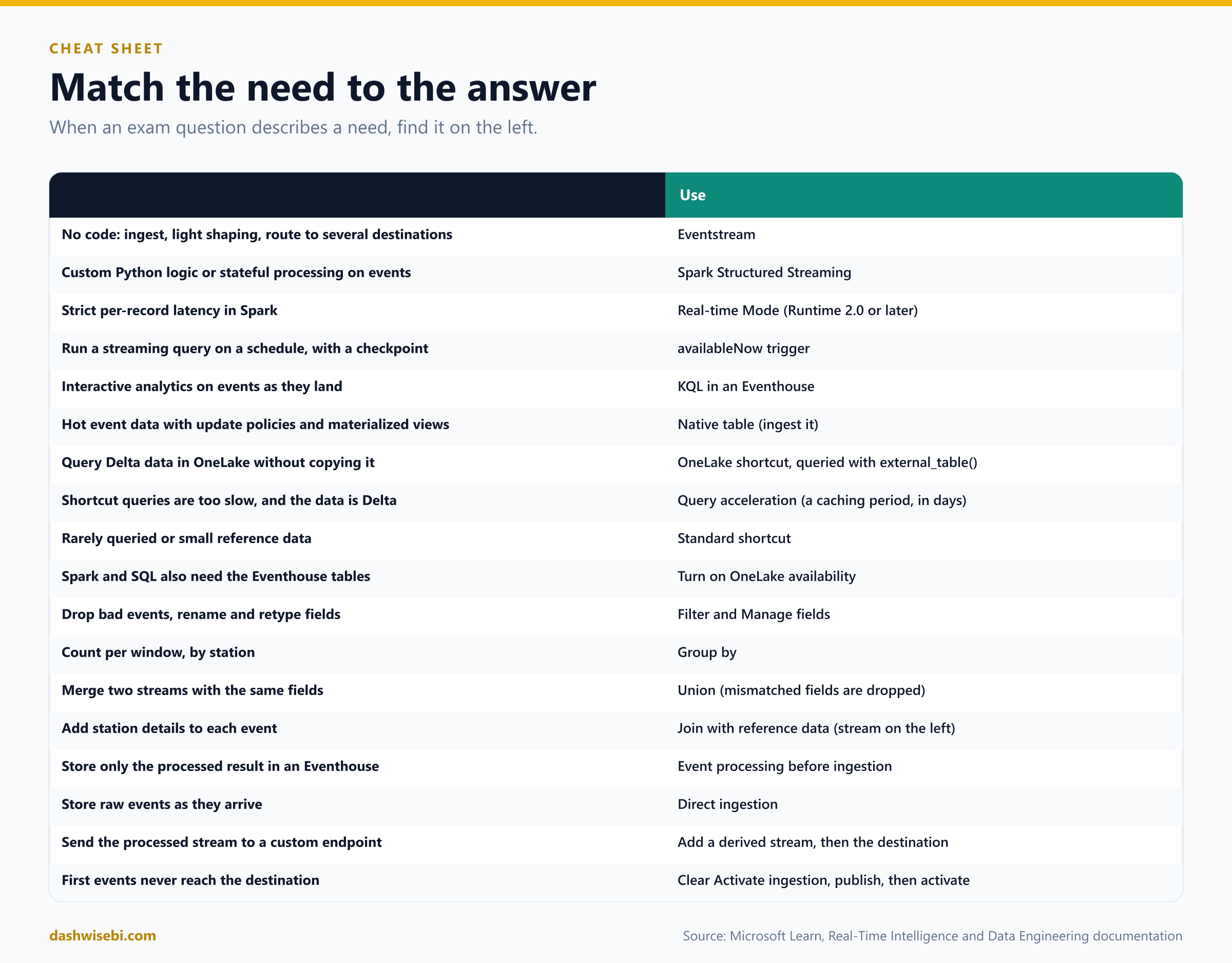
The cheat sheet
Myth or fact?
- “Eventstream can run any custom logic.” Myth. It does light transformation. For custom code, use Spark.
- “Micro-batch is the only Spark streaming mode.” Myth. Real-time Mode exists, on Runtime 2.0 or later.
- “An Eventhouse routes events from sources to destinations.” Myth. It stores and queries them. An eventstream routes.
- “Eventstream guarantees exactly-once delivery.” Myth. Delivery is at least once.
- “A shortcut and a native table are equally fast.” Myth. Shortcut queries are slower unless accelerated.
- “You can put a materialized view on a shortcut.” Myth. External-table limits apply, even when accelerated.
- “Query acceleration is free.” Myth. It uses the OneLake Premium cache meter and SSD storage.
- “Acceleration caches the whole table whatever you set.” Myth. You set the number of days.
- “OPTIMIZE on the Delta table is harmless to acceleration.” Myth. Optimized data must be re-accelerated.
- “OneLake availability costs extra storage.” Myth. There is no extra storage cost.
- “Union keeps all fields from both streams.” Myth. Fields that do not match are dropped.
- “The reference data can be the left input of the Join.” Myth. The stream is the left input.
- “Any destination accepts an operator in front of it.” Myth. Only lakehouse, Eventhouse (processing before ingestion), derived stream and Activator. Use a derived stream for the rest.
- “Publishing an eventstream always delivers the first events.” Myth. Ingestion can start before routing is ready.
Where to go next
- Create an eventstream with the Bicycles sample source. Add a Filter, Manage fields and Group by, then send the raw stream to an Eventhouse with direct ingestion and the aggregate to a lakehouse. Open the data preview on every node.
- Create a lakehouse table of stations. Add it as reference data, join it with an inner and then a left outer join, and compare the number of events.
- In a KQL database, create a OneLake shortcut to a Delta table. Query it with
external_table(), turn on acceleration, and watch the progress with.show external table operations query_acceleration statistics. - Run the
rateto Delta example in a notebook. Stop it and restart it with the same checkpoint. Then try theavailableNowtrigger. - Next episode, Streaming II: Spark structured streaming in depth, processing with KQL, and windowing functions.
- Read the sources behind this post: DP-700 study guide, Fabric decision guide: copy activity, dataflow, Eventstream, or Spark, Overview of Structured Streaming, Eventstreams overview, Eventstream for Azure Event Hubs and Stream Analytics users, Process event data by using the event processing editor, Route events based on content, Enrich events with reference data, Add an Eventhouse destination to an eventstream, Add a Spark Notebook destination, OneLake shortcuts in a KQL database, Query acceleration for OneLake shortcuts, overview, Query acceleration over OneLake shortcuts, Query acceleration policy and Turn on OneLake availability for an eventhouse.
Keep reading
DP-700 Episode 11: Streaming II, Spark & KQL
DP-700 study guide told as a story: run Spark Structured Streaming in production, process data with KQL, and write tumbling, hopping, sliding and session windows.
DP-700 Episode 9: Resolving Errors II & Optimization I
DP-700 study guide: fix Eventstream, T-SQL and OneLake shortcut errors, then tune Lakehouse tables and pipeline Copy activities in Microsoft Fabric.