DP-700 Episode 5: Loading Patterns & Choosing Tools

PowerBI consultant ·
Welcome to Episode 5 of our DP-700 series. In Episode 1 we looked at workspace settings, in Episode 2 at lifecycle management, in Episode 3 at security and governance, and in Episode 4 at orchestration. That finished the first skill area. Now we move to the second one, Ingest and transform data (30 to 35 percent of the exam), and we start with the decisions that shape every data platform: how data gets in, where it lives, and which tool reshapes it. These are the five topics from the session outline:
- Design and implement full and incremental data loads
- Prepare data for loading into a dimensional model
- Design and implement a loading pattern for streaming data
- Choose an appropriate data store
- Choose between Dataflows Gen2, notebooks, KQL and T-SQL for data transformation
Four of the five are decisions, so this post gives you decision rules you can apply under exam pressure, plus enough detail about each tool to explain why the rule holds.
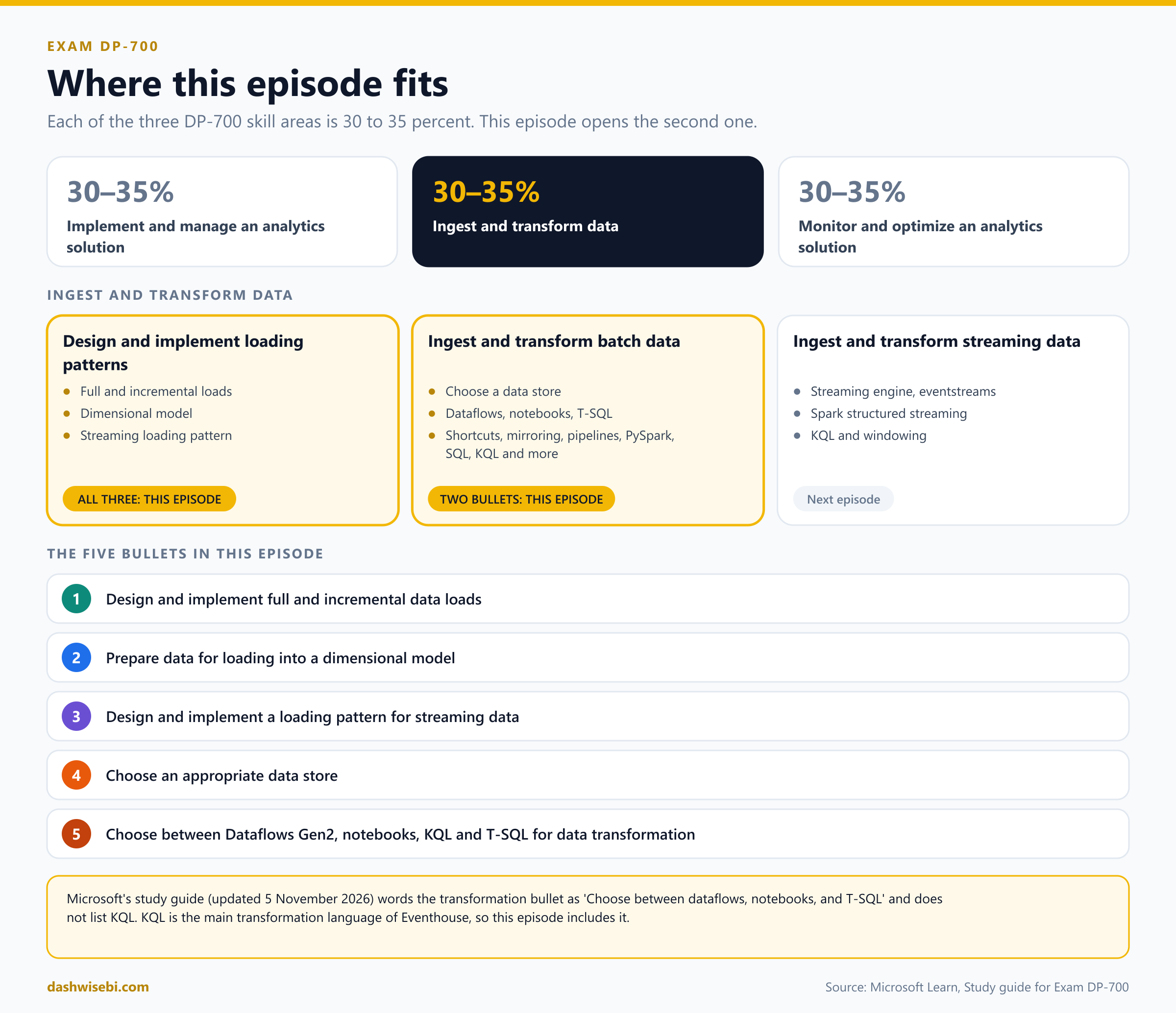
A note on wording. The study guide Microsoft updated on 5 November 2026 puts these bullets in two groups: Design and implement loading patterns (full and incremental loads, dimensional model preparation, streaming loading pattern) and Ingest and transform batch data (choose a data store, and choose between dataflows, notebooks and T-SQL). The study guide does not list KQL in that last bullet. KQL is the main transformation language of Eventhouse, so we include it here, as your outline does. The group about streaming engines, eventstreams and Spark structured streaming continues in the next episode. Here we only cover the streaming loading pattern.
The big picture: load, store, transform
Every ingestion design answers three questions, and each of them is a bullet in this episode.
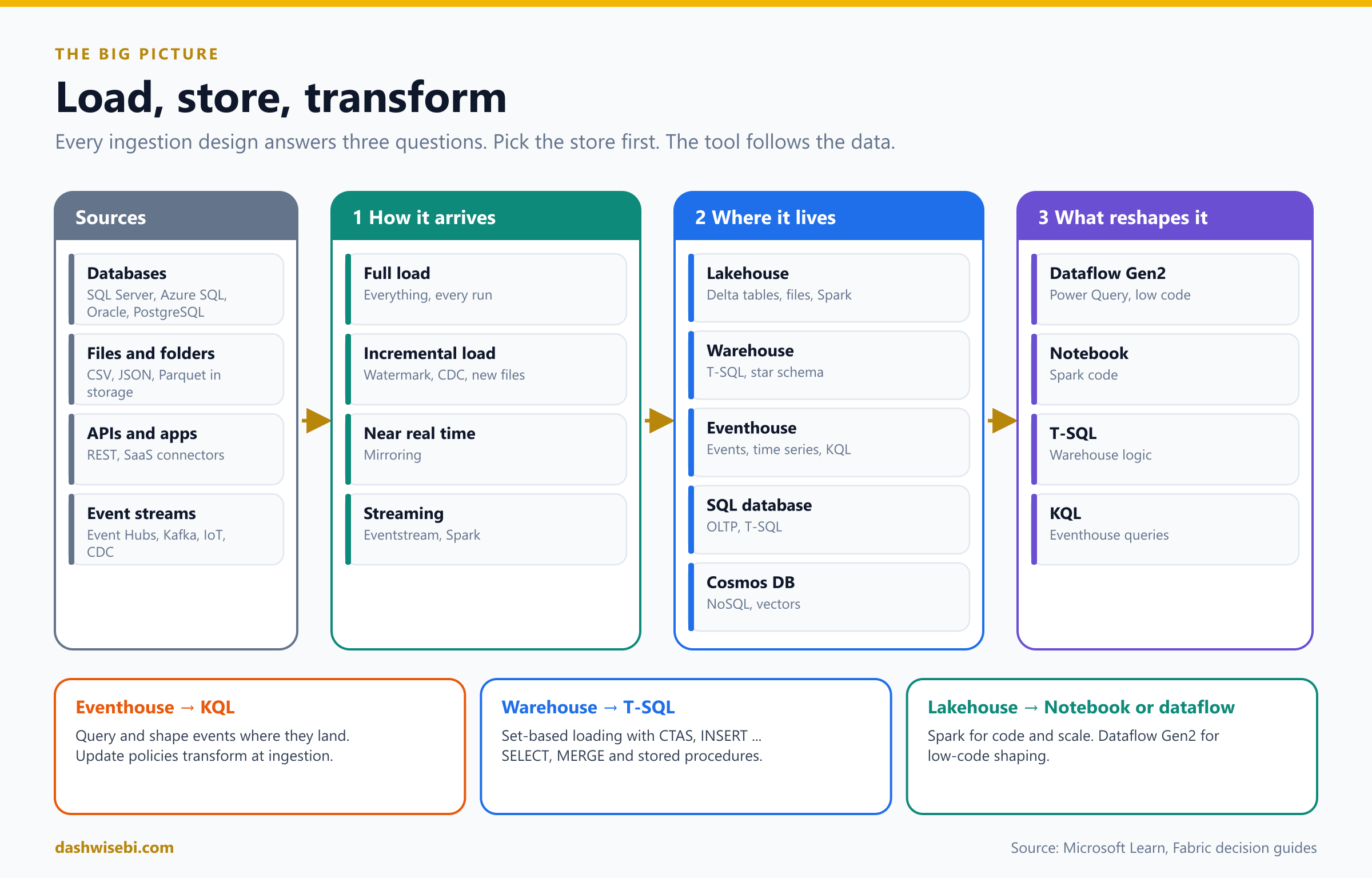
- How does the data arrive? The load pattern: a full load that copies everything, an incremental load that copies only what changed, near real-time replication, or a continuous stream of events.
- Where does it live? The data store: lakehouse, warehouse, eventhouse, SQL database in Fabric or Cosmos DB in Fabric. All of them keep their data in OneLake.
- What reshapes it? The transformation tool: Dataflow Gen2, a notebook, T-SQL or KQL.
A tip for design questions: the tool follows the data. If the data lands in an Eventhouse, KQL is natural. If it lands in a warehouse, T-SQL is natural. If it lands in a lakehouse, you can use a notebook, a dataflow or a pipeline. Pick the store first, then the tool.
1. Design and implement full and incremental data loads
Full load: copy everything, every time
A full load reads the whole source and writes the whole destination on every run. It is simple and always correct, and it is the right answer for small tables, for reference data, and for the very first load. It gets expensive as data grows, because the cost of each run grows with the total size, not with the size of the change.
The Copy job calls this Full copy: every run copies all the data from the source to the destination. It can also truncate the destination before a full load, so the two sides stay in sync without duplicates. By default the Copy job deletes nothing in the destination, and truncation is an option you turn on.
Incremental load: copy only what changed
An incremental load (also called a delta load) does one full load first, then moves only new or changed data on each later run. It is faster, cheaper and kinder to the source system. The price is a design question: how do you know what changed? There are a handful of answers, and the exam asks you to match the answer to the source.
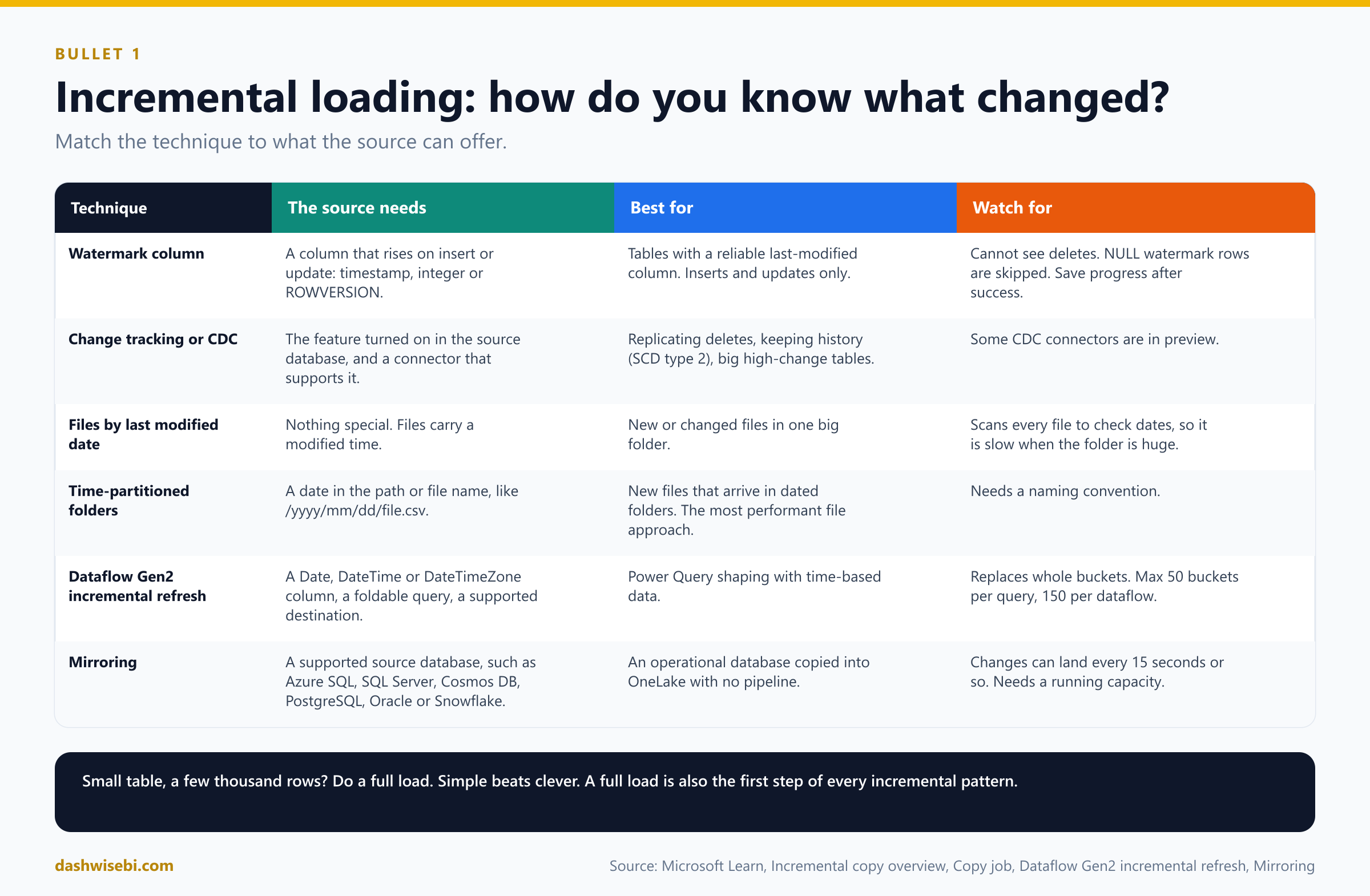
- Watermark column. The source has a column that grows when a row is inserted or updated, such as a last-modified timestamp or an increasing ID. Each run copies the rows between the old and the new watermark. It sees inserts and updates, but cannot see deletes.
- Change tracking or change data capture (CDC). The source database itself records which rows were inserted, updated or deleted. This is the right choice when you need to replicate deletes, keep a destination continuously in sync, keep history, or avoid scanning a big table to find new rows.
- Files by last modified date. Copy only files that are new or changed since the last run. The service still has to scan the whole folder to check dates, so this gets slow when there are huge numbers of files and only a few are new.
- Time-partitioned folders or file names. When files are written into paths like
/2026/11/07/file.csv, the pipeline can build the path for the slice it needs. Microsoft Learn calls this the most performant way to load new files incrementally. - Dataflow Gen2 incremental refresh. A built-in feature for dataflows that refreshes by time buckets (details below).
- Mirroring. Fabric keeps a replica of an operational database in OneLake and applies changes continuously, so there is no load pipeline to build (details in section 3).
The classic pattern: a watermark pipeline
The Microsoft tutorial for loading from a warehouse to a lakehouse builds the watermark pattern from five pieces. Learn this shape well, because many exam questions describe it in words.
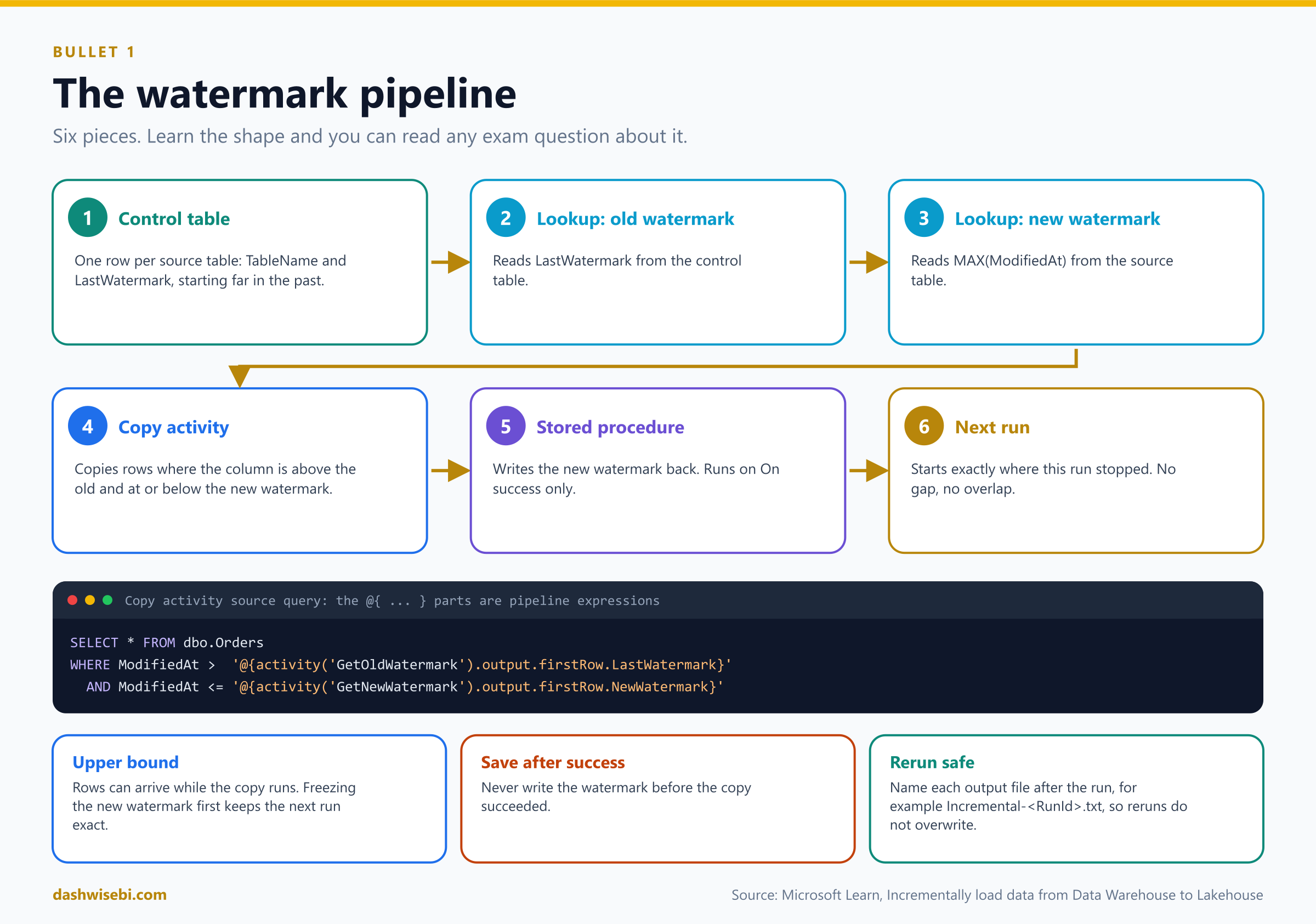
- Pick a watermark column in the source table, one whose value rises when a row is added or changed.
- Keep the last watermark in a small control table, one row per source table, with a safe starting value far in the past.
- Lookup 1 reads the old watermark from the control table.
- Lookup 2 reads the new watermark from the source: the maximum value of the watermark column.
- Copy activity copies the rows where the column is greater than the old watermark and less than or equal to the new one.
- Stored procedure activity writes the new watermark to the control table. It runs only after the copy succeeded, because it hangs off the Copy activity's On success arrow.
Here is the idea in code. The names are made up for this post. The two expressions inside the query use the output of the Lookup activities, which you learned about in Episode 4:
-- control table: one row per source table
CREATE TABLE dbo.load_control (TableName VARCHAR(128), LastWatermark DATETIME2(6));

-- Lookup 2: the new watermark
SELECT MAX(ModifiedAt) AS NewWatermark FROM dbo.Orders;

-- Copy activity source query (the @{...} parts are pipeline expressions)
SELECT * FROM dbo.Orders
WHERE ModifiedAt > '@{activity('GetOldWatermark').output.firstRow.LastWatermark}'
  AND ModifiedAt <= '@{activity('GetNewWatermark').output.firstRow.NewWatermark}';

-- Stored procedure activity: save progress for the next run
UPDATE dbo.load_control SET LastWatermark = @NewWatermark WHERE TableName = 'Orders';
Why use an upper bound (<= the new watermark) and not just "everything newer than the old one"? Because rows can arrive while the copy is running. Freezing the upper limit first means the next run starts exactly where this one stopped, with no gaps and no overlap. The tutorial also names the output file after the run, with @CONCAT('Incremental-', pipeline().RunId, '.txt'), so each run writes a separate file and a rerun never overwrites another run.
Copy job: incremental copy without building a pipeline
The Copy job gives you the same idea in a wizard, and it manages the state for you. It is the answer when a question says "simple, low-code, incremental, scheduled".
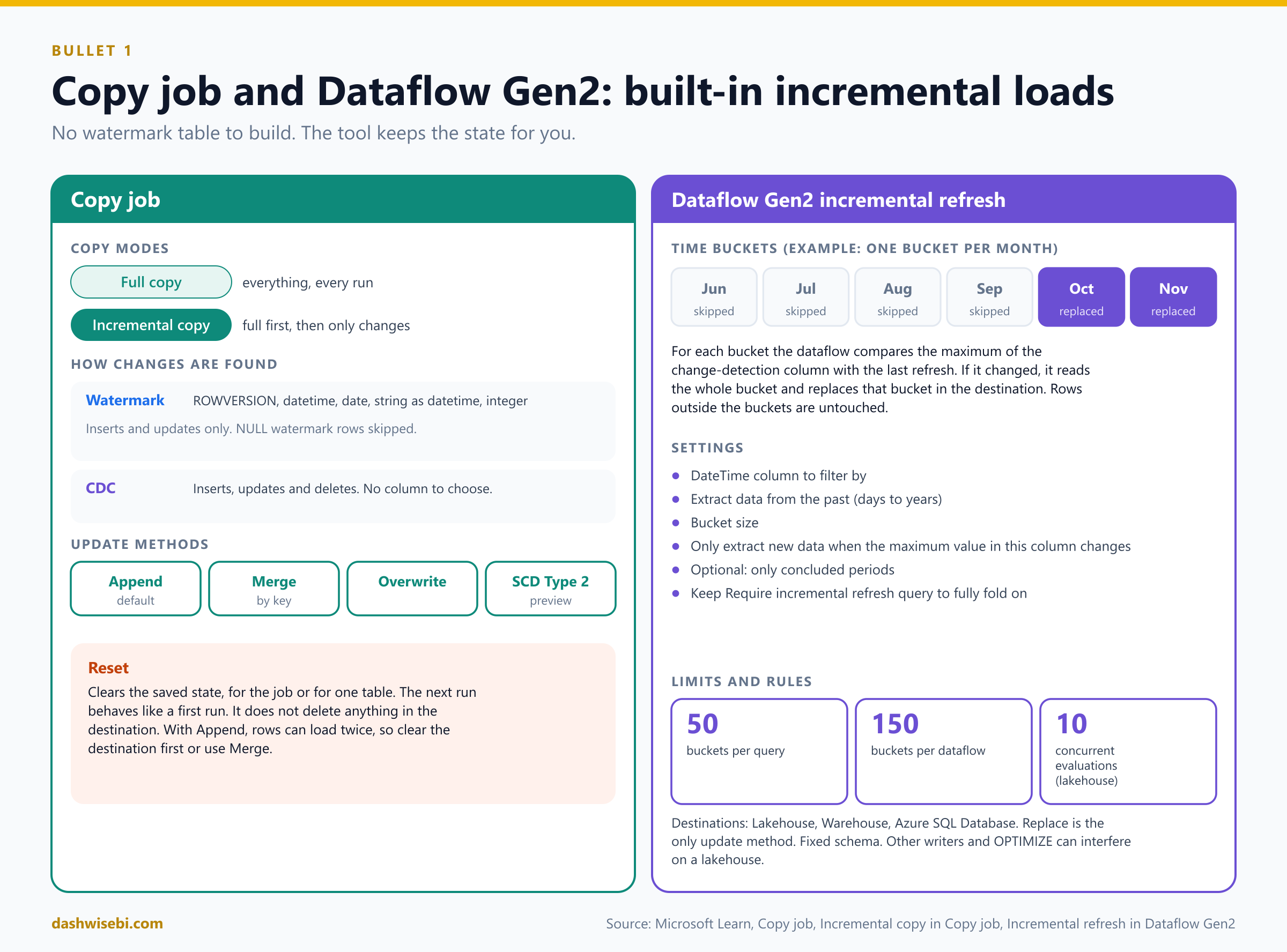
- Copy modes. Full copy copies everything each run. Incremental copy copies everything on the first run, then only changes. The Copy job remembers the state of the last successful run. If a run fails, the next run resumes from the end of the last successful run, so nothing is lost.
- Watermark-based incremental copy supports these column types:
ROWVERSION, datetime, date, a string that can be read as a datetime, and integer. For a date-only column, the Copy job re-reads from the last day to avoid missing rows. If the column you want is not a supported type but its values can be compared, cast it in the source query, for example a numericvarcharto an integer. A truly alphanumeric ID cannot be a watermark. - NULLs in the watermark column cannot be compared. On the first full load you choose to skip them or include them. On later incremental runs, rows with a NULL watermark are not picked up.
- CDC-based incremental copy is used when CDC is enabled on the source and the connector supports it. You do not choose a column. It captures inserts, updates and deletes. CDC replication connectors are partly in preview.
- Update methods decide how rows land in the destination: Append (the default, keeps full history), Merge (update existing rows by key), Overwrite, or SCD Type 2 (keep versions with effective dates, available with CDC, in preview). With CDC and merge, deletes are applied. With CDC and SCD Type 2, deletes become soft deletes. Into storage, new data becomes new files, and a file with the same name is replaced.
- Reset. You can reset incremental copy back to a full copy for the whole job or for one table. Reset clears the saved state. It does not delete anything in the destination. With Append, a reset can load the same rows again and create duplicates, so clear the destination first or use Merge.
- Other features: automatic table creation, audit columns (for example the extraction time and run ID), optional Change data feed on lakehouse destinations, optional auto-partitioning for large tables (preview), multiple schedules per job, and an on-premises gateway for sources behind a firewall.
Dataflow Gen2 incremental refresh
Dataflows have their own incremental feature. It works with time buckets instead of a watermark table.
- Prerequisites: a Fabric capacity, a source that supports query folding (recommended) with a Date, DateTime or DateTimeZone column, and a destination that supports it: Lakehouse, Warehouse or Azure SQL Database. You must set the destination yourself. The default destination setting is not supported. The destination table needs a fixed schema.
- How to set it up: right-click the query and choose Incremental refresh. Then choose the DateTime column to filter by, how far back to extract (days, weeks, months, quarters or years), the bucket size, and the column whose maximum value tells the dataflow that data changed ("only extract new data when the maximum value in this column changes"). An optional setting extracts only concluded periods, such as complete months. Keep Require incremental refresh query to fully fold turned on.
- How it works: the dataflow splits the data into buckets by the date column. For each bucket it compares the maximum value with the last refresh. If the maximum changed, it reads the whole bucket and replaces that bucket in the destination (it deletes the old rows of the bucket and inserts the new ones). If not, it skips the bucket. Data outside the buckets is untouched. Replace is the only update method.
- Limits: up to 50 buckets per query and 150 per dataflow. For a lakehouse destination at most 10 concurrent evaluations.
- Lakehouse cautions: other writers (such as Spark) can interfere, and table maintenance such as
OPTIMIZEorREORG TABLEis not supported on tables that use incremental refresh. You cannot switch to incremental refresh if the destination already holds data that overlaps the buckets. - Do not use the same column for both filtering and change detection. If rows shift between buckets, you can get duplicates.
- If your destination does not support incremental refresh, enable it on a staged query and add a second query that reads the staged data into the final destination. You still save work at the source, but the last step is a full refresh.
How to choose
- A database with CDC on, and you need deletes or history: CDC through a Copy job or an eventstream.
- A table with a reliable "last modified" column and you only need inserts and updates: watermark.
- Files that arrive in dated folders: build the path from the date.
- Files in one big folder: last modified date, accepting the scan cost.
- Low-code and no pipeline: Copy job. Several steps with logic around the copy: pipeline.
- Power Query shaping with a date column: Dataflow Gen2 incremental refresh.
- Operational database that you want in OneLake with no pipelines at all: mirroring.
- A table of a few thousand rows: just do a full load. Simple beats clever.
Design rules for any incremental load
These are practical rules, drawn from the patterns above, that also help you spot wrong answers.
- Save progress only after success. Write the new watermark after the copy succeeds, never before.
- Make a rerun safe. A reload of the same slice should not create duplicates. Merge on a key, replace a bucket, or write a file named after the run.
- Plan for deletes. A watermark cannot see them. Use CDC, soft-delete flags in the source, or a periodic full reload.
- Keep a way back to full. A reset or full reload is your repair tool when source and destination drift apart.
- Parameterize. One pipeline driven by a control table and Lookup plus ForEach can load many tables, as in Episode 4.
2. Prepare data for loading into a dimensional model
A dimensional model (a star schema) has fact tables that record events and measurements, and dimension tables that describe the things around them, such as customers, products and dates. Microsoft's Fabric Warehouse guidance on dimensional modeling is the base for this section. Loading is an ETL job: it stages source data, synchronizes the dimensions, inserts into the facts, and records what it did.
The order of work
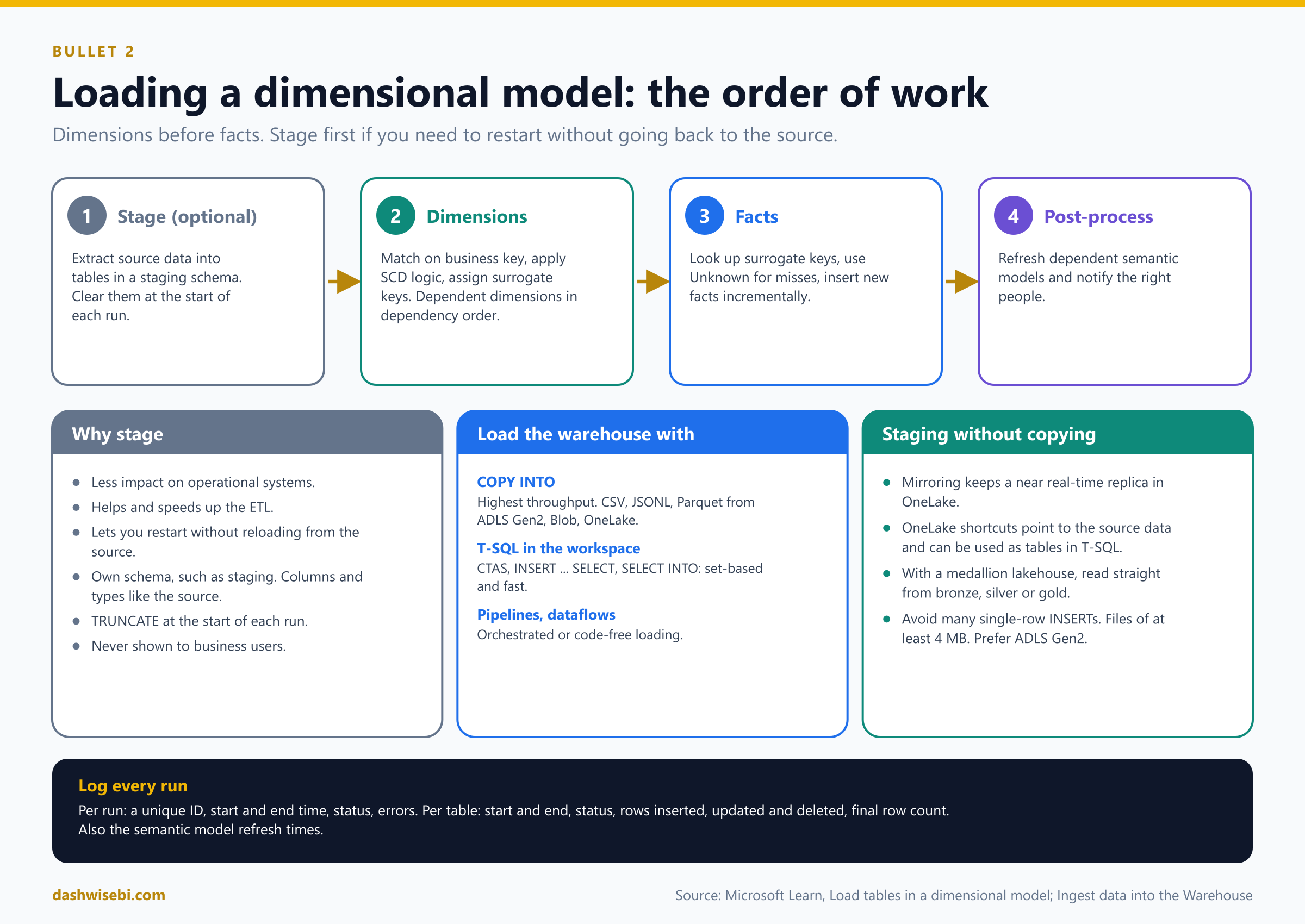
- Stage (optional). Copy source data into staging tables.
- Process the dimension tables. They go first so they hold every member, including ones added to the source since the last run. If dimensions depend on each other (an outrigger dimension), load them in dependency order. For example, a geography dimension used by both customer and vendor dimensions loads before them.
- Process the fact tables, once all dimensions are done.
- Post-process. Refresh dependent semantic models, and notify the people who care about the outcome.
You orchestrate this with a pipeline, which can run SQL scripts and stored procedures and call dataflows, or you can write it as stored procedures called in order.
Staging
Staging means extracting source data into tables made only for the ETL process. Learn gives three reasons: it reduces the impact on operational systems, it helps optimize the ETL, and it lets you restart without going back to the source. Rules for staging tables:
- Put them in their own schema, for example
staging. - Make them look like the source: same column names and data types.
- Clear them at the start of each ETL run.
TRUNCATE TABLEis supported in the warehouse. - Never expose them to business users.
If your data is already in a lakehouse with a medallion layout (bronze, silver, gold), you may not need to stage it again in the warehouse, because you can read it from the layer you want. Staging alternatives that avoid copying are mirroring and OneLake shortcuts, which can be used as tables in T-SQL queries.
Transform before you load
The dimensional tables must hold clean, consistent data, so the ETL often has to: combine data from several sources by matching keys (or stack data of the same shape), convert data types, calculate values (a full name, or revenue as price times quantity), detect and store history, and aggregate to the right grain. Learn's warning is short and good: garbage in, garbage out.
How to load the warehouse
The Fabric Warehouse supports several ingestion tools. The table of choices is a classic exam topic.
COPY INTO(T-SQL): code-rich, highest throughput. Reads CSV, JSONL and Parquet from Azure Data Lake Storage Gen2, Azure Blob Storage and OneLake. It can use the workspace identity to read the source while the statement still runs in the user's SQL security context.- Pipelines: code-free or low-code, robust workflows that repeat, run on schedules or move large volumes. They can run T-SQL, do lookups and copy data.
- Dataflows: code-free, with custom transformations before ingestion.
- T-SQL ingestion within the workspace:
INSERT ... SELECT,SELECT INTOandCREATE TABLE AS SELECT(CTAS) read from other warehouses, lakehouses or mirrored databases in the same workspace, using three-part names. Learn describes these set-based commands as likely the fastest and most efficient way to load dimensional tables from staging tables.OPENROWSETreads files in external Azure storage. - BCP API (preview): client-side ingestion when you cannot stage files first.
Best practices from the same guidance: avoid loading with many singleton INSERT statements (it hurts query performance), make external files at least 4 MB, prefer ADLS Gen2 over legacy Blob Storage, split large compressed CSV files, and use explicit transactions to group changes so they become visible only when complete. The load tools apply V-Order write optimization to the Parquet files they write, and you should not turn it off.
Processing a dimension
Processing a dimension means matching incoming source rows to existing dimension rows by the business (natural) key, then deciding: new, changed or unchanged.
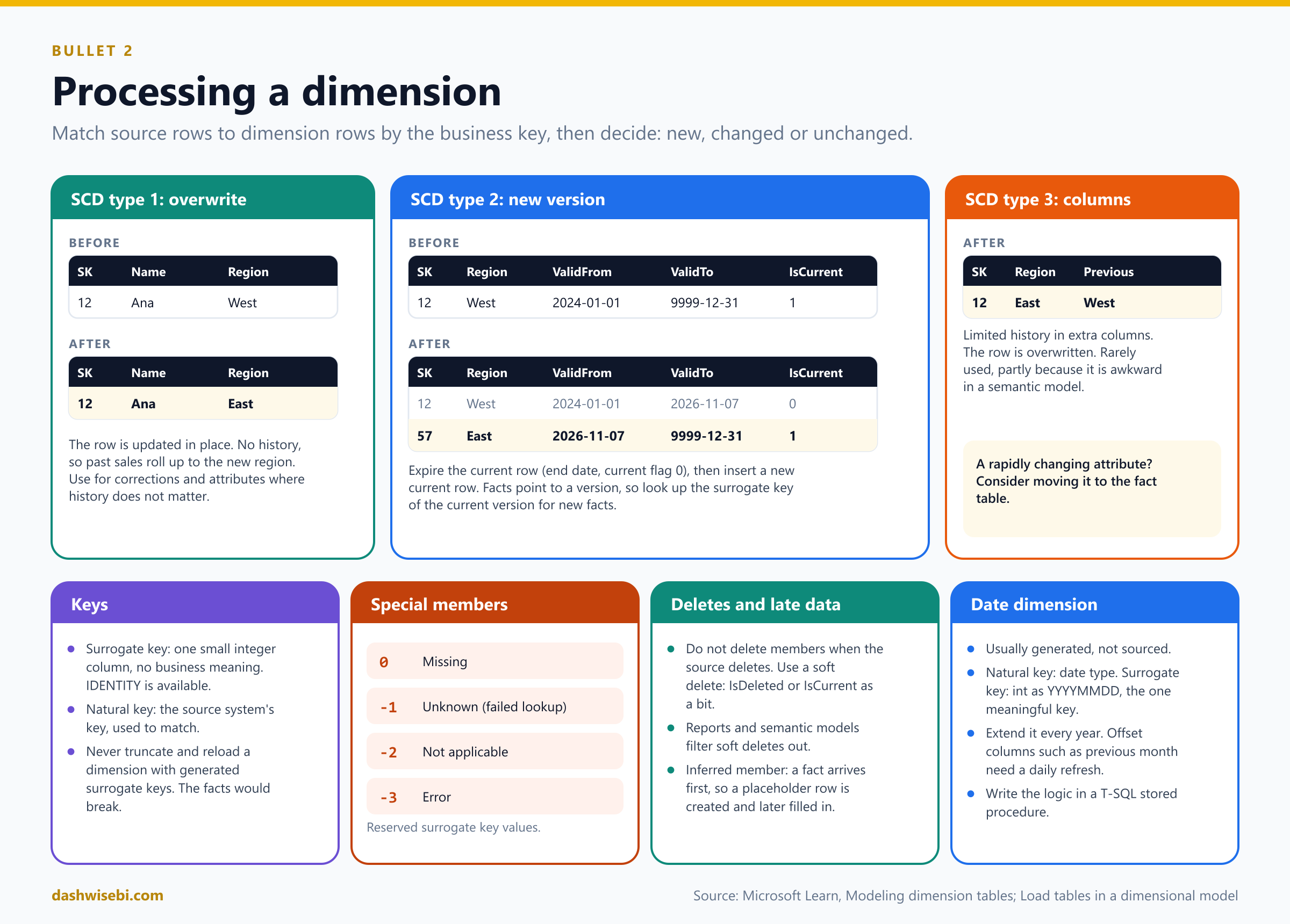
- Surrogate key. Give every dimension a single-column surrogate key, with the smallest integer type that fits. It insulates the warehouse from changes in the source, lets you combine sources, and makes SCD type 2 possible. Fabric Warehouse offers
IDENTITYcolumns, with some limits. Never truncate and reload a dimension that has generated surrogate keys. The facts already store those key values, so a reload would break them, and old versions of an SCD type 2 dimension could not be recreated. - Natural key. The key from the source system. It is how you match source rows to dimension rows.
- SCD type 1: overwrite. Update the changed attributes in place. Use it for corrections and for attributes whose history does not matter (a name, an email address). It does not keep history, so rolled-up history can change.
- SCD type 2: version. Expire the current row (set its end date, and its current flag to false) and insert a new current row (start date equal to that end date, current flag true). Use it only for attributes that must keep their historical perspective. Facts then point to a version, so you must look up the surrogate key of the current version when you load new facts.
- SCD type 3: limited history in columns. Store the previous value next to the current one. It overwrites the row, and it is rarely used, partly because it is awkward in a semantic model.
- Rapidly changing attribute? Consider moving it to the fact table instead of making many type 2 versions.
- Source deletes. Do not delete dimension rows, unless they were created by mistake and have no facts. Use a soft delete: a bit column such as
IsDeletedorIsCurrent, and filter on it in reports and semantic models. - Special members. Reserve surrogate key values for rows that stand for missing (0), unknown (-1, a failed lookup during a fact load), not applicable (-2) and error (-3).
- Date dimension. It usually has no source, so you generate it. Use the
datetype as the natural key and anintinYYYYMMDDform as the surrogate key. This is the one place where a meaningful key is accepted. Extend it every year, and if it has relative offset columns (such as "previous month") refresh them daily. Learn recommends writing this logic in T-SQL inside a stored procedure. - Inferred members. If a fact arrives before its dimension row, the fact load creates a placeholder row with unknown attributes and an
IsInferredMemberflag. When the real details arrive, the dimension load fills them in and clears the flag. Treat that as a late-arriving detail, not as an SCD change.
An SCD type 2 load is two statements: expire, then insert. A sketch with invented names (it assumes the surrogate key is an IDENTITY column, so it is not listed):
-- 1. Expire the current version of customers whose region changed
UPDATE d
SET d.ValidTo = @LoadDate, d.IsCurrent = 0
FROM dbo.DimCustomer AS d
JOIN staging.Customer AS s ON s.CustomerID = d.CustomerID
WHERE d.IsCurrent = 1 AND s.Region <> d.Region;

-- 2. Insert a new current version for changed customers and for brand-new ones
INSERT INTO dbo.DimCustomer (CustomerID, CustomerName, Region, ValidFrom, ValidTo, IsCurrent)
SELECT s.CustomerID, s.CustomerName, s.Region, @LoadDate, '9999-12-31', 1
FROM staging.Customer AS s
LEFT JOIN dbo.DimCustomer AS d ON d.CustomerID = s.CustomerID AND d.IsCurrent = 1
WHERE d.CustomerID IS NULL;
Step 2 works because step 1 already removed the current flag from the changed customers, so they now look "missing" to the join. The Fabric Warehouse also supports MERGE as a generally available feature, which is another way to write dimension logic.
Processing a fact
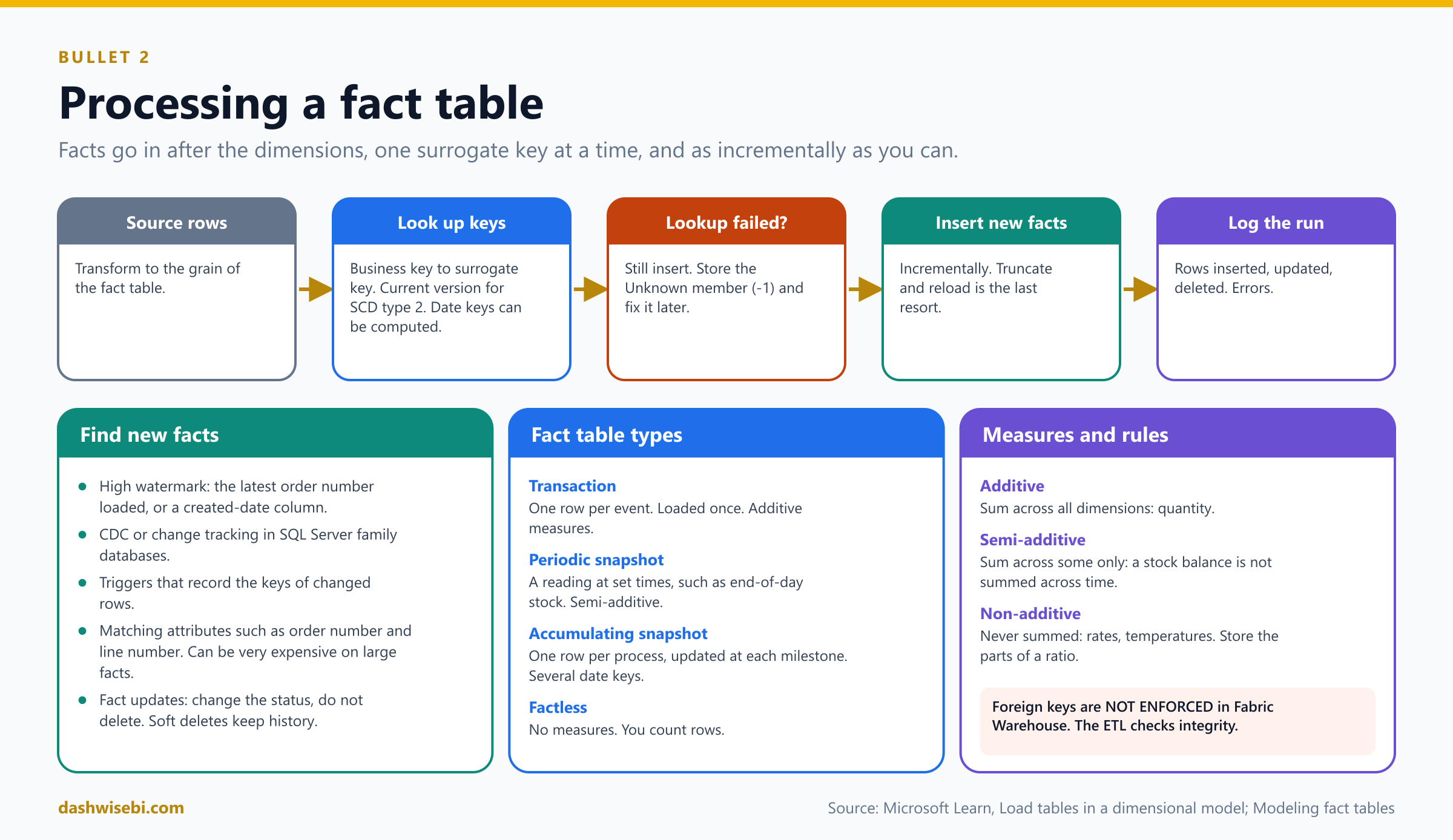
- Transform the source rows to the grain of the fact table.
- Look up each dimension key: for each business key, find the surrogate key. For an SCD type 2 dimension, use the current version. For date and time dimensions you can compute the key from the value (
YYYYMMDDorHHMM). - If a lookup fails, still insert the row. Store the special Unknown member key, and fix it later with a periodic job. Another way, when you trust the natural key, is to create an inferred dimension member first.
- Check integrity yourself. Fabric Warehouse accepts foreign key constraints but does not enforce them (
NOT ENFORCED), so the ETL must check for orphaned keys. It is still worth declaring them, because tools like Power BI Desktop use them to detect relationships. - Load incrementally whenever possible. Truncating and reloading a large fact table should be the last resort. It is expensive, it disturbs the source, and it is hard when dimensions use SCD type 2, because lookups must respect each version's validity period.
Learn offers these ways to find new facts: a high watermark (the latest sales order number you loaded, or a created-date column), a source capability such as CDC or change tracking in SQL Server family databases, or triggers that record changed keys. Matching rows by attributes such as order number and line number works but can be very expensive for large facts. A sketch of an incremental fact load, with invented names:
INSERT INTO dbo.FactSales (OrderDateKey, CustomerSK, ProductSK, OrderNo, OrderLineNo, Quantity, Amount)
SELECT
    YEAR(s.OrderDate) * 10000 + MONTH(s.OrderDate) * 100 + DAY(s.OrderDate),
    COALESCE(c.CustomerSK, -1),            -- -1 = Unknown member
    COALESCE(p.ProductSK, -1),
    s.OrderNo, s.OrderLineNo, s.Quantity, s.Quantity * s.UnitPrice
FROM staging.SalesLines AS s
LEFT JOIN dbo.DimCustomer AS c ON c.CustomerID = s.CustomerID AND c.IsCurrent = 1
LEFT JOIN dbo.DimProduct  AS p ON p.ProductID  = s.ProductID  AND p.IsCurrent = 1
WHERE s.ModifiedAt > @LastWatermark;
Fact updates and deletions. If an order is cancelled, update its status. Do not delete the fact row. This soft delete keeps history, and reports filter it out. Keep attributes such as the order number and line number in the fact table, and index them so changes can find their rows. A fact table does not usually need a primary key.
Fact table types that the exam can mention:
- Transaction fact: one row per event, loaded once and never changed except to fix errors. Measures are additive.
- Periodic snapshot: a measurement taken at set times, such as end-of-day stock. Measures are semi-additive.
- Accumulating snapshot: one row per process, updated as milestones occur, with several date keys and durations as measures.
- Factless fact: no measures. You count rows, for example students attending a class.
Measure types: additive (can be summed across all dimensions, like quantity), semi-additive (summed across some dimensions only, like a stock balance, which cannot be summed across time) and non-additive (never summed, like a temperature or a rate). Store the parts of a ratio, so the ratio can be calculated when needed. The grain of a fact table is the level of detail set by its dimension keys. Storing a higher grain is easy, but you cannot split it into lower grain later.
Log every run
Learn recommends logging the ETL process to non-dimensional tables in the warehouse, with a unique ID per run. Record for the whole run: the ID, start and end time, status and errors. For each staging and dimensional table: start and end time, status, rows inserted, updated and deleted, the final row count and errors. Also record when the semantic model refresh started and ended. This helps you find slow steps and predict growth.
3. Design and implement a loading pattern for streaming data
Streaming data arrives continuously as events. A loading pattern for streams answers four questions: where the events come from, what to do to them on the way, where they land, and how the job stays alive. In Fabric the building block for the first three is the eventstream.
Get events in: the Real-Time hub
The Real-Time hub is where you find and manage streaming data in Fabric. The user flow in Learn has seven steps:
- Open the Real-Time hub and select Get events.
- Pick a connector that matches where your stream lives.
- Give it a connection to the source, with credentials.
- Name the stream. A new eventstream is created and data starts to flow.
- Open the new eventstream.
- Define processing operations that transform the events.
- Add a destination.
Source connectors cover Azure Event Hubs, IoT Hub, Service Bus, Event Grid, Kafka (Confluent Cloud, Apache Kafka, Amazon MSK), Amazon Kinesis, Google Pub/Sub, MQTT, a custom endpoint for your own apps, and CDC connectors for databases such as Azure SQL Database, SQL Managed Instance, SQL Server on a VM, PostgreSQL, MySQL, MongoDB and Cosmos DB. A CDC connector takes a snapshot of the current data, then records every row-level change. In preview, DeltaFlow can turn raw CDC events into analytics-ready streams and manage the destination tables as schemas evolve. There are also discrete Fabric events: workspace item events, OneLake events, job events and Azure Blob Storage events. These are the same events you used for triggers in Episode 4.
Process events on the way in
The event processor is a drag-and-drop editor. It needs no code.
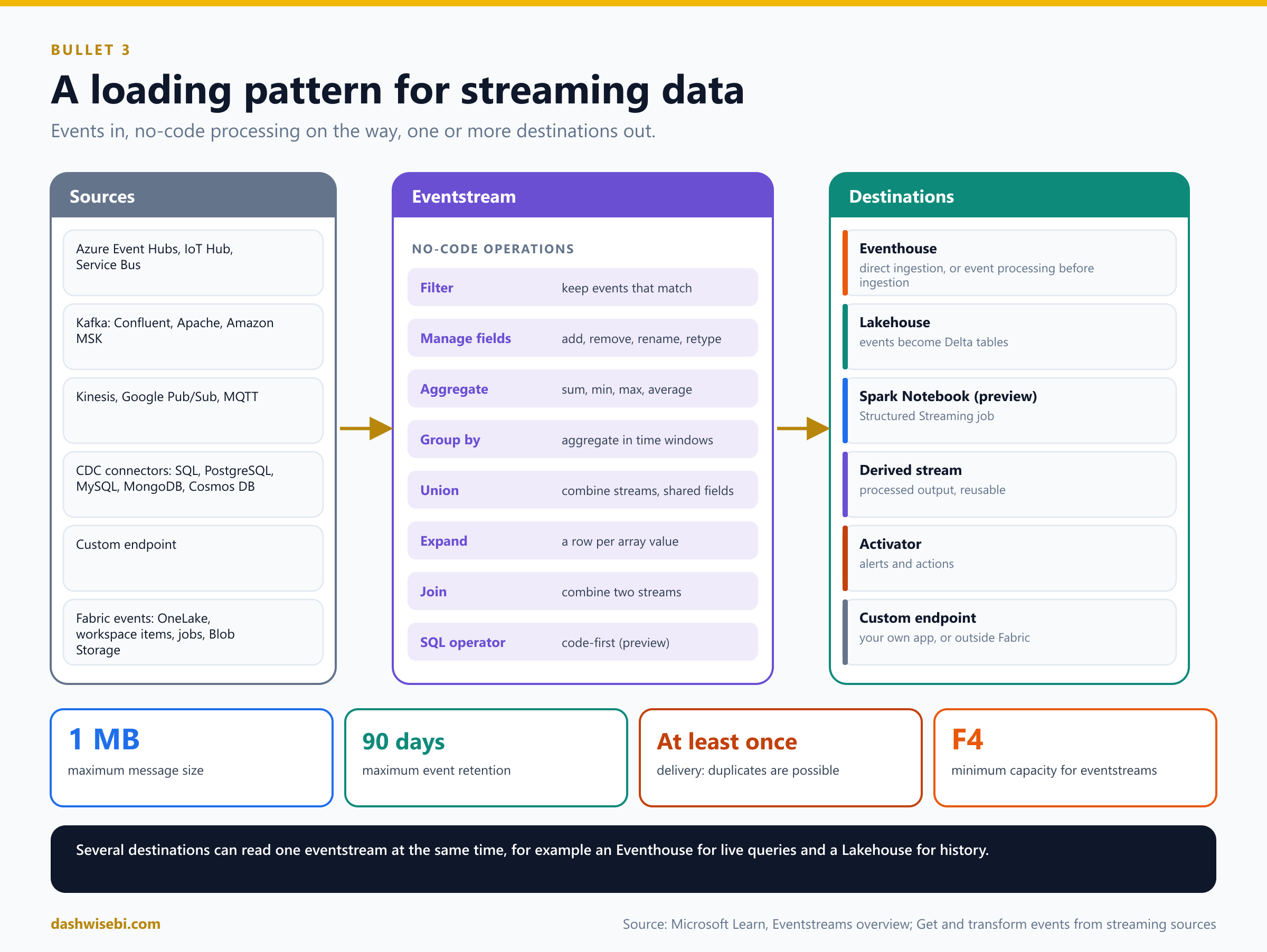
- Filter: keep events that match a condition on a field.
- Manage fields: add, remove, rename or change the type of fields.
- Aggregate: a sum, minimum, maximum or average calculated every time a new event occurs over a period.
- Group by: aggregations across all events in a time window, grouped by one or more fields, with richer window options.
- Union: combine streams that have shared fields (same name and type). Fields that do not match are dropped.
- Expand: create a row for each value in an array.
- Join: combine two streams on a matching condition.
- SQL operator (preview): code-first logic with SQL expressions, including windowing, joins and aggregations.
Choose a destination
- Eventhouse. For querying and analyzing events with KQL. You pick one of two ingestion modes. Direct ingestion sends the events in as they are, with no processing. Event processing before ingestion applies your operators first (filter, aggregate and so on), which you also use after a derived stream.
- Lakehouse. Events are converted to Delta Lake format and stored in lakehouse tables, which supports warehousing scenarios.
- Spark Notebook (preview). Runs a notebook that processes the stream with a Spark Structured Streaming job.
- Derived stream. The output of your operators as a new logical stream that you can send to several destinations.
- Activator. Connects events to alerts and actions.
- Custom endpoint. Sends events to your own application or to a system outside Fabric.
You can attach several destinations to one eventstream at the same time. That makes a common pattern easy: the same events go to an Eventhouse for fast, interactive queries, and to a Lakehouse to keep a history in Delta format.
Limits and behaviors worth remembering: a message can be at most 1 MB, event data is retained for up to 90 days, delivery is at least once (so duplicates are possible and your downstream logic should cope), and eventstreams need at least four capacity units (F4). Eventstreams also expose an Apache Kafka endpoint, so existing Kafka producers and consumers can connect by changing connection settings.
A tip from Learn for destinations that process events: when you publish an eventstream, ingestion can start a little before routing is ready, so initial data (for example the first CDC snapshot) can be missed. Uncheck Activate ingestion when you add the destination, publish, activate it yourself, and use a custom time that starts earlier.
Pattern A: eventstream to Eventhouse, with an update policy
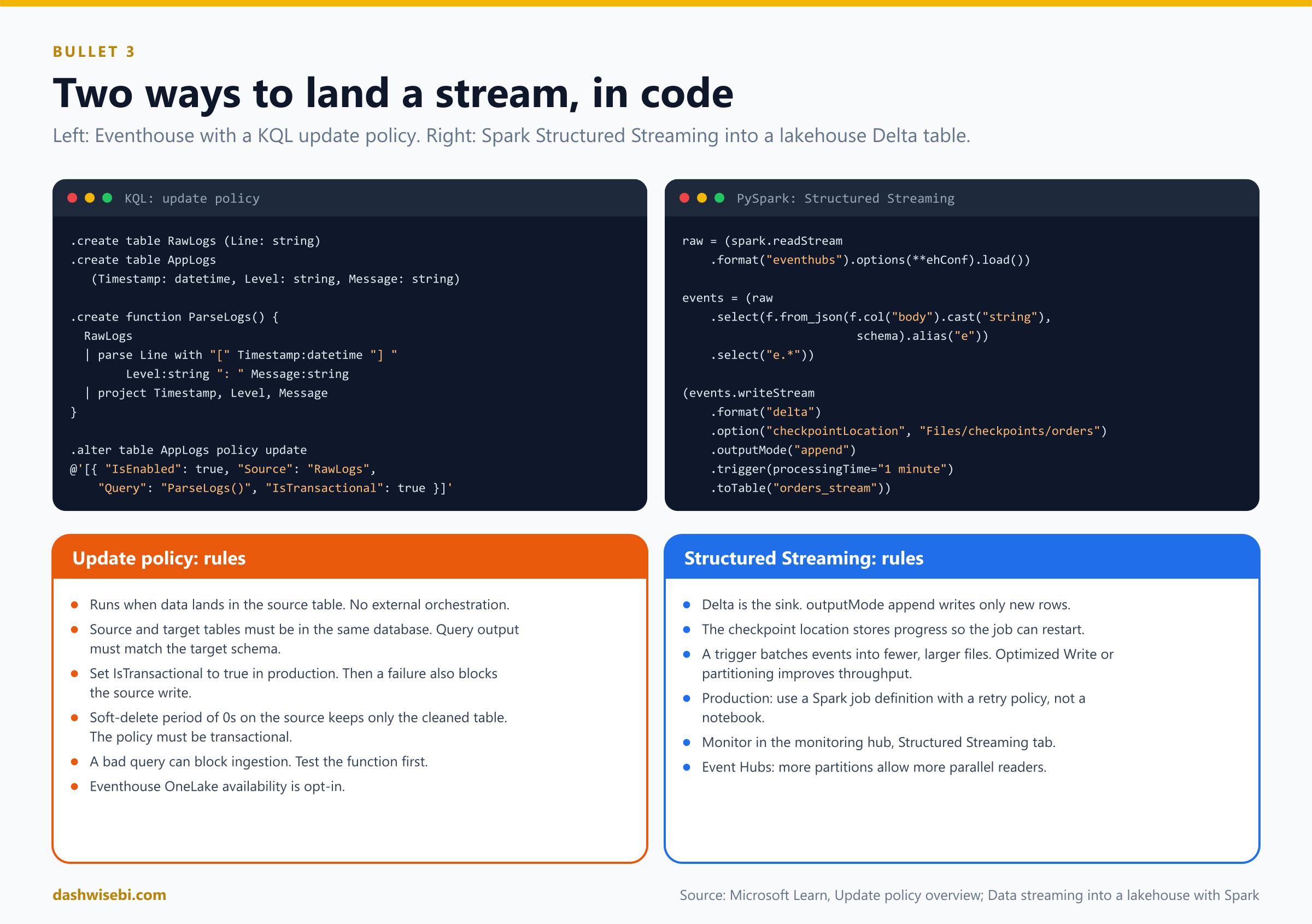
The Eventhouse is built for time-based events of any shape, including semistructured data and free text. A neat way to transform events as they arrive is an update policy. It is a rule on a table: whenever new data is written to the source table, a query runs and writes the result into a target table. It needs no external orchestration.
.create table RawLogs (Line: string)
.create table AppLogs (Timestamp: datetime, Level: string, Message: string)

.create function ParseLogs() {
    RawLogs
    | parse Line with "[" Timestamp:datetime "] " Level:string ": " Message:string
    | project Timestamp, Level, Message
}

.alter table AppLogs policy update
@'[{ "IsEnabled": true, "Source": "RawLogs", "Query": "ParseLogs()", "IsTransactional": true }]'
Facts about update policies:
- The source and target tables must be in the same database, and the query output must match the target table's column types and order.
- The target can have a different schema and retention. You can have several policies on one source, and cascade A to B to C.
- Set
IsTransactionalto true in production. Then if the policy fails, the data is not written to the source either, so the tables stay consistent. If it is false, a failure still ingests into the source but not into the target. - To keep only the cleaned table, set the source table's soft-delete retention to zero (
0s). Then the policy must be transactional. - A bad query can block ingestion into the source table, so test the function first and be careful when you change functions the policy uses.
- In Fabric, streaming ingestion is on by default for tables, and a policy function that uses
joinneeds it turned off. - In preview, an update policy can also use an external Delta table (for example a OneLake shortcut) as its source. It runs periodically, ignores deletes and only ever adds rows to the target.
An Eventhouse stores data in its own format. OneLake availability makes the data readable as open Delta tables, but it is an opt-in setting. All other Fabric stores publish to OneLake by default.
Pattern B: Spark Structured Streaming into a Lakehouse
Structured Streaming treats a live stream as a table that rows are continuously appended to. A Delta table can be the sink, so streamed rows flow straight into a lakehouse table with ACID guarantees. This is the code-first pattern. A sketch:
import pyspark.sql.functions as f

raw = spark.readStream.format("eventhubs").options(**ehConf).load()

events = (raw
    .select(f.from_json(f.col("body").cast("string"), schema).alias("e"))
    .select("e.*"))

(events.writeStream
    .format("delta")
    .option("checkpointLocation", "Files/checkpoints/orders")
    .outputMode("append")
    .trigger(processingTime="1 minute")
.toTable("orders_stream"))format("delta")makes Delta the sink,outputMode("append")writes only new rows, andtoTablesaves to a managed table.- The checkpoint location stores progress so the job can restart where it stopped.
- Triggers batch events. A one-minute
processingTimetrigger writes fewer, larger files instead of many tiny ones. - For write throughput you can partition on disk with
partitionBy(), repartition in memory withrepartition()orcoalesce(), or turn on Optimized Write (spark.databricks.delta.optimizeWrite.enabled) and drop the manual repartitioning. - For Event Hubs, remember that more partitions allow more parallel readers, but too many partitions for a low event rate make each reader do little. High-throughput scenarios often use 32 or more partitions.
- In production, use a Spark job definition, not a notebook. Notebooks are good for developing and testing. A job definition is non-interactive and more robust. Set a retry policy on it (a number of retries, up to unlimited, with a pause between) so the job restarts if the infrastructure stops it.
- The monitoring hub has a Structured Streaming tab with input rate, process rate, input rows, batch duration and operation duration.
Mirroring: near real time without a pipeline
For operational databases, there is a third option that is not a stream you build. Mirroring continuously replicates a database into OneLake as Delta tables, with a SQL analytics endpoint on top. There are three kinds: database mirroring (replicates data, for sources such as Azure SQL Database, Cosmos DB, PostgreSQL, SQL Server, Oracle, Snowflake and others), metadata mirroring (mirrors only the catalog and uses shortcuts, for example for Azure Databricks) and open mirroring (your own app writes change data to a landing zone). Changes can be published as fast as every 15 seconds. Compute for replication is free and does not use your capacity, and storage is free up to a limit that grows with your capacity size (one terabyte per capacity unit). You still need a running capacity.
Choosing the streaming path
- No code, events routed with simple filtering and aggregation, destination Eventhouse or Lakehouse: eventstream.
- Time-series analysis, free text, KQL: Eventhouse, with an update policy to shape data at ingestion.
- Custom logic, libraries, joins with big tables, code-first, history in Delta: Spark Structured Streaming.
- Both a live view and a history: one eventstream with two destinations.
- Operational database replicated with no pipeline: mirroring. Database changes you want as events: a CDC connector on an eventstream.
4. Choose an appropriate data store
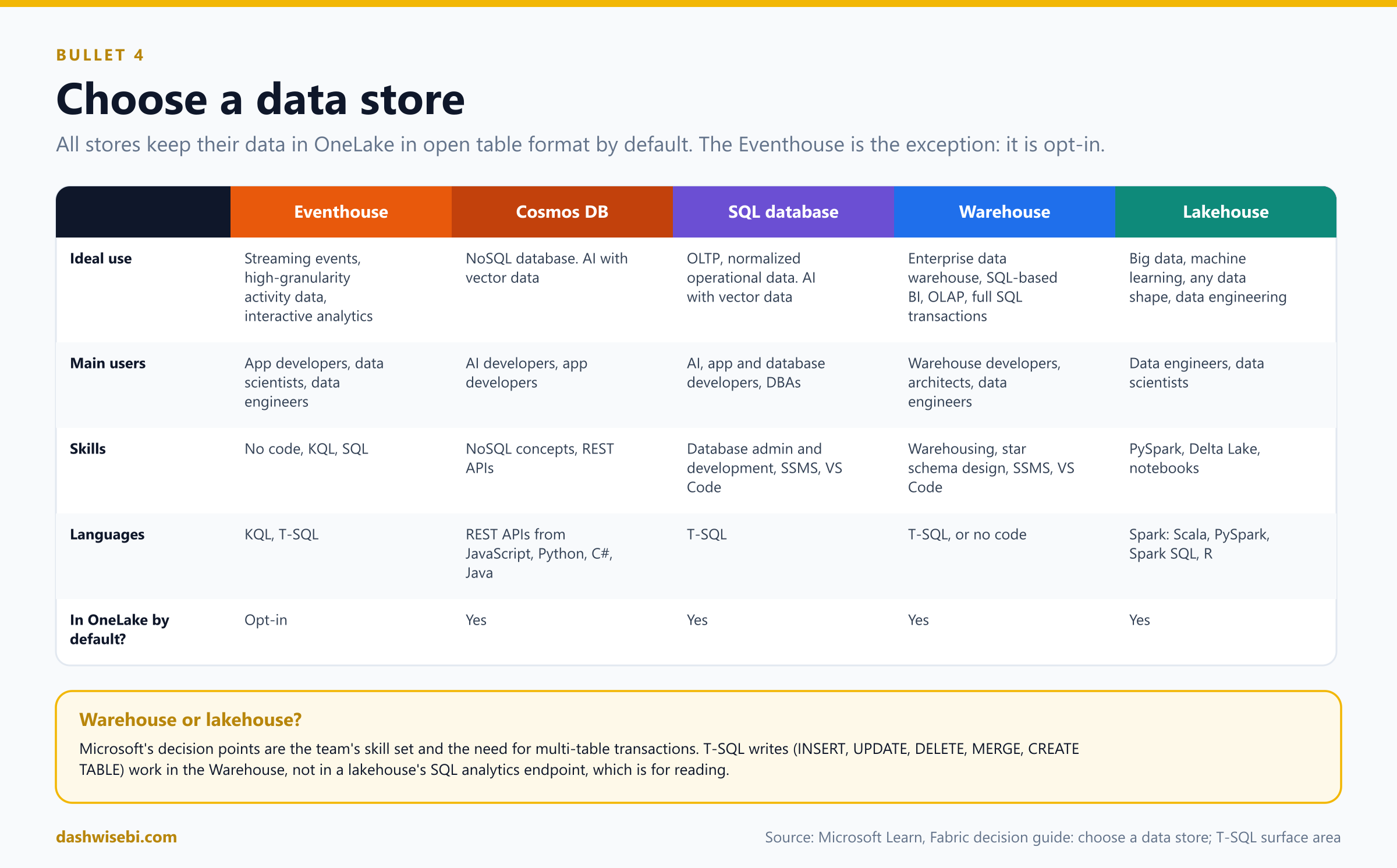
Microsoft's decision guide lists the Fabric data stores and what each is for. All of them keep their data in OneLake, in open table format by default. The exception is a KQL database in an Eventhouse, where OneLake availability is an opt-in setting.
The five stores
- Eventhouse. Streaming event data and high-granularity activity data for interactive analytics (time, space, detail, JSON and text). Users: app developers, data scientists, data engineers. Skills: no-code, KQL, SQL. Languages: KQL and T-SQL. OneLake availability: opt-in.
- Cosmos DB in Fabric. A NoSQL database, and a home for AI with vector data. Users: AI and app developers. Access through REST APIs and many languages.
- SQL database in Fabric. Operational, transactional (OLTP), normalized data, and AI with vector data types. Users: AI, app and database developers and admins. Language: T-SQL. It uses the same SQL engine as Azure SQL Database, supports full ACID transactions and enforced foreign keys, and tunes itself automatically. Every Fabric database has a SQL analytics endpoint, so analytics can read it without burdening the operational database.
- Warehouse. An enterprise data warehouse for SQL-based BI and OLAP, with full SQL transaction support. Users: data warehouse developers, data architects, data engineers, database developers. Skills: warehousing concepts, star schema design, SSMS, VS Code. Languages: T-SQL, and no-code.
- Lakehouse. Big data and machine learning, with unstructured, semi-structured or structured data, and data engineering. Users: data engineers and data scientists. Skills: PySpark, Delta Lake, notebooks. Languages: Spark (Scala, PySpark, Spark SQL, R).
How to decide
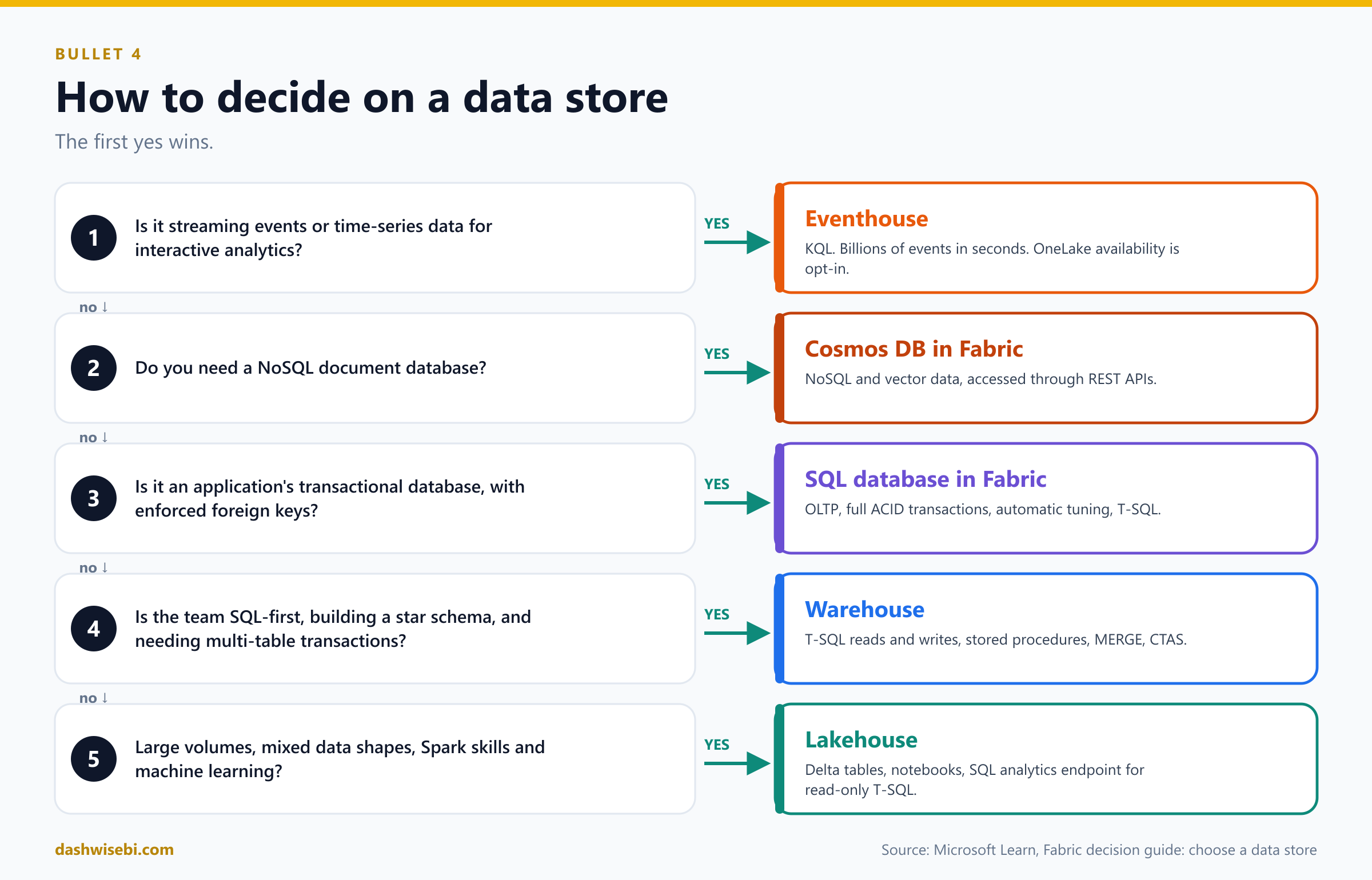
- Streaming events and time-series analytics: Eventhouse.
- A NoSQL document database: Cosmos DB in Fabric.
- An application's transactional database, with enforced relational integrity: SQL database in Fabric.
- A star schema for BI, a team that lives in T-SQL, full SQL transactions: Warehouse.
- Large volumes, mixed formats, Spark and notebooks, machine learning: Lakehouse.
The two choices people mix up most are the Warehouse and the Lakehouse. The decisive factors in Microsoft's guide are the team's skill set and the need for multi-table transactions. Also remember how they behave:
- The Warehouse is fully T-SQL for reading and writing.
INSERT,UPDATE,DELETEandMERGE(generally available) work, and so do stored procedures, views, temp tables,TRUNCATEandIDENTITYcolumns. Some things are not supported, for example triggers and materialized views. - The Lakehouse has a SQL analytics endpoint that lets T-SQL users read Delta tables, and create views, functions and procedures on top. Creating tables and inserting, updating or deleting rows works in the Warehouse, not in the lakehouse's SQL analytics endpoint. Write to a lakehouse with Spark, pipelines or dataflows.
- A warehouse can query lakehouse tables and other warehouses in the same workspace with three-part names, so the choice is not a wall between teams.
Four scenarios from Learn
- Susan has years of experience building warehouses with SQL, her consumers use SQL analytical tools, and her existing T-SQL code mostly works in Fabric. Answer: Warehouse.
- Rob must store and model several terabytes. His team mixes PySpark and T-SQL skills, and most T-SQL users are only consumers. Answer: Lakehouse, so the engineers use notebooks and the SQL users read through the SQL analytics endpoint.
- Daisy is a Power BI analyst who needs to analyze billions of rows from plants, suppliers and shippers, with time series and geospatial functions, and fast dashboards. Answer: Eventhouse.
- Kirby is an application architect who needs high concurrency, full ACID transactions, enforced foreign keys and automatic tuning. Answer: SQL database in Fabric, with pipelines to import existing data and the SQL analytics endpoint for reporting.
5. Choose between Dataflows Gen2, notebooks, KQL and T-SQL for data transformation
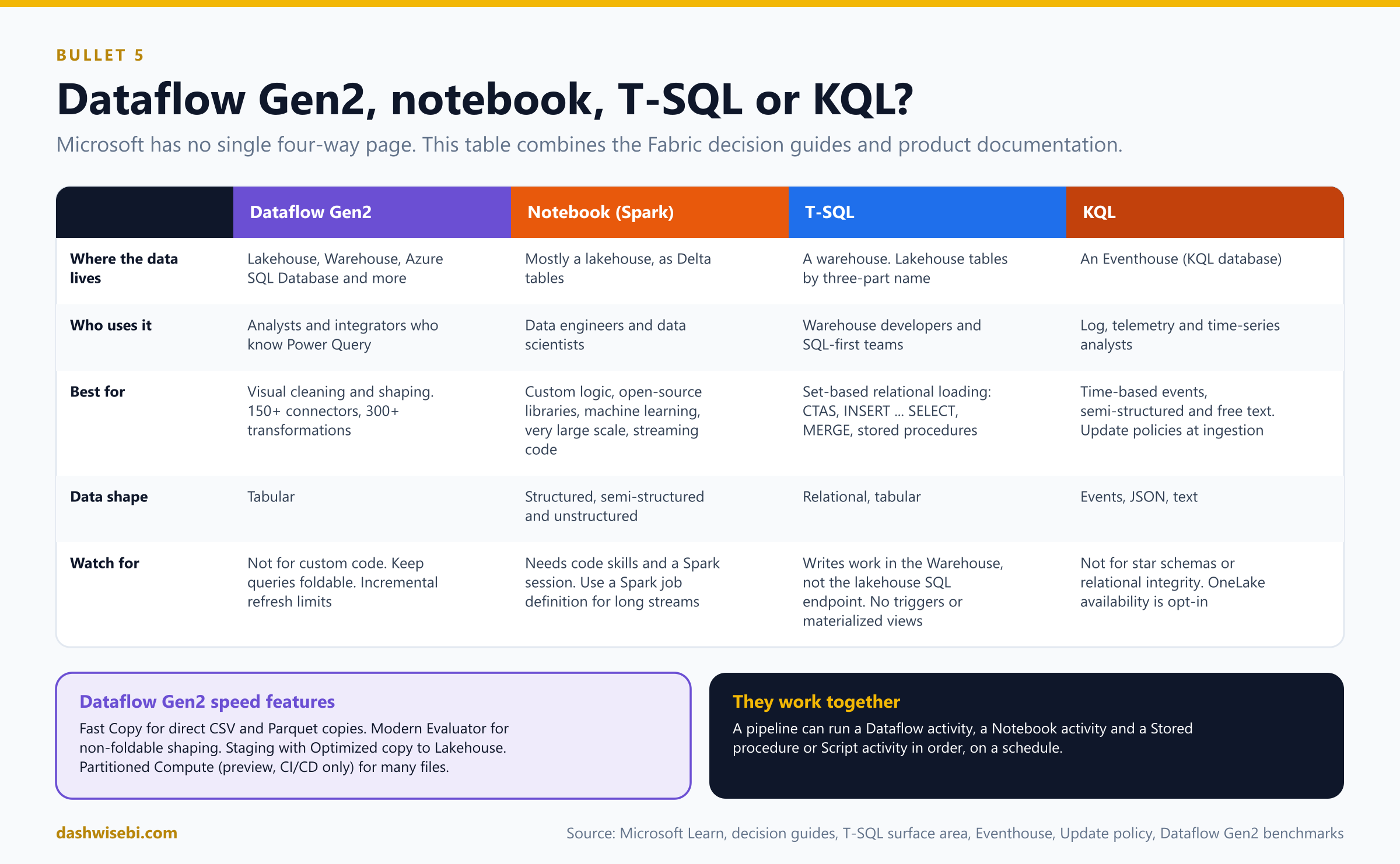
Microsoft does not publish one page that compares these four. This section combines the Fabric decision guides, the Warehouse and Eventhouse documentation and the Dataflow Gen2 documentation, so use it as a way to reason, not as a quotation. The reasoning rests on three things: where the data lives, who will maintain the logic, and what the data looks like.
Dataflow Gen2: Power Query, low code
- Fits: analysts and integrators who know Power Query, shaping and cleaning data, merging queries, many sources (150+ connectors) and 300+ transformation functions, with a visual interface.
- Destinations in the decision guide: Lakehouse, Azure SQL Database, Azure Data Explorer and Azure Synapse Analytics, and also Warehouse.
- Performance features: Fast Copy for direct, high-throughput copies of CSV and Parquet with no transformations, Modern Evaluator for non-foldable shaping, staging and Optimized copy to Lakehouse, and Partitioned Compute (preview, CI/CD only) for many files. Keep your queries foldable so the source does the work.
- Watch for: it is not for very custom logic, streaming or machine learning, and incremental refresh has the limits you met in section 1.
Notebook: Spark, code-first
- Fits: data engineers and data scientists, complex or custom transformations, open-source libraries, machine learning, very large scale, semi-structured or unstructured data, and structured streaming.
- Data lives: mostly in a lakehouse as Delta tables. Delta Lake supports upserts, compaction, time travel and schema evolution.
- Watch for: it needs code skills and a Spark session. Run it from a pipeline Notebook activity (Episode 4), or use a Spark job definition for long-running jobs.
T-SQL: the warehouse's language
- Fits: data warehouse developers and architects, set-based transformation of relational data, star schema loading, and teams that live in SQL.
- Tools:
INSERT ... SELECT,CTAS,SELECT INTO,COPY INTO,MERGE, stored procedures, views, temp tables, and cross-warehouse and lakehouse reads with three-part names. A pipeline runs them with a Stored procedure or Script activity. - Watch for: write operations work in the Warehouse and not in a lakehouse's SQL analytics endpoint. Some SQL Server features are missing (triggers, materialized views, recursive queries and others).
KQL: the Eventhouse's language
- Fits: time-based, streaming, semi-structured and free-text data, such as telemetry, logs, IoT and security data, queried in seconds even at billions of events. You can also use T-SQL on an Eventhouse.
- Transformation tools: KQL queries such as
parseandproject, update policies that transform data as it is ingested, and eventstream operators before ingestion. - Watch for: it is not the tool for a star schema or for relational integrity. OneLake availability is opt-in.
How to decide
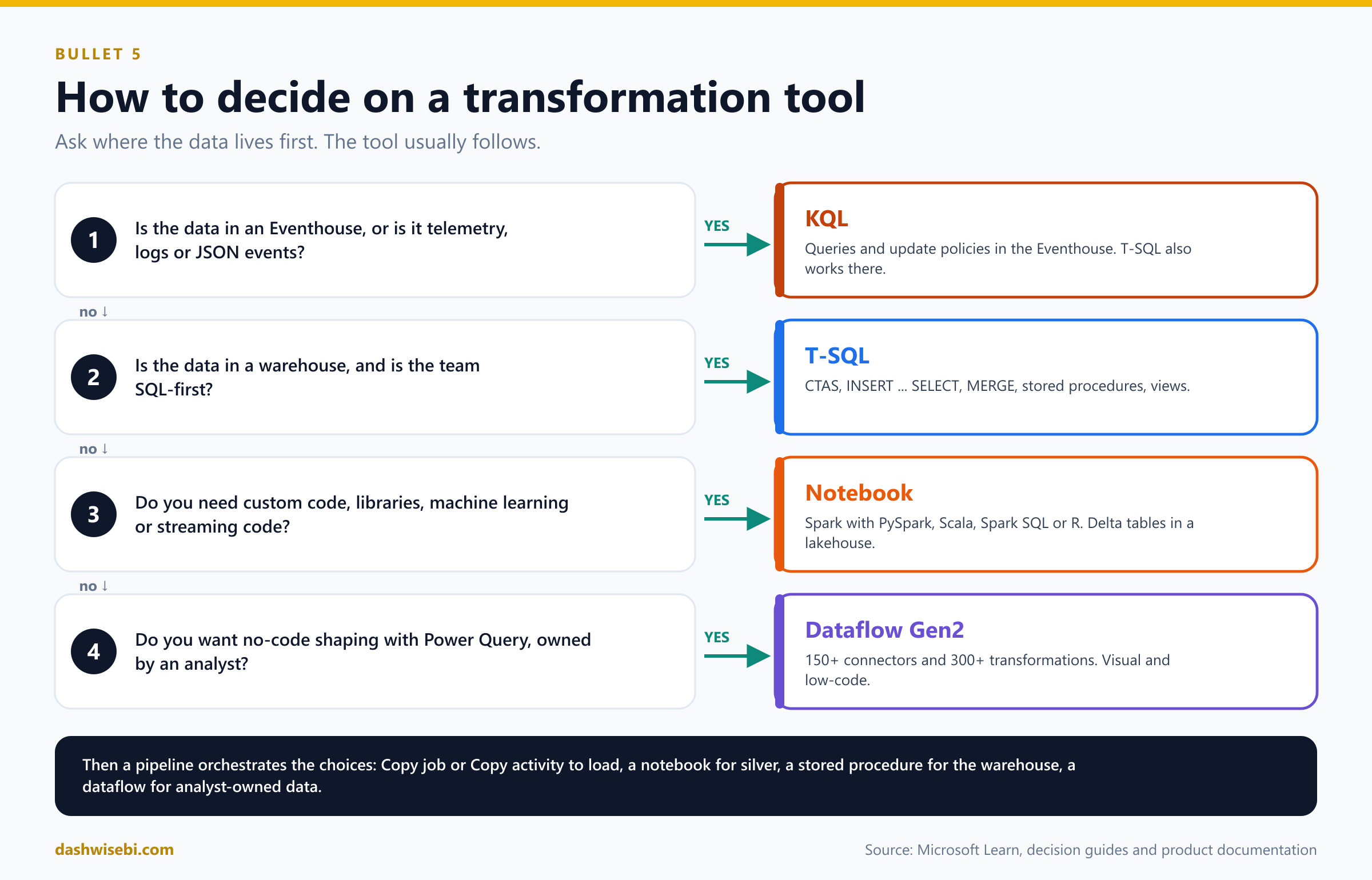
- Where is the data? In an Eventhouse, use KQL. In a warehouse, use T-SQL. In a lakehouse, use a notebook or a dataflow.
- Who maintains it? SQL people point to T-SQL. Power Query people point to Dataflow Gen2. Python and Spark people point to a notebook. Log analysts point to KQL.
- What does the data look like? Relational and tabular: T-SQL or Dataflow Gen2. Telemetry, logs or JSON events: KQL. Mixed, unstructured or very large: notebook.
- What else does it need? Machine learning, custom libraries or streaming code: notebook. A no-code visual build for an analyst: Dataflow Gen2.
Also note how they work together: a pipeline calls a Dataflow activity, a Notebook activity and a Stored procedure or Script activity in order. The Learn tutorial on moving and transforming data does exactly this: a dataflow cleans and merges, then a Copy activity moves the result, and a schedule runs it all.
Putting it all together: one platform, four tools
A common design uses each tool where it is strongest. Imagine a retail company:
- A Copy job loads operational tables incrementally into a bronze lakehouse (CDC where available, a watermark elsewhere).
- A notebook cleans and conforms the data into silver Delta tables.
- A T-SQL stored procedure in the warehouse stages the silver data, processes the dimensions (SCD type 2 for customers) and then the facts, and logs the run. A pipeline orchestrates the order and refreshes the semantic model at the end.
- A Dataflow Gen2 maintained by a business analyst loads a small reference table of regional targets.
- Store sensor events flow through an eventstream to an Eventhouse, where a KQL update policy parses the raw lines, and to a lakehouse for history.
Choosing the right option
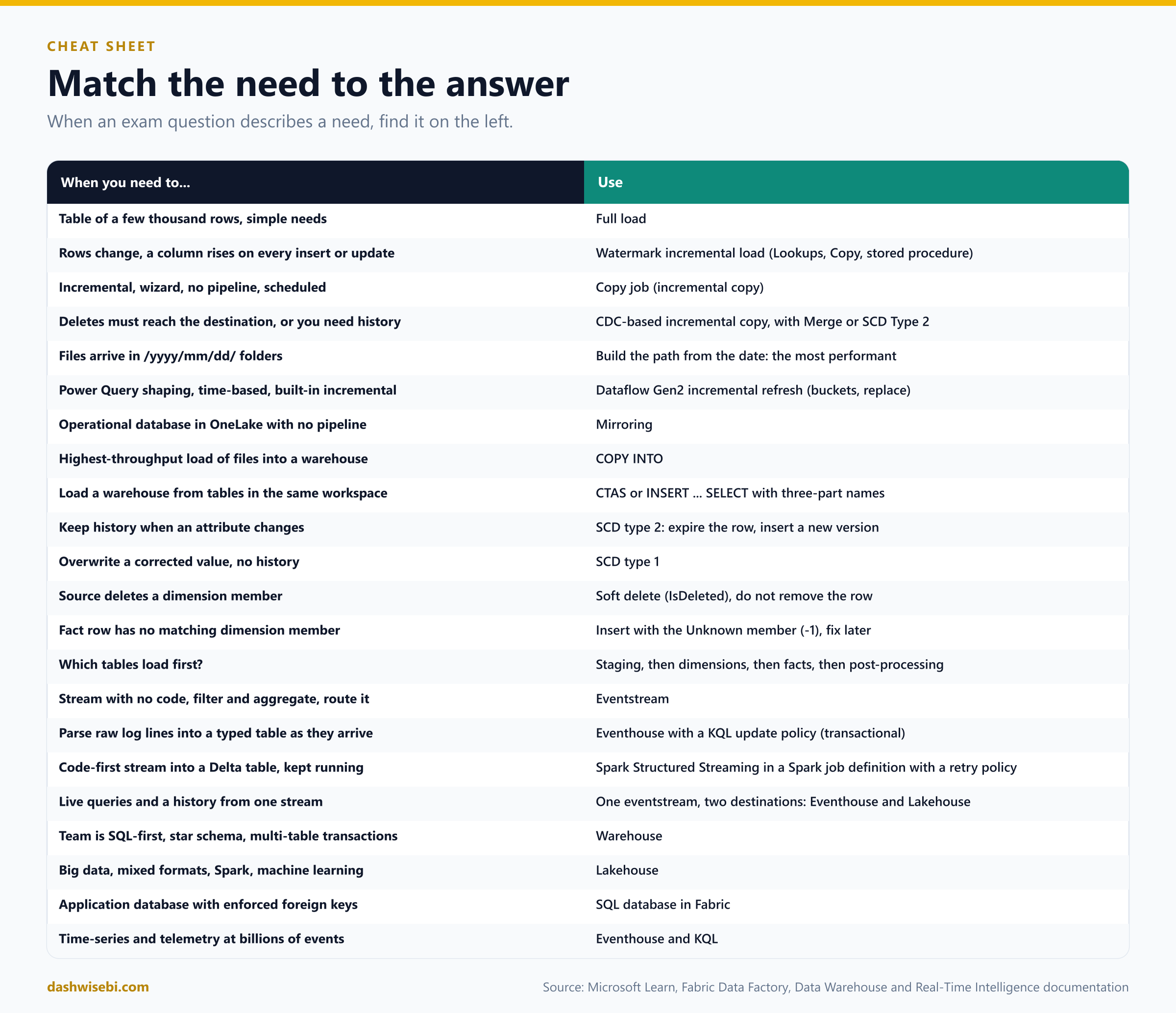
When an exam question describes a need, find it on the left and pick the answer on the right.
Common mix-ups
- "A watermark load also picks up deleted rows." It cannot see deletes. Use CDC, a soft-delete flag or a periodic full reload.
- "Save the new watermark at the start of the run." Save it only after the copy succeeds.
- "Resetting incremental copy cleans the destination." It only clears the saved state. With Append you can get duplicates.
- "A NULL watermark value is picked up by later runs." It is skipped.
- "A last-modified-date file load is as fast as a dated-folder load." It still scans every file. The time-partitioned path is the most performant.
- "Dataflow Gen2 incremental refresh merges rows." It replaces whole buckets. Replace is the only update method.
- "Truncate and reload a dimension to refresh it." Not with generated surrogate keys. It would invalidate the facts.
- "Delete dimension rows when the source deletes them." Use a soft delete, unless the member was created in error and has no facts.
- "The Warehouse enforces foreign keys." It accepts them as
NOT ENFORCED. The ETL checks integrity. - "Load facts before dimensions." Dimensions first, so the lookups can find every member.
- "A failed dimension lookup should skip the fact row." Insert it with the Unknown member and repair later.
- "Staging tables are for report users." Staging is for the ETL only.
- "Eventstreams deliver each event exactly once." Delivery is at least once.
- "Run production streaming jobs from a notebook." Use a Spark job definition with a retry policy.
- "An update policy can read from another database." The source and target tables must be in the same database.
- "Eventhouse data is in OneLake by default." It is opt-in. All other Fabric stores publish by default.
- "You can INSERT into a lakehouse through its SQL analytics endpoint." Not in the endpoint. Use the Warehouse for T-SQL writes, or Spark, pipelines or dataflows for the lakehouse.
- "Mirroring is a pipeline you schedule." It is a managed, continuous replication into OneLake.
Try these scenarios
Eight exam-style questions. Cover the answers and test yourself.
1. The big table with a modified date
An orders table with 200 million rows has a reliable ModifiedAt column. A nightly full copy is too slow. Nobody deletes orders. What do you build?
Answer: A watermark incremental load: a control table with the last watermark, two Lookups (old and new), a Copy activity for the range, and a stored procedure on On success that saves the new watermark. A Copy job with an incremental column does the same without a pipeline.
2. The deletes that never arrive
The watermark load works, but rows deleted in the source stay in the lakehouse. The source database supports CDC. What now?
Answer: Switch to CDC-based incremental copy in a Copy job. CDC captures delete events, and a Merge update method applies them. A watermark can never see a deleted row.
3. The duplicates after a reset
You reset a Copy job to repair a gap. After the next run the destination has duplicate rows. Why, and what should you have done?
Answer: Reset clears the saved state but leaves the destination data. With the Append update method the same rows were loaded again. Clear the destination first, or use Merge.
4. The customer who moved
A customer changes region. Reports must show past sales under the old region and new sales under the new one. What do you do in the dimension?
Answer: SCD type 2. Expire the current row (end date, current flag false), insert a new current row with the new region, and when loading new facts look up the surrogate key of the current version.
5. The fact with no matching product
While loading sales facts, 300 rows have a product ID that does not exist in the product dimension. What should the load do?
Answer: Insert the rows anyway, with the special Unknown member key (for example -1), then run a periodic job that fixes them once the real product arrives. Or create an inferred member. Do not drop the rows. The warehouse will not stop you, because foreign keys are not enforced.
6. Logs that arrive as text lines
Application servers send raw log lines. Analysts want a clean table with a timestamp, a level and a message, queried with seconds of delay. What is the design?
Answer: An eventstream into an Eventhouse raw table, and a KQL update policy (set transactional) that parses the line into a typed target table.
7. The job that keeps dying
A Spark Structured Streaming job in a notebook stops whenever the cluster is patched. What should you change?
Answer: Move it to a Spark job definition and configure a retry policy. Keep a checkpoint location so it resumes where it stopped.
8. The team that knows only SQL
A team of SQL developers must build a governed star schema for Power BI, with multi-table transactions and stored procedures. Raw files already sit in a lakehouse. Which store and which transformation tool?
Answer: A Warehouse and T-SQL. They can read the lakehouse tables with three-part names, load with CTAS or INSERT ... SELECT, and write stored procedures. Keep the raw data in the lakehouse.
Where to go next
- Build the watermark pipeline from Learn's tutorial in a trial workspace. Then redo the same load with a Copy job and compare the effort.
- Create a small star schema in a warehouse: a staging schema, a customer dimension with SCD type 2, a date dimension from a stored procedure, and a sales fact with an Unknown member.
- Set up an eventstream with the sample data source and send it to both an Eventhouse and a Lakehouse. Add an update policy.
- For a different explanation of the transformation choice, you can also read Choose between Dataflows Gen2, notebooks, KQL, and T-SQL for data transformation (The Data Community). It is an independent article. This post was written separately from Microsoft Learn, and does not copy it.
- Read the sources behind this post: DP-700 study guide, Incrementally copy data from a source data store to a destination data store, Incrementally load data from Data Warehouse to Lakehouse, What is Copy job, Incremental copy in Copy job, Incremental refresh in Dataflow Gen2, Load tables in a dimensional model, Modeling dimension tables, Modeling fact tables, Ingest data into the Warehouse, T-SQL surface area, Get and transform events from streaming sources, Eventstreams overview, Add an Eventhouse destination to an eventstream, Eventhouse overview, Update policy overview, Data streaming into a lakehouse with Spark, Mirroring, Lakehouse and Delta tables, Fabric decision guide: choose a data store, Fabric decision guide: copy activity, dataflow, Eventstream or Spark, Move and transform data with dataflow and pipelines and Dataflow Gen2 cost and performance.
Keep reading
DP-700 Episode 4: Orchestrate Processes
DP-700 study guide to orchestration in Fabric: Dataflow Gen2 vs pipeline vs notebook, schedules, event triggers, parameters, expressions and notebook patterns.
DP-700 Episode 3: Security & Governance
DP-700 study guide to Fabric security: workspace and item access, RLS, CLS, OLS, folder access, masking, sensitivity labels, endorsement, audit logs and OneLake security.