DP-700 Episode 3: Security & Governance

PowerBI consultant ·
Welcome to Episode 3 of our DP-700 series. In Episode 1 we looked at workspace settings, and in Episode 2 at lifecycle management. This time we cover security and governance, still inside the skill area Implement and manage an analytics solution (30 to 35 percent of the exam). These are the eight topics from the session outline:
Implement workspace-level access controls
Implement item-level access controls
Implement row-level, column-level, object-level, and folder/file-level access controls
Implement dynamic data masking
Apply sensitivity labels to items
Endorse items
Implement and use Microsoft Fabric audit logs
Configure and implement OneLake security
Security has a reputation for being a pile of settings. It is easier if you ask one question each time: at which layer is this decided, and who does it apply to? This post answers that for every bullet, with a small example, the exact steps, and the traps the exam likes.
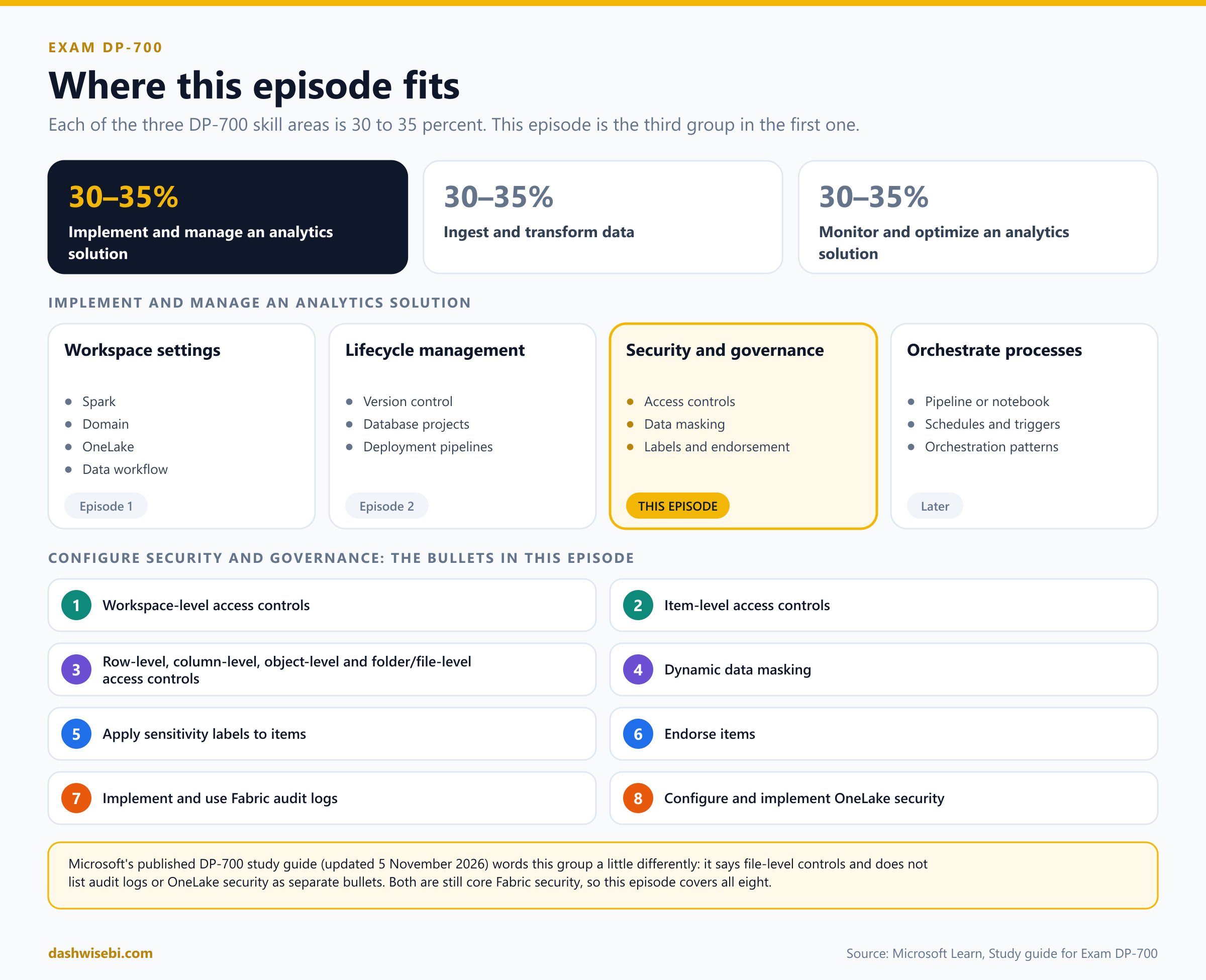
A note on wording. The study guide Microsoft published on 5 November 2026 phrases this group a little differently from the session outline: it says "file-level" instead of "folder/file-level", and it does not list audit logs or OneLake security as separate bullets. Both topics are still core to how Fabric security works and they connect everything else, so we cover all eight here. One more note on the third bullet: Fabric has no separate file-level control. OneLake security works on folders, tables and schemas, and files follow the folder they sit in.
The big picture: five checkpoints
Before the details, here is the whole journey of a request. A person who wants to read one row of data has to get past five checkpoints, and Microsoft Learn groups them into three levels. Learn's order of operation is: Entra authentication, then Fabric access, then data security.
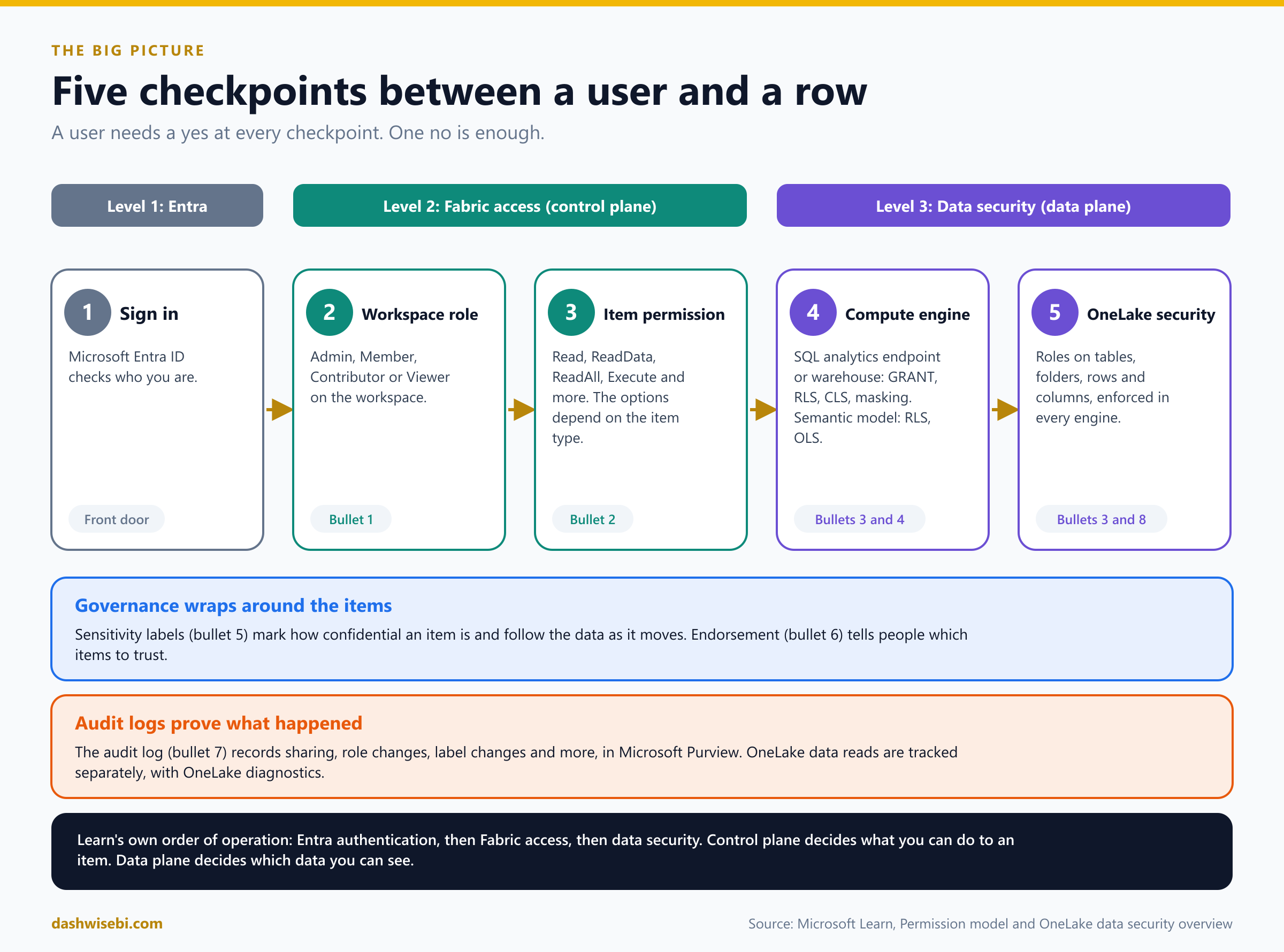
Sign in. Microsoft Entra ID checks who you are.
Workspace role. Admin, Member, Contributor or Viewer on the workspace (bullet 1).
Item permission. What you may do with one item that was shared with you (bullet 2).
Compute engine. The SQL analytics endpoint or warehouse can enforce T-SQL permissions, row-level security, column-level security and masking. A semantic model enforces row-level and object-level security (bullets 3 and 4).
OneLake security. Roles on tables, folders, rows and columns, enforced in every Fabric engine (bullets 3 and 8).
Learn also uses two plain names for this. The control plane decides what you can do to an item: create it, configure it, share it. Workspace roles and item permissions live there. The data plane decides which data you can see. OneLake security lives there. Governance wraps around all of it: sensitivity labels (bullet 5) and endorsement (bullet 6) describe the items, and audit logs (bullet 7) record what happened.
1. Implement workspace-level access controls
A workspace is the first and widest boundary. Fabric workspaces sit on top of OneLake and divide the data lake into containers that can be secured separately. You grant access by giving a person or a group one of four roles. A role applies to everything in that workspace, and people with no role cannot get in at all.
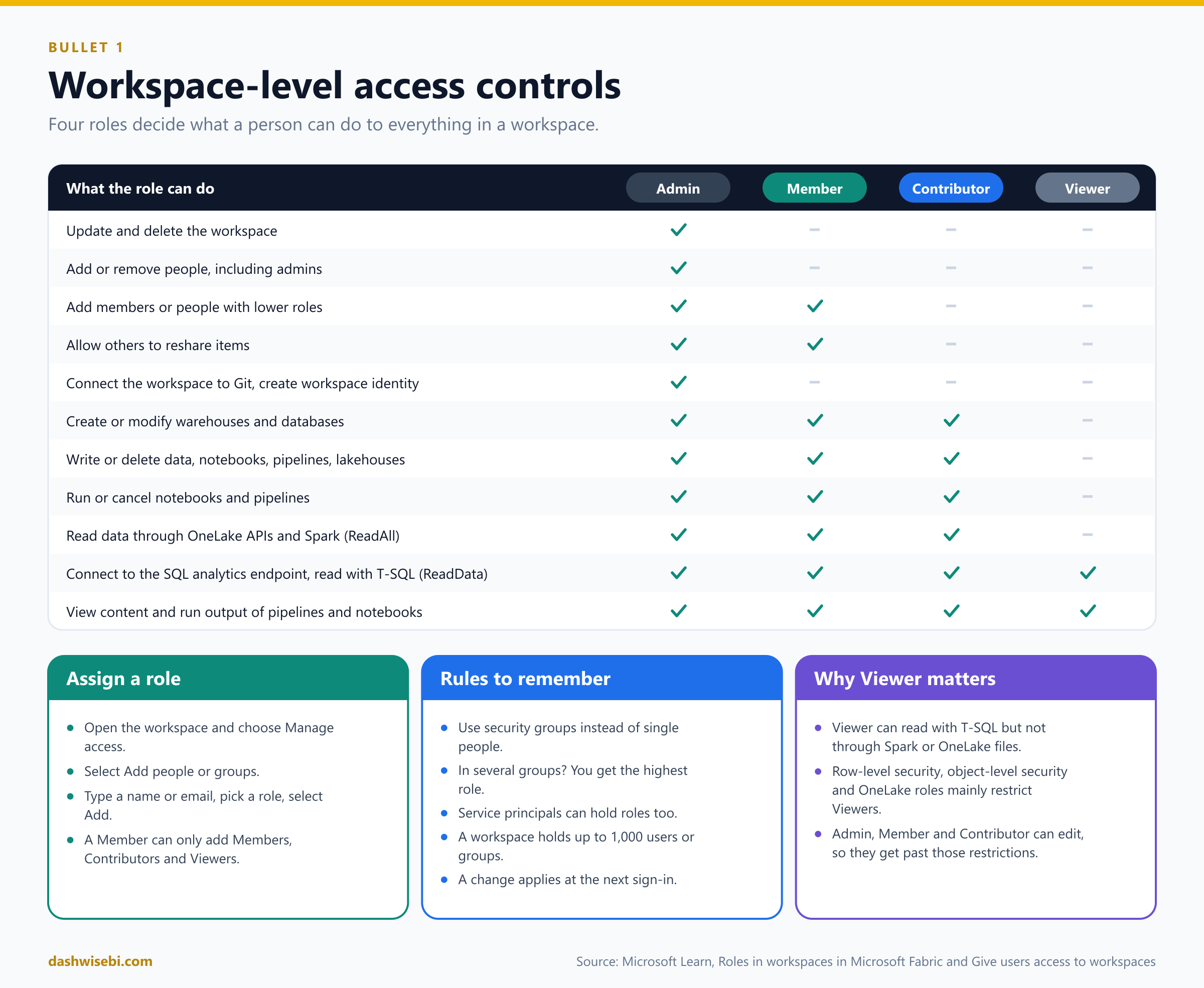
The four roles in plain words
Admin can do everything, including deleting the workspace and adding or removing people, including other admins.
Member can edit all content and share it, and can add people with the Member, Contributor or Viewer role. A Member cannot add admins.
Contributor can create and edit content, run notebooks and pipelines, and read all the data. A Contributor cannot manage people.
Viewer can see content and the run results, and can connect to the SQL analytics endpoint to read data with T-SQL. A Viewer cannot write, and cannot read data through OneLake APIs or Spark.
Two rows of the table are worth memorizing. Connecting the workspace to Git and creating a workspace identity are Admin-only. And the line between can edit and cannot edit sits between Contributor and Viewer, which matters again for row-level security, as you will see.
More rows of Microsoft's capability table
Create or modify warehouse, database and database mirroring items: Admin, Member and Contributor.
View and read the content of pipelines, notebooks, Spark job definitions, ML models, experiments, eventstreams, KQL databases and real-time dashboards, and view execution output: all four roles, Viewer included.
Read lakehouse data through the Lakehouse explorer, read through OneLake APIs and Spark (ReadAll), and subscribe to OneLake events: Admin, Member and Contributor, not Viewer.
Read data with T-SQL through the SQL analytics endpoint (ReadData): all four roles. Shortcut data needs other permissions at the destination too.
Allow others to reshare items: Admin and Member. Contributors and Viewers can also share items if they have the Reshare permission.
Schedule refreshes through an on-premises gateway and change gateway connection settings: Admin, Member and Contributor, but you also need permission on the gateway itself, which is managed separately from workspace roles.
The same roles apply to the Fabric REST APIs. Through the Items REST API, Admin, Member and Contributor can create, edit and delete notebooks, and Viewer cannot. Through the Job Scheduler API, Admin, Member and Contributor can start and cancel runs, while every role, Viewer included, can monitor run status and see the output.
How to assign a role
Open the workspace. If you are an Admin or Member you will see Manage access on the command bar (sometimes under the three dots).
Select Add people or groups.
Type a name or email, choose a role, and select Add. You can add security groups, mail-enabled security groups, distribution lists, Microsoft 365 groups or single people.
To change a role later, use the search box, then the drop-down next to the person.
Rules that make the exam questions easy
Use groups. Assign the role to a security group and manage the people by changing the group.
The highest role wins. If someone is in several groups with different roles, they get the highest one. If you nest groups and give a role to the outer group, everyone inside it gets the role.
Service principals (app registrations) can also hold workspace roles and get the same permissions for API calls, such as the Items REST API and the Job Scheduler API.
A workspace holds up to 1,000 users or groups in roles. The limit counts groups, not the members inside them.
A change applies at the next sign-in. It is not instant for someone who is already signed in.
To make row-level security work on Power BI items for people who browse a workspace, give them the Viewer role.
2. Implement item-level access controls
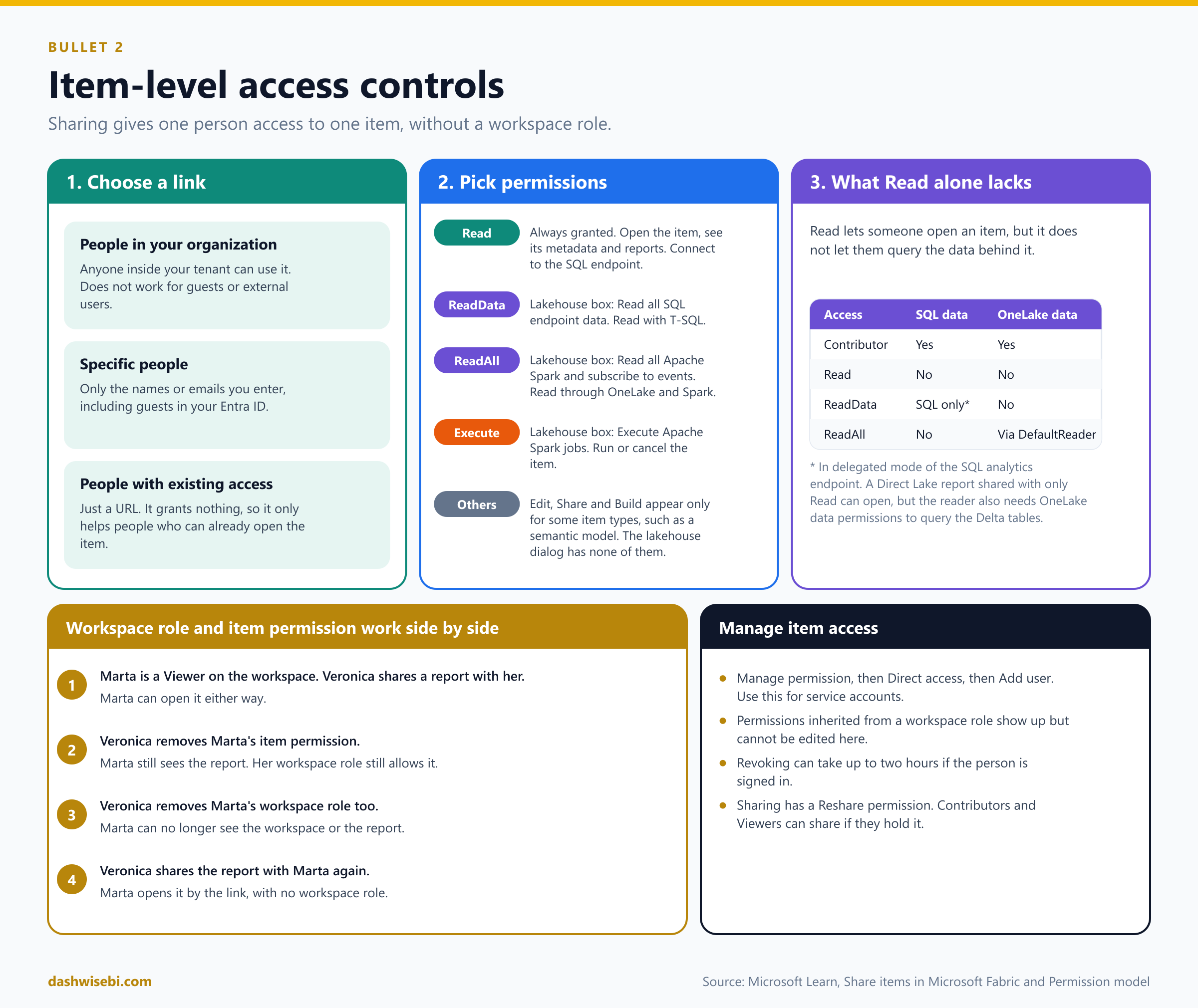
Sometimes a workspace role is too much. A manager wants to see one report, and you do not want them to see the lakehouse next to it. For that you share the item. Sharing gives access to that item only, and the person gets no workspace role.
Share an item with a link
In the item list or inside the item, select Share.
In Create and send link, choose who the link is for:
People in your organization: anyone in your tenant can use it. It does not work for guests or external users.
Specific people: only the names or emails you type. This includes guests in your Entra ID, but not external people who are not guests.
People with existing access: only a URL. It grants nothing, so it only helps people who can already open the item.
Choose the permissions the link includes. Read is always included. Then select Apply.
Copy the link, email it, send it in Teams, or send it directly to specific people.
If your admin has turned off links for people in your organization, you can only use the other two types.
The item permissions
The options you see depend on the item type. Microsoft's item permission model lists the full set, but each item shows only the ones that make sense for it. Read is always granted when you share.
Read: discover and open the item, see its metadata, and connect to the warehouse or the SQL analytics endpoint of a lakehouse.
ReadData (shown as Read all SQL endpoint data): read data with T-SQL.
ReadAll (shown as Read all Apache Spark and subscribe to events): read data through OneLake APIs, Spark and the Lakehouse explorer. Today the permission to subscribe to OneLake events comes bundled with it.
Execute: run or cancel the item. On a lakehouse it is shown as Execute Apache Spark jobs on lakehouse.
Edit, Share and Build: edit the item, pass access on (only up to what the person holds), or build new content on a semantic model. These appear for item types that support them.
What the lakehouse Share dialog really shows
Open Share on a lakehouse and you get the Grant people access window. It offers exactly three additional permissions, all unticked by default:
Read all SQL endpoint data gives ReadData.
Read all Apache Spark and subscribe to events gives ReadAll.
Execute Apache Spark jobs on lakehouse gives Execute.
There is no Edit box and no Share box. Microsoft states that lakehouse sharing does not provide write permissions: shared users can read data but not change it. To let someone change a lakehouse, give them a workspace role of Contributor or higher. The dialog also has a Notify recipients by email option and an optional message. Workspace Admins and Members can share by default; a Contributor or Viewer can share only if they were granted Share on that lakehouse. Expect the exam to test the idea that sharing grants read access, not write access.
Two more details from Microsoft's lakehouse sharing page. Execute Apache Spark jobs lets the person use the lakehouse Livy endpoint to run Spark jobs. And someone who holds only ReadData can query through the SQL analytics endpoint URL but cannot read through the lakehouse URL. If they need both, grant ReadAll as well.
If lakehouse sharing does not behave
You cannot select Share. You need permission to share: Admin and Member have it by default, a Contributor or Viewer only if Share was granted on that lakehouse.
The person opens the item but cannot query the data. Check they have the permission for their path: ReadData for the SQL analytics endpoint, ReadAll for Spark and OneLake APIs.
The person still has old access after a change. It can take up to two hours for signed-in users. Check the Direct access list and ask them to sign in again.
To change permissions later, open Manage permissions, then Direct access, and add, edit or remove entries.
Read alone does not give you the data
This is the most tested idea in this section. Read lets someone open the item, but not query the data behind it. Imagine you share a Direct Lake report with only Read. The reader can open the report, but the report reads Delta tables in OneLake, so the reader also needs data permissions there. For deeper access you grant ReadData or ReadAll, add compute-level permissions in the SQL analytics endpoint or the semantic model, or use OneLake security roles.
Workspace roles and item permissions work side by side
Marta is a Viewer on the workspace, and Veronica shares a report with her. If Veronica removes Marta's item permission, Marta can still open the report because her workspace role allows it. To really remove access Veronica must also remove Marta's workspace role. If Veronica then shares the report again, Marta can open it by the link without any workspace role. In short: access is the sum of what you hold at each level.
Give access directly, and manage it
Use Manage permissions, then Direct access, then Add user to give access to a person or a service account without a link. Select Grant.
In Manage permissions you can edit or delete a link. Advanced opens a page with all links and all people who have direct access.
Permissions that come from a workspace role show up in that list, but you cannot change them there.
Revoking a permission can take up to two hours to apply if the person is signed in. If they are not signed in, it applies at their next sign-in.
3. Implement row-level, column-level, object-level, and folder/file-level access controls
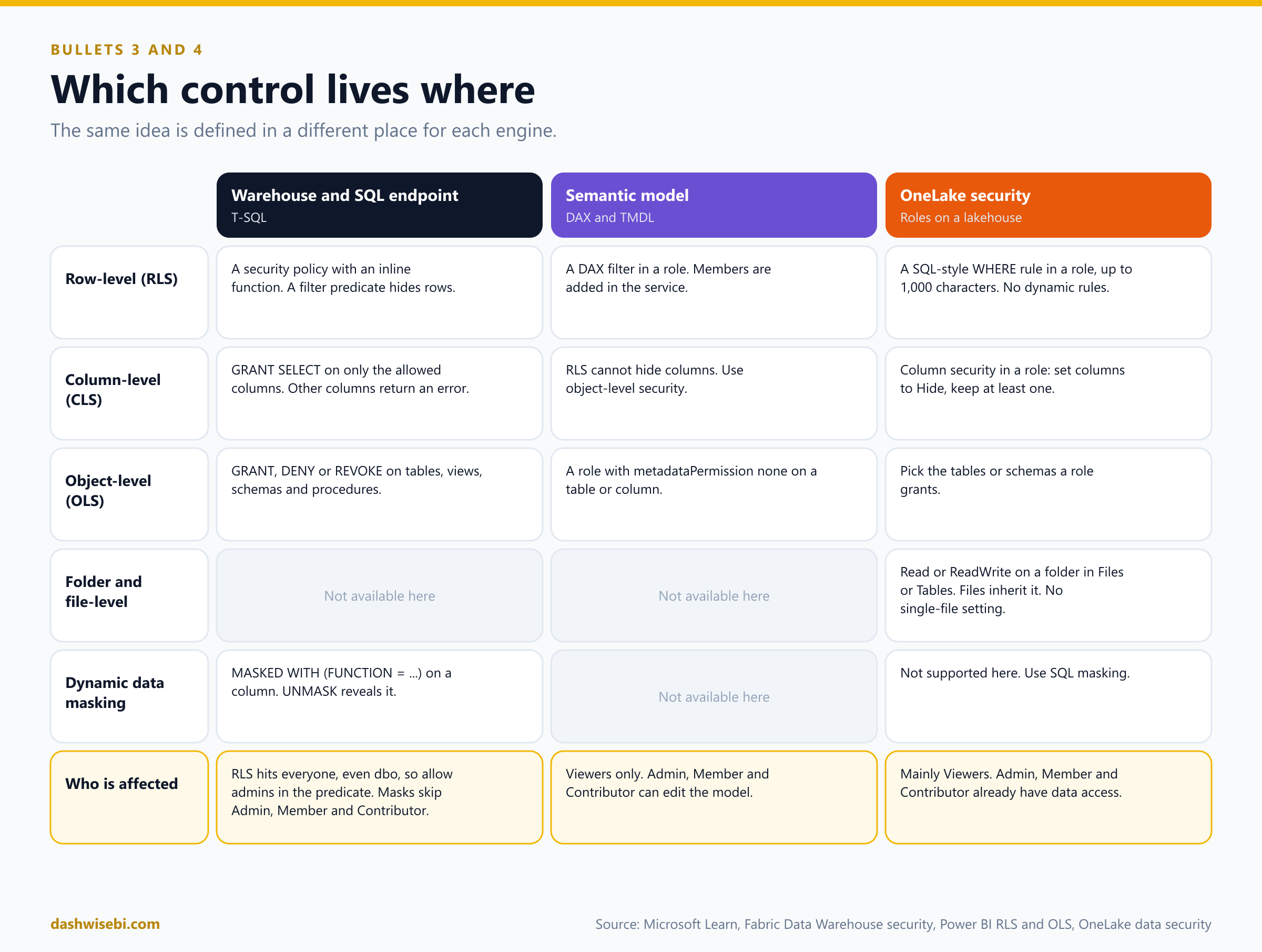
Now we go inside the data. Four short definitions first, in plain words:
Row-level security (RLS) hides some rows. A sales rep sees only their own sales.
Column-level security (CLS) hides some columns. Support staff do not see the credit card number.
Object-level security (OLS) hides whole objects: a table, a view, a schema, or a column in a semantic model.
Folder and file-level security limits who can read which folders in a lakehouse. In OneLake security a role is set on a table, folder or schema, and the files inside take the permission of their folder. There is no setting for one single file.
The same idea is defined in a different place for each engine. This table is the one to keep in your head.
In a warehouse or SQL analytics endpoint: T-SQL
The SQL analytics endpoint and the warehouse use ordinary T-SQL. Two things apply to everything below. To connect at all, a person needs a workspace role or at least the item Read permission. And you cannot run CREATE USER here: when you run GRANT or DENY, Fabric creates the database user for you. You can define permissions in SQL first and give the workspace access afterwards.
Row-level security with a security policy
RLS in a warehouse has two parts. An inline table-valued function holds the rule. A security policy attaches that function to a table. Microsoft's tutorial for it has four steps.
Before you start: you need a workspace with an active or trial capacity, a warehouse or a SQL analytics endpoint on a lakehouse, and either the Admin, Member or Contributor role or elevated permissions on the warehouse or endpoint.
Connect with such an account and open the warehouse or endpoint.
Define the policy. Decide which roles and predicates control access, write the predicate as an inline table-valued function, then bind it with a security policy. In the tutorial the table has a column holding each user's name, and the function compares it with the system function
USER_NAME():
-- Creating schema for Security
CREATE SCHEMA Security;
GO

-- Creating a function for the SalesRep evaluation
CREATE FUNCTION Security.tvf_securitypredicate(@UserName AS varchar(50))
    RETURNS TABLE
WITH SCHEMABINDING
AS
    RETURN SELECT 1 AS tvf_securitypredicate_result
WHERE @UserName = USER_NAME()
OR USER_NAME() = 'BatchProcess@contoso.com';
GO

-- Using the function to create a Security Policy
CREATE SECURITY POLICY YourSecurityPolicy
ADD FILTER PREDICATE Security.tvf_securitypredicate(UserName_column)
ON sampleschema.sampletable
WITH (STATE = ON);
GO
The second condition is an optional exception for the managed identity that moves data, here BatchProcess@contoso.com. Repeat the steps for each table that needs a policy.
Test it. Sign in as a user covered by the policy. Run
SELECT USER_NAME()to see the exact value that must match the column, thenSELECT * FROM sampleschema.sampletable. The user should see only the rows the predicate allows. Other apps that use Microsoft Entra authentication get the same filtered results. Then keep monitoring role assignments and policies as needs change.
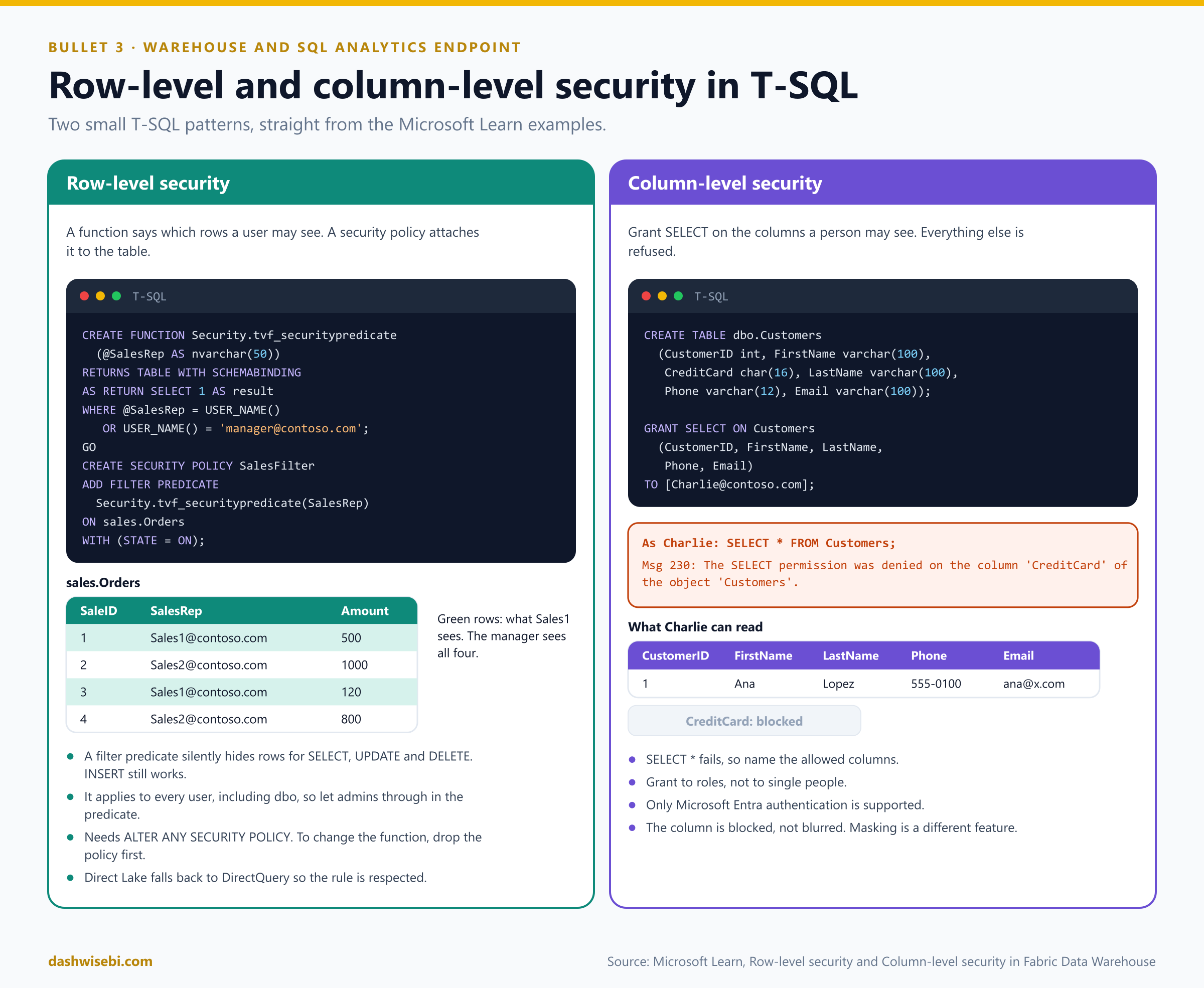
Here is the worked example from the Learn concept page: each sales rep sees only their own rows, and the manager sees everything.
CREATE FUNCTION Security.tvf_securitypredicate(@SalesRep AS nvarchar(50))
    RETURNS TABLE
WITH SCHEMABINDING
AS
    RETURN SELECT 1 AS tvf_securitypredicate_result
WHERE @SalesRep = USER_NAME() OR USER_NAME() = 'manager@contoso.com';
GO

CREATE SECURITY POLICY SalesFilter
ADD FILTER PREDICATE Security.tvf_securitypredicate(SalesRep)
ON sales.Orders
WITH (STATE = ON);
GO
What to remember:
A filter predicate silently removes rows for
SELECT,UPDATEandDELETE. The application never knows the rows exist.INSERTstill works, even for a row the user then cannot see.Each table needs its own policy. A table with no policy shows everything.
The policy applies to every user, including dbo. If Admins, Members or Contributors need to see all rows, write that into the predicate, as the manager is in the example.
Creating a policy needs
ALTER ANY SECURITY POLICYandALTERon the schema. To change the function you must drop the policy first, then create it again.A Power BI report on a warehouse in Direct Lake mode falls back to DirectQuery so that RLS is respected.
In the SQL analytics endpoint you cannot
CREATE TABLE, but you canCREATE SCHEMA,CREATE FUNCTIONandCREATE SECURITY POLICYon its existing tables.A user cannot select or delete a filtered row, and cannot update it. They can, however, update a visible row so that it becomes filtered afterwards.
If you try to add a predicate to a table that already has one for that operation, you get an error, whether the first one is enabled or not. Changing a schema-bound table in a way that touches the predicate columns, or modifying the predicate function while the policy exists, also fails.
For every predicate you add you also need
SELECTandREFERENCESon the function,REFERENCESon the target table, andREFERENCESon each column used as an argument.RLS is not leak-proof. A carefully built query such as
SELECT 1/(SALARY-100000) FROM PAYROLL WHERE NAME='John Doe'can reveal a value through an error. Microsoft also warns that someone who can both create policies and alter functions could collude to infer data, so limit those permissions and watch for constantly changing policies and functions.
The security policy and the function: the T-SQL reference
Two reference pages sit behind the RLS code, and the exam can ask about them.
CREATE SECURITY POLICY takes
ADD FILTER PREDICATE(and the reference also listsBLOCKpredicates withAFTER INSERT,AFTER UPDATE,BEFORE UPDATEorBEFORE DELETE), the target table, and optionsSTATE = ON | OFFandSCHEMABINDING = ON | OFF. A filter predicate silently filters rows on read. A block predicate stops writes that break the rule. Fabric's own row-level security article only describes filter predicates, so know the filter predicate best.SCHEMABINDING is on by default and then the predicate function must be created with
WITH SCHEMABINDING. With it on, people querying the table need no separate permission on the function. With it off, they needSELECTorEXECUTEon the function and on whatever it uses. Only one policy can be enabled for a table and operation at a time.CREATE FUNCTION in Fabric creates inline table-valued functions and scalar functions. An inline table-valued function has no body: it is
RETURNS TABLEplus a singleSELECT, optionallyWITH SCHEMABINDING. TheENCRYPTIONandEXECUTE ASoptions are not supported. To schema bind, reference objects with two-part names. Admin, Member and Contributor can create functions. Scalar and external functions are in preview.To remove schema binding from a function you must
ALTERit. That is why you drop the security policy first when you change a predicate function.
Column-level security with GRANT
For columns you do not need a function. Grant SELECT on only the columns a person may see. Microsoft's tutorial follows the same four steps as for RLS: connect with an account that has the Admin, Member or Contributor role or elevated permissions on the warehouse or endpoint, define access, test, then monitor. The core of it is one statement, and Microsoft prefers granting to roles or groups over individuals because it is easier to manage:
-- Grant select to subset of columns of a table
GRANT SELECT ON YourSchema.YourTable
(Column1, Column2, Column3, Column4, Column5)
TO [SomeGroup];
Replace the schema, table, group and column list with your own, and repeat for other tables. To test, sign in as a member of that group and run SELECT * FROM YourSchema.YourTable. The person should see only the allowed columns. Here is a fuller example:
GRANT SELECT ON Customers(CustomerID, FirstName, LastName, Phone, Email)
TO [Charlie@contoso.com];
When Charlie runs SELECT * FROM Customers, it fails with "The SELECT permission was denied on the column 'CreditCard'". He has to name the columns he is allowed to read. Granting to roles instead of single people keeps this manageable, and only Microsoft Entra authentication is supported. Like RLS, column-level security makes a Direct Lake report fall back to DirectQuery.
Object-level security with GRANT, DENY and REVOKE
The same T-SQL statements control access to whole tables, views, schemas and stored procedures. You can also put people into SQL roles, custom or built-in, and grant to the role. A small example of the pattern (the names are ours):
GRANT SELECT ON dbo.Customers TO [Charlie@contoso.com];
DENY  SELECT ON dbo.Salaries  TO [Charlie@contoso.com];
A person can check what they hold with SELECT * FROM sys.fn_my_permissions(NULL, 'Database');. A user with elevated rights can list permissions granted explicitly by querying sys.database_principals and sys.database_permissions, but those views do not show permissions that come from a workspace role or an item.
In a semantic model: DAX roles and TMDL
Report builders define security in the model, and Power BI applies it when a Viewer opens a report.
Row-level security
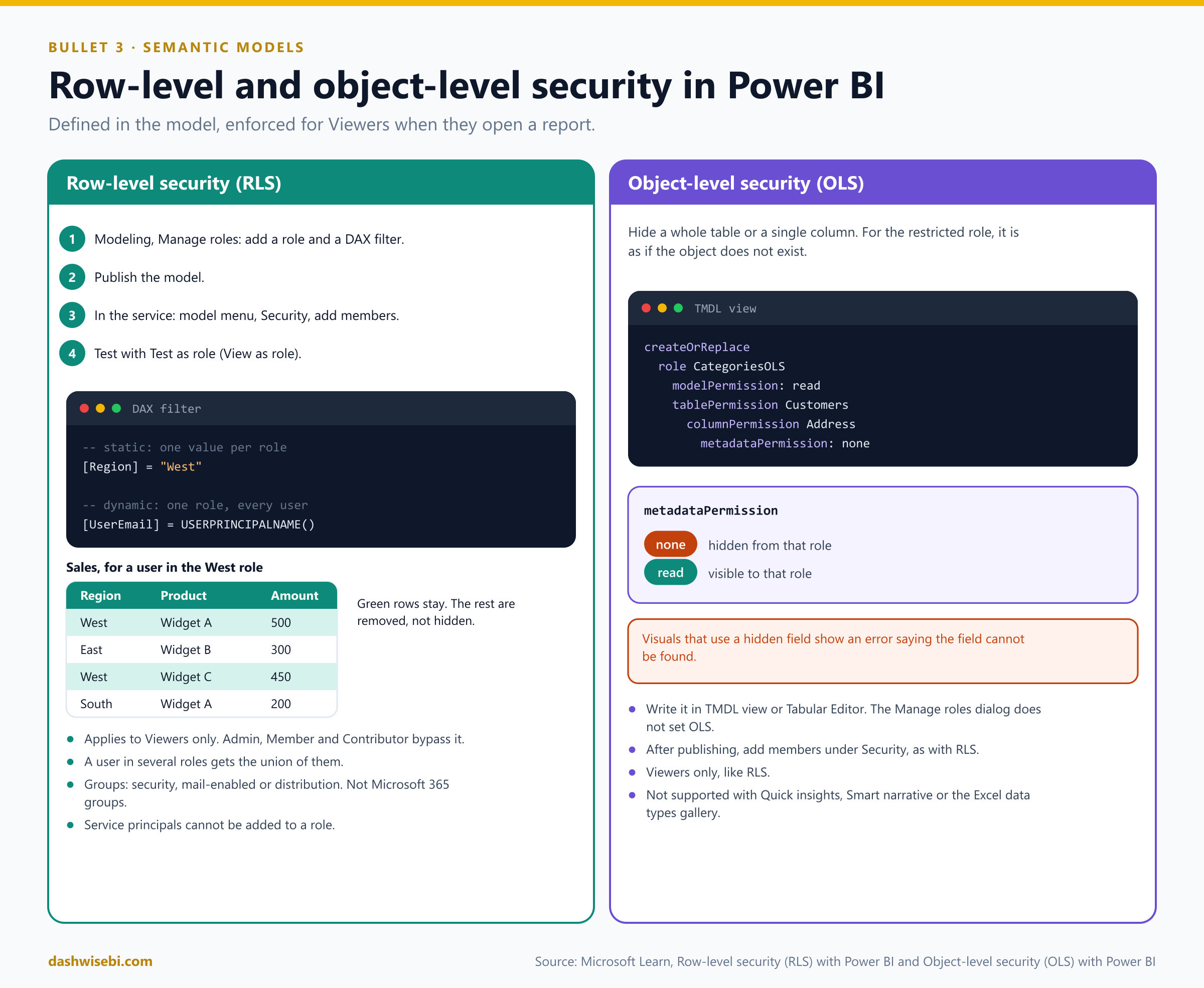
In Power BI Desktop, on the Modeling tab, select Manage roles, then New, and name the role.
Choose the table and write a DAX filter that returns true or false for each row. Only rows that return true stay visible.
Publish the model.
In the service, open the model's menu, select Security, and add people or groups to each role. You cannot add members in Desktop.
Check your work with Test as role (also called View as role).
A static rule uses a fixed value, so it needs one role per value:
[Region] = "West"A dynamic rule uses the signed-in person's identity, so one role works for everyone, with a user-mapping table in the model:
[UserEmail] = USERPRINCIPALNAME()Things to remember:
RLS only restricts Viewers. Admin, Member and Contributor can edit the model, so the rules do not apply to them. Even a Viewer with Build permission is still restricted.
A person in several roles gets the union of them. Roles are additive.
Members can be Entra security groups, mail-enabled groups or distribution groups. Microsoft 365 groups are not supported, and service principals cannot be added.
RLS removes rows only. If a user can see a row they can see every column of it. To hide columns, use object-level security.
In the service,
USERNAME()andUSERPRINCIPALNAME()both return the user's UPN.
Object-level security
OLS hides a table or a column from certain roles, even its name. For those people the object does not exist. You cannot set it in the Manage roles dialog. Use TMDL view in Power BI Desktop, or Tabular Editor, and set metadataPermission on a role:
createOrReplace

    role CategoriesOLS
        modelPermission: read

        tablePermission Customers
            columnPermission Address
                metadataPermission: none
none hides the object from that role and read shows it. After you publish, add members under Security, as with RLS. A restricted user who opens a visual that uses the hidden field gets a message that the field cannot be found. Like RLS, OLS only applies to Viewers. Semantic models with OLS do not support Quick insights, Smart narrative visuals or the Excel data types gallery.
Folder and file-level access
For files and folders in a lakehouse, the tool is OneLake security roles, which we cover in section 8. A role is scoped to tables, folders or schemas. It cannot be pointed at one individual file. A role can grant Read on a folder, and that permission flows down to every file and subfolder inside it. So "file-level" access in practice means folder-level access: if one file needs different access from its neighbours, it has to live in a different folder. Because tables are folders too, the same roles secure tables and schemas.
4. Implement dynamic data masking
Masking is different from the controls above. The user can still query the column, but the value in the result is blurred. The stored data does not change, so existing applications keep working. It applies to the warehouse and the SQL analytics endpoint.
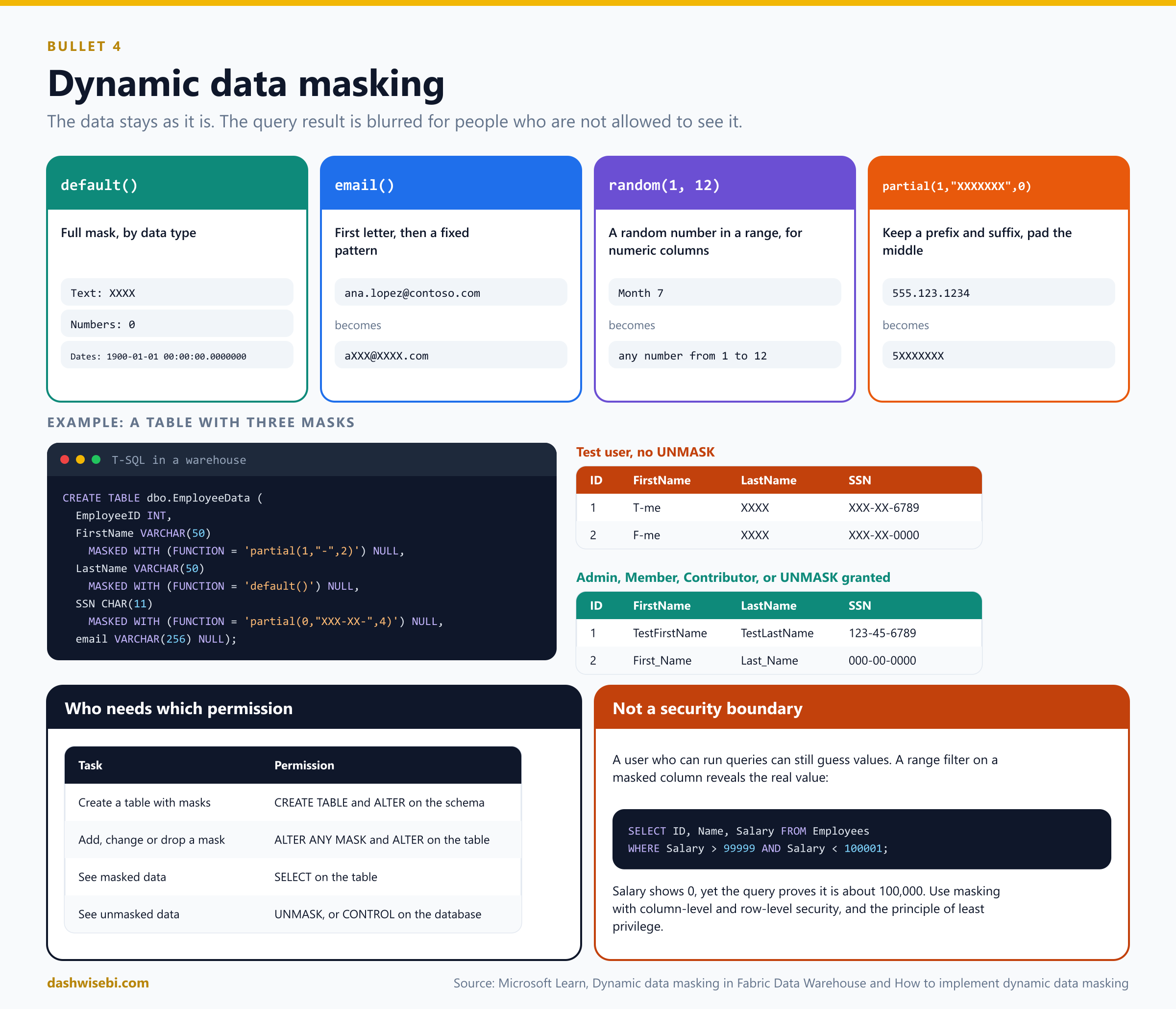
The four masks
default(): a full mask that depends on the data type. Text becomesXXXX(or fewer characters for short fields), numbers become0, dates become1900-01-01 00:00:00.0000000, binary becomes a single byte of ASCII 0.email(): shows the first letter and a fixed suffix, likeaXXX@XXXX.com.random(start, end): replaces a numeric value with a random one in the range you give, for examplerandom(1, 12)for a month.partial(prefix, padding, suffix): keeps the first and last characters and puts your padding in the middle.partial(1,"XXXXXXX",0)turns555.123.1234into5XXXXXXX, andpartial(5,"XXXXXXX",0)turns it into555.1XXXXXXX.
Add a mask
Connect to the warehouse with an account that has Admin, Member or Contributor rights (or elevated rights on the warehouse), open a New SQL query, and define masks with MASKED WITH:
CREATE TABLE dbo.EmployeeData (
    EmployeeID INT
    ,FirstName VARCHAR(50) MASKED WITH (FUNCTION = 'partial(1,"-",2)') NULL
    ,LastName  VARCHAR(50) MASKED WITH (FUNCTION = 'default()') NULL
    ,SSN       CHAR(11)    MASKED WITH (FUNCTION = 'partial(0,"XXX-XX-",4)') NULL
    ,email     VARCHAR(256) NULL
);
To add or remove a mask on an existing column:
ALTER TABLE dbo.EmployeeData
ALTER COLUMN [email] ADD MASKED WITH (FUNCTION = 'email()');

ALTER TABLE dbo.EmployeeData
ALTER COLUMN [email] DROP MASKED;
Test the masks
Microsoft's how-to uses two people: an admin account (Admin, Member or Contributor, or elevated rights on the warehouse) and a test user with none of those. Masking also works on the SQL analytics endpoint, where you add masks to existing columns with ALTER TABLE ... ALTER COLUMN. First add two sample rows as the admin:
INSERT INTO dbo.EmployeeData
    VALUES (1, 'TestFirstName', 'TestLastName', '123-45-6789', 'email@youremail.com');
INSERT INTO dbo.EmployeeData
    VALUES (2, 'First_Name', 'Last_Name', '000-00-0000', 'email2@youremail2.com');
As the test user, run
SELECT * FROM dbo.EmployeeData;.FirstNameshows the first character, a dash and the last two characters,LastNameshowsXXXX, andSSNshowsXXX-XX-followed by the last four characters.emailhas no mask yet.As the admin, run
GRANT UNMASK ON dbo.EmployeeData TO [TestUser@contoso.com];.As the test user, run the query again. The real values appear.
As the admin, run
REVOKE UNMASKfor that user. The masked values return.You can grant and revoke
UNMASKto a role in the same way, for exampleGRANT UNMASK ON dbo.EmployeeData TO [TestRole];.To tidy up, run
DROP TABLE dbo.EmployeeData;.
Who sees the real value?
People see masked data when they are not in the Admin, Member or Contributor roles and have no elevated permissions on the warehouse. Those three roles have CONTROL permission by design, so they see unmasked data by default.
Create a table with masks:
CREATE TABLEandALTERon the schema.Add, change or drop a mask:
ALTER ANY MASKandALTERon the table. GiveALTER ANY MASKto a security officer.See masked data:
SELECTon the table.See unmasked data:
UNMASKon the column, orCONTROLon the database.
GRANT  UNMASK ON dbo.EmployeeData TO [TestUser@contoso.com];
REVOKE UNMASK ON dbo.EmployeeData FROM [TestUser@contoso.com];
Masking is not a security boundary
A person who can run queries can still guess. If Salary is masked and shows as 0, the query WHERE Salary > 99999 AND Salary < 100001 still returns the person's row, so the person learns the value is about 100,000. Microsoft says it plainly: use masking to prevent accidental exposure, together with column-level security, row-level security and least privilege, and do not rely on it alone for sensitive data.
5. Apply sensitivity labels to items
Sensitivity labels come from Microsoft Purview Information Protection. A label such as Confidential or Highly confidential is attached to an item, and it can travel with the data. Labels help you meet governance and compliance requirements and protect content from leaking.
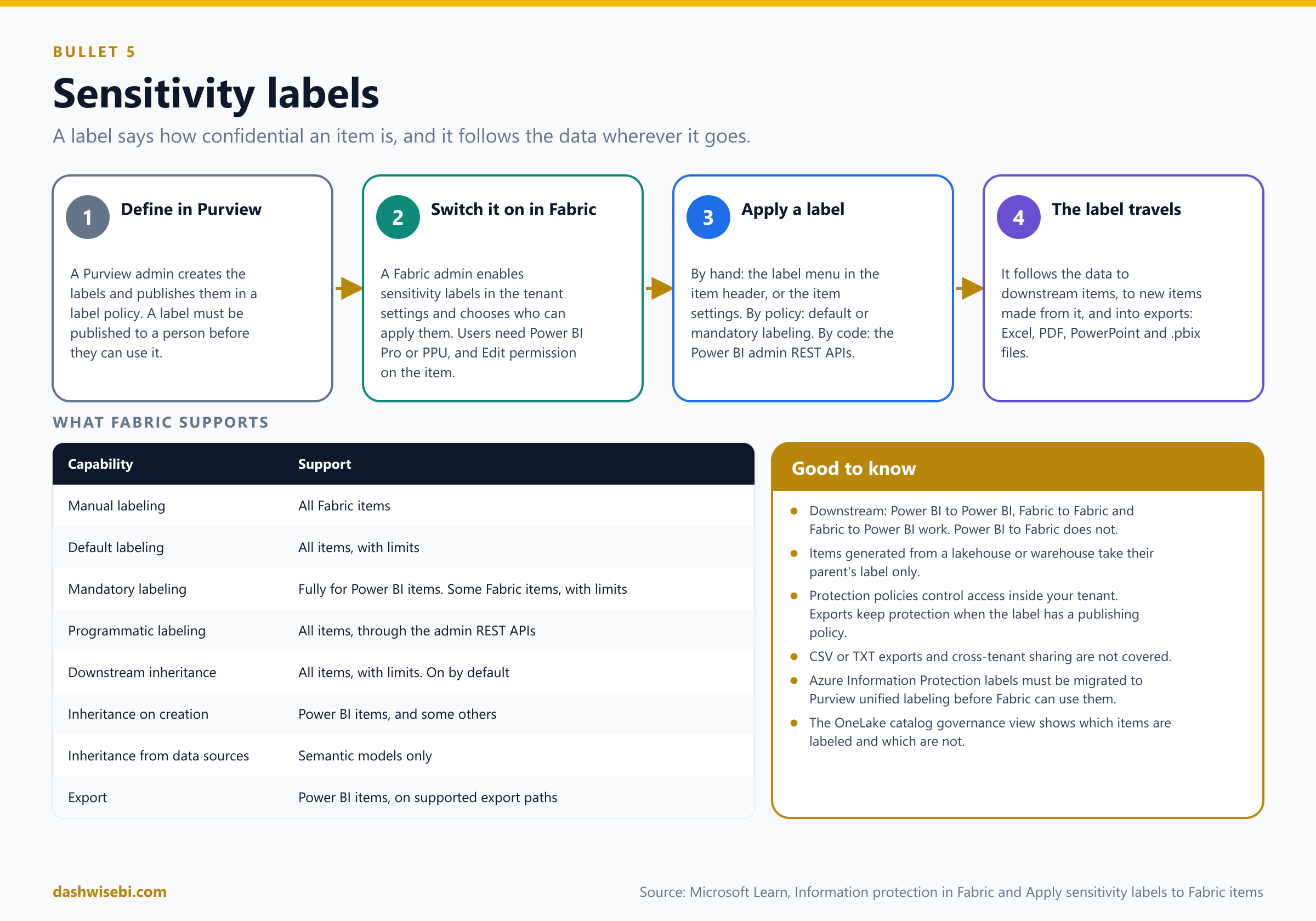
What has to be in place
Labels are defined and published in Microsoft Purview. A label must be published to a person, through a label policy, before that person can use it. If your organization still has Azure Information Protection labels, migrate them to the Purview unified labeling platform first.
A Fabric admin enables sensitivity labels in the tenant settings and chooses who can apply them.
To label items, a user needs a Power BI Pro or Premium Per User license and Edit permission on the item. If the label menu is greyed out, the person probably lacks permission to use that label.
Apply a label by hand
Open the item and select the sensitivity indicator in the header to open the flyout menu, or open the item settings and find the sensitivity section.
Choose the label.
The other ways a label arrives
Default labeling: a new or edited item gets a default label when nobody chooses one.
Mandatory labeling: users cannot save an item without a label. It is fully supported for Power BI items. For lakehouses, pipelines and warehouses the rule is not enforced.
Programmatic labeling: set or remove labels with the Power BI admin REST APIs. Supported for all Fabric items.
Downstream inheritance (on by default): a label on an item flows to the items that depend on it. It works Power BI to Power BI, Fabric to Fabric and Fabric to Power BI, but not Power BI to Fabric.
Inheritance on creation: an item created from a labeled item takes its label. For example a pipeline or a notebook created from a lakehouse inherits the lakehouse's label.
Inheritance from data sources: a semantic model that reads from a labeled source gets that label. Today this is supported for semantic models only.
Items generated automatically from a lakehouse or warehouse take their label from that parent only, not from further upstream.
What a label can protect
A label tied to a Purview protection policy controls access inside your tenant. A label tied to a publishing policy stays with the content when it leaves Fabric through supported export paths: Excel, PDF and PowerPoint exports, Analyze in Excel, a PivotTable on a semantic model, and a downloaded .pbix file. Access control is not carried by exports to CSV or TXT files, or in cross-tenant sharing. Administrators can also use the OneLake catalog governance view to see which items are labeled and which are not.
6. Endorse items
Endorsement is not security. It is a signal. It makes quality content easier to find, and it tells colleagues which items they can trust. Endorsed items show a badge, and in some lists they are listed first.
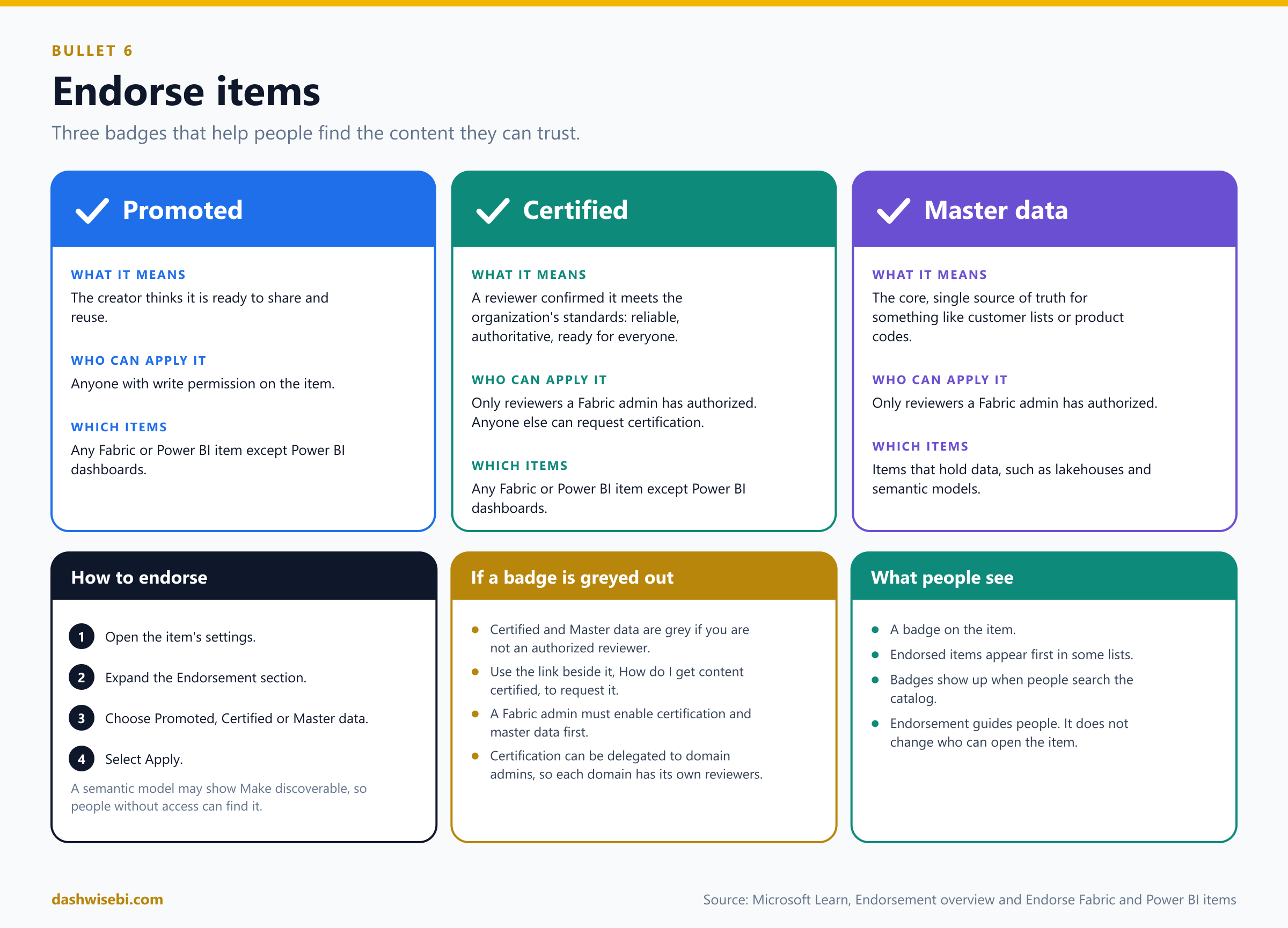
Three badges
Promoted: the creator thinks the item is ready for sharing and reuse. Anyone with write permission on the item can promote it.
Certified: an authorized reviewer confirmed that the item meets the organization's quality standards and is ready for use across the organization. Only reviewers a Fabric admin has authorized can certify. Anyone else can request certification.
Master data: the item is a core source of organizational data, the single source of truth for things like customer lists or product codes. Only authorized reviewers can apply it, and only to items that hold data, such as lakehouses and semantic models.
All Fabric and Power BI items except Power BI dashboards can be promoted or certified.
How to endorse an item
Go to the item's settings (for certification, from the workspace where it lives).
Expand the Endorsement section.
Choose Promoted, Certified or Master data.
Select Apply.
For a Power BI semantic model you may also see Make discoverable, which lets people who do not have access find the model and ask for it. You need write permission on the item for all three badges.
Setup and requests
Certification and master data only work if a Fabric admin has enabled them and named the authorized reviewers. Certification can be delegated to domain admins, so each domain can have its own reviewers.
If you are not authorized, the Certified and Master data buttons are greyed out. Use the link beside them, How do I get content certified, to find your organization's process.
7. Implement and use Microsoft Fabric audit logs
When something changes, you want to know who did it and when. Fabric writes user activities to the Microsoft Purview unified audit log. This helps with regulatory compliance and records management.
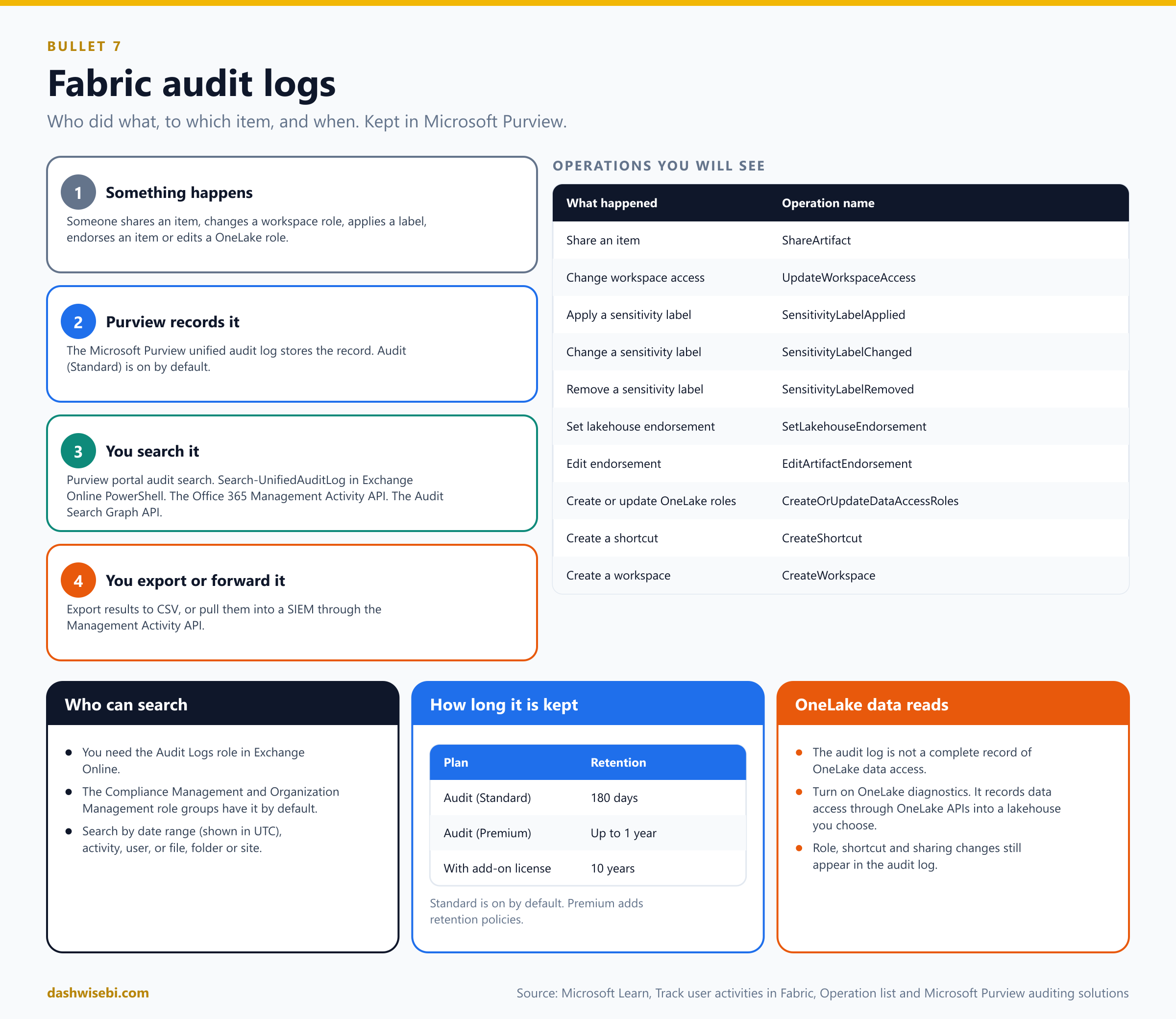
Search the audit log
You need the Audit Logs role in Exchange Online. By default the Compliance Management and Organization Management role groups have it.
Open the Microsoft Purview portal and go to Audit.
Filter by date and time range (the default is the past seven days, shown in UTC), by activities, by users, and by file, folder or site. When you combine filters, results must match all of them.
Export the results to CSV if you want to analyze them in Excel.
You can reach the same records with the Search-UnifiedAuditLog cmdlet in Exchange Online PowerShell, the Office 365 Management Activity API (useful for sending data to a SIEM), or the Audit Search Graph API.
Operation names to recognize
Fabric's operation list is long. These are the ones that matter for security and governance:
ShareArtifact: an item was shared.UpdateWorkspaceAccess: workspace access changed.SensitivityLabelApplied,SensitivityLabelChanged,SensitivityLabelRemoved: label changes on Power BI items.SetLakehouseEndorsementandEditArtifactEndorsement: endorsement changes.CreateOrUpdateDataAccessRoles: OneLake security roles were created or updated.CreateShortcutandCreateWorkspace: shortcuts and workspaces created.
How long records are kept
Audit (Standard) is on by default and keeps records for 180 days.
Audit (Premium) adds retention policies, up to one year, and up to 10 years for users with the add-on license.
The OneLake exception
The Fabric audit log is not a complete record of OneLake data access. To see who read data in OneLake, turn on OneLake diagnostics. It records access through OneLake APIs and stores the events in a lakehouse you choose. Control-plane changes, such as security roles, shortcuts and sharing, still appear in the audit log. If the capacity name or ID is missing from an audit entry, look it up in the Microsoft Fabric Capacity Metrics app.
8. Configure and implement OneLake security
OneLake security is the data-plane model for OneLake. Workspace roles and item permissions decide what you can do. OneLake security decides which data you can see, down to folders, tables, rows and columns, and it is enforced the same way in Spark, the SQL analytics endpoint, semantic models and the OneLake APIs.
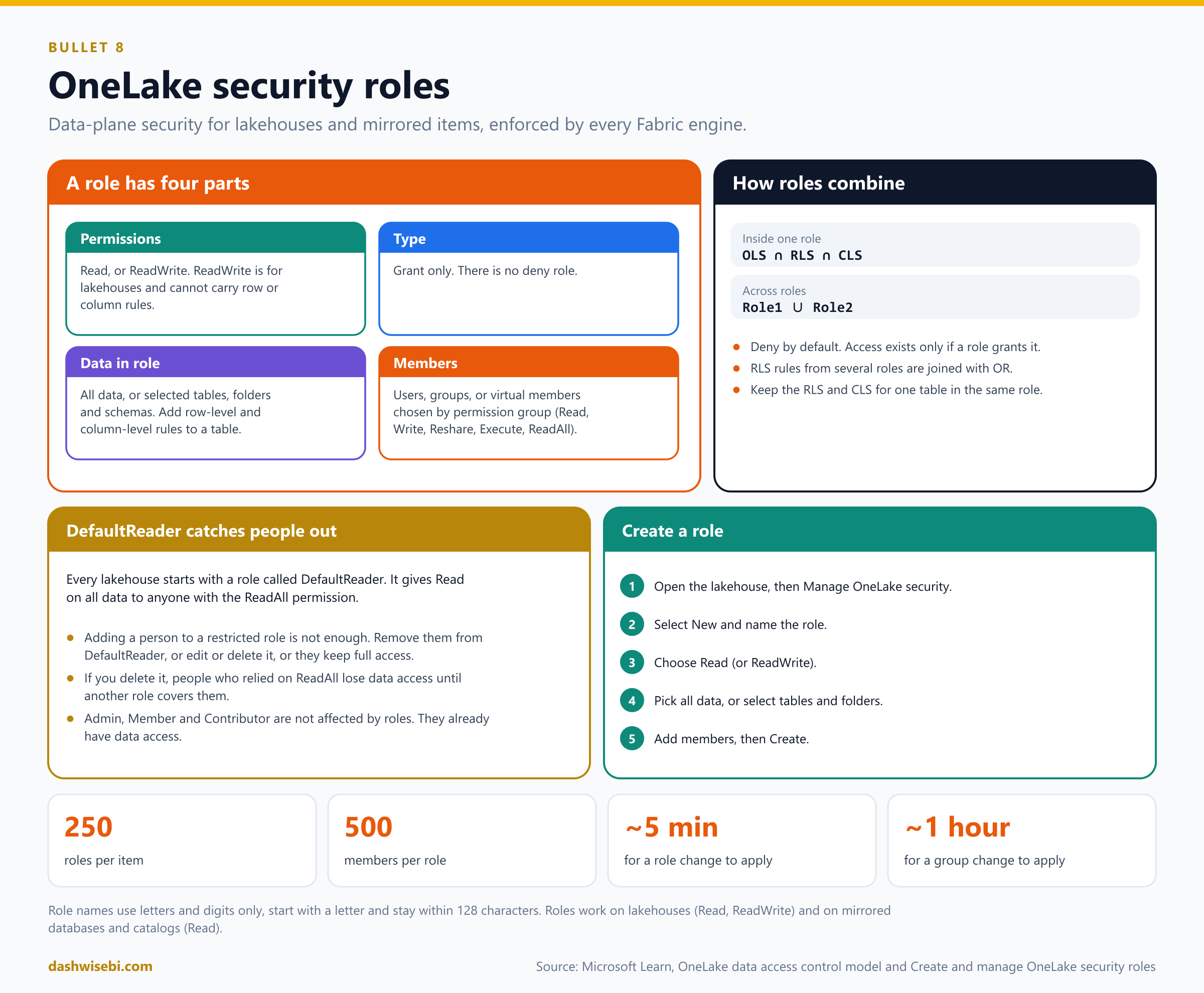
Anatomy of a role
Permissions: Read (like
SELECTplusVIEW_DEFINITION), or ReadWrite (lets a read-only person write to specific data through OneLake). ReadWrite cannot be combined with row or column rules.Type: only Grant roles exist. There are no deny roles.
Data in role: all data, or selected tables, folders and schemas. On a table you can add row-level and column-level rules.
Members: users, Entra groups, or non-user identities. A virtual member group picks everyone with certain item permissions, such as Read, Write, Reshare, Execute or ReadAll. If you pick several permissions, a person must have all of them, for example ReadAll and Write. You cannot remove such a member by hand: remove the permission group from the role instead.
Roles can be created on lakehouses (Read and ReadWrite) and on mirrored databases and catalogs (Read). OneLake security is deny by default: nobody gets data unless a role grants it. It mainly affects people in the Viewer role or with the Read permission. Admin, Member and Contributor already have data access and are not restricted by these roles. To create and manage roles you need Write or Reshare permission on the item, which Admins and Members normally have. Role creation and membership changes take effect as soon as you save, so be sure before you add someone.
Create a role
Open the lakehouse and select Manage OneLake security.
On the All roles tab, select New. Name the role: letters and digits only, starting with a letter, up to 128 characters. Names are not case sensitive and must be unique. The type is always Grant.
Choose Read (or ReadWrite). Select Next.
Choose All data (every table and file, including folders you add later) or Selected data. For selected data, select Edit, expand Tables and Files, tick what the role covers, and select Add data.
To restrict rows or columns of a table, select the table, then Data access, and pick Row security or Column security.
Add members by typing names or emails, or use Advanced configuration for virtual members. Before you add anyone to a restricted role, check that DefaultReader does not already give them broader access. Then select Create. The role starts working as soon as it is saved.
Review and manage roles after you create them
Open a role to see its name, permissions and type, and two tabs. Data in role lists each table or folder with its type (Schema, Table or Folder) and a lock icon: horizontal lines mean row-level security, vertical lines mean column-level security. Members in role lists each member, whether it is a user or a group, and how they were added, directly or through a permission group.
Edit lets you rename the role or change its permissions. Edit data adds or removes tables and folders. The ... menu next to a table opens Row security or Column security. To remove a person, use ... next to their name, then Remove from role.
The All members in roles tab shows access by person: the roles they are in and the data they can reach, with the role that grants each table. From here you can add people to several roles at once, or remove one person from all roles.
The All data in roles tab shows access by data: each table, the roles that grant it and how many members have access.
To delete roles, tick them on the roles tab and select Delete.
Row rules apply only to tables in Delta Parquet format, so you cannot set them on non-table folders or unstructured data. Keep row rules simple and clear. For column rules, remember that hiding a column in one role does not block it if another role grants it.
The DefaultReader trap
Every lakehouse starts with a role called DefaultReader. It gives Read on all data to anyone with the ReadAll permission. This is the number one reason a new restriction does not seem to work: you add a Viewer to a role limited to one folder, but they are still in DefaultReader, so they can read everything. When you put someone in a restricted role, remove them from DefaultReader, or edit or delete DefaultReader. The reverse also bites: if you delete DefaultReader, people who relied on ReadAll lose data access until another role covers them.
How roles combine
Within one role, you get the intersection of the table or folder scope, the row rule and the column rule.
Across roles, you get the union, the least restrictive result. If Role1 grants TableA and Role2 grants TableB, a member of both can read both.
Row rules from several roles are joined with OR. Column rules also combine as a union, except in the SQL analytics endpoint, where one role hiding a column blocks it.
Keep the row-level and column-level rules for one table in the same role. A combination of one role with row rules and another with column rules is not supported and gives query errors.
Row-level and column-level rules
A column-level rule is an allow list. Set the columns you want to hide to Hide, and keep at least one column visible. If a user runs SELECT * on a table where some columns are hidden, Spark succeeds and shows only the allowed columns, but the SQL analytics endpoint and semantic models return an error.
A row-level rule is a SQL-style statement. It is limited to 1,000 characters and written like this:
SELECT * FROM Sales WHERE Amount > 50000 AND State='CA'It supports comparisons (=, <>, >, >=, <, <=), IN, NOT, AND, OR, IS NULL and IS BLANK. String comparison is case insensitive. It does not support dynamic rules (like USERNAME()) or rules that query several tables. If the rule has a syntax error or does not match the table, users see no rows. Row and column rules work on Delta Parquet tables and virtualized Iceberg tables only.
Folders, files and shortcuts
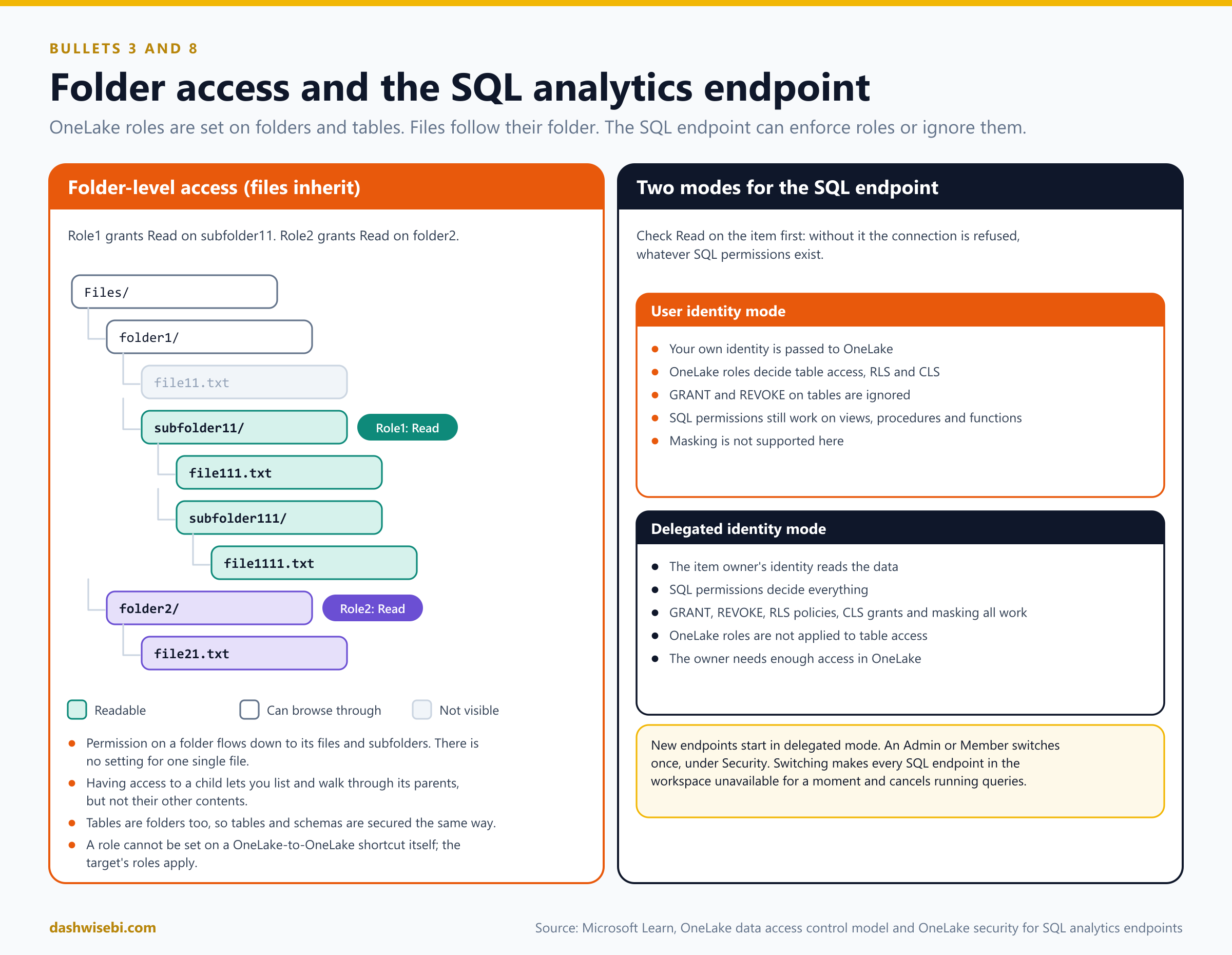
Inheritance: Read on a folder applies to its files and subfolders.
Traversal: if you can read a child, you can list and walk through its parents. But you do not see the parents' other contents. In the picture, Role1 grants Read on
subfolder11. Its members can read everything below it and browse throughfolder1andFiles, but they cannot seefile11.txt,folder2or theTablesfolder.Tables are folders, so tables and schemas are secured the same way. A folder counts as a table only if it is under
Tables/, has a_delta_logfolder, and has no child shortcuts.Shortcuts: you cannot set a role on a OneLake-to-OneLake shortcut itself. The roles of the target apply. A passthrough shortcut uses the caller's identity, so the person needs access at both ends. A delegated shortcut shows the intersection of the shortcut path and the connection's access.
The SQL analytics endpoint: two modes
The SQL analytics endpoint of a lakehouse can enforce OneLake security or ignore it. It depends on its access mode, and first the person needs at least Read on the item to connect.
User identity mode: the signed-in user's identity is passed to OneLake. OneLake roles decide table access, row-level and column-level security.
GRANTandREVOKEon tables are ignored. SQL permissions still work on views, stored procedures and functions. Dynamic data masking is not supported here.Delegated identity mode: the item owner's identity reads the data, and only SQL permissions apply.
GRANT,REVOKE,CREATE SECURITY POLICY, column grants and masking all work. OneLake roles are not applied to table access.
New endpoints start in delegated mode. An Admin or Member switches to user identity mode once, under the endpoint's Security tab, then Data access mode settings. Switching makes SQL endpoints in the workspace briefly unavailable and cancels running queries, and switching to user identity mode removes existing SQL roles. Do it outside business hours.
Limits and delays
Up to 250 roles per item (an increase to 1,000 can be requested), 500 members per role, and 500 permissions per role.
A role change takes about 5 minutes to apply. A change to the membership of a group takes about an hour, and some engines cache for another hour.
Mail-enabled security groups and distribution lists are not fully supported. The SQL analytics endpoint cannot resolve the members of a distribution list.
Spark needs Fabric runtime 1.3 and an environment version of 3.5 or higher. Use schema-enabled lakehouses. Azure Data Share and Purview Data Share are not supported.
To use shortcuts with OneLake security, the tenant setting Users can access data stored in OneLake with apps external to Fabric must be on.
Choosing the right control
When an exam question describes a problem, find it on the left and pick the tool on the right.
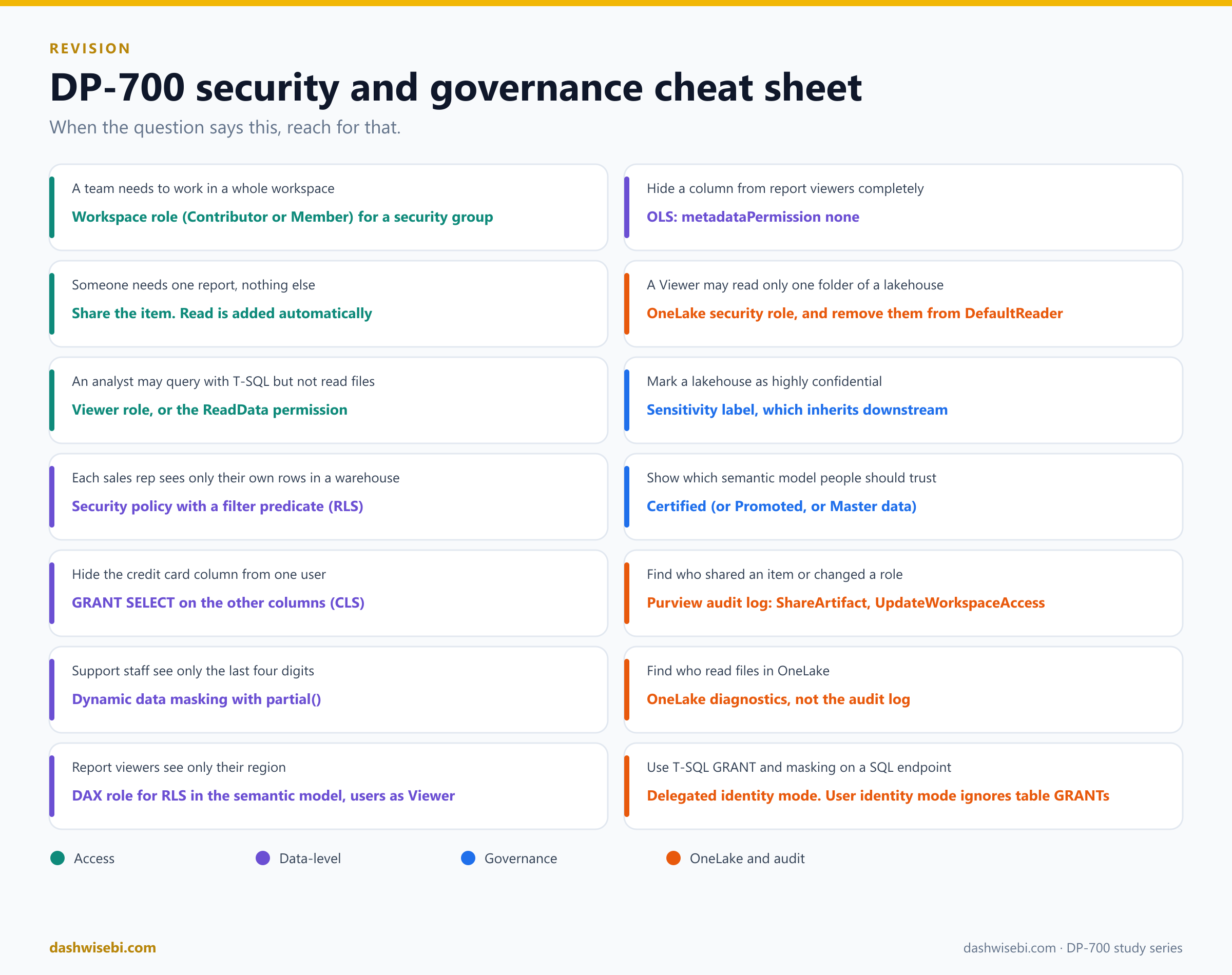
Common mix-ups
"Read permission lets people query the data." It lets them open the item. Data needs ReadData, ReadAll, compute-level permissions or a OneLake role.
"Row-level security in the model protects everyone." Only Viewers. Admin, Member and Contributor can edit the model, so the rules skip them.
"Masking encrypts or removes data." The data stays as it is. Only the query result is blurred, and a determined user can infer values.
"Adding someone to a OneLake role restricts them." Not while they are still in DefaultReader.
"A deny role overrides a grant in OneLake security." There are no deny roles. Roles only add access.
"A table GRANT works on every SQL endpoint." Not in user identity mode, where OneLake roles decide table access.
"Sensitivity labels and endorsement do the same thing." A label says how confidential an item is. Endorsement says how trustworthy it is. Neither changes who can open the item by itself.
"The audit log shows every file read in OneLake." Use OneLake diagnostics for that.
"Sharing a lakehouse lets people edit it." No. The lakehouse Share dialog offers only ReadData, ReadAll and Execute on top of Read. Sharing never gives write access. Use a workspace role for that.
"OneLake security can secure a single file." No. Roles are scoped to tables, folders and schemas. A file takes the permission of its folder.
"Removing an item permission removes the access." Not if the person still holds a workspace role.
"Anyone can click Certified." Only reviewers the Fabric admin authorized. Anyone with write access can promote.
Try these scenarios
Seven exam-style questions. Cover the answers and test yourself.
1. The Contributor who sees every row
You defined row-level security on a semantic model, but a colleague with the Contributor role in the workspace sees all rows. Why?
Answer: RLS only restricts people in the Viewer role. Contributors can edit the model, so the rules do not apply to them. Give the person the Viewer role.
2. The report with no data
You share a Direct Lake report with a colleague using only the Read permission. They can open it but cannot query the lakehouse tables behind it. What is missing?
Answer: Read does not give data access. The person needs data permissions: for example ReadAll or a OneLake security role on the tables, or you switch the report's data source credential to a fixed identity.
3. The blocked column
Charlie was granted SELECT on every column of Customers except CreditCard. His SELECT * fails. How does he get his data?
Answer: He lists the allowed columns in the query. Column-level security makes SELECT * fail when any column is denied.
4. The masked salary
Salary is masked with default() and shows 0. A user runs WHERE Salary > 99999 AND Salary < 100001 and gets a row. What does this tell you?
Answer: Dynamic data masking is not a security boundary. A user who can query can infer values. Add column-level or row-level security and apply least privilege.
5. Still reading everything
You created a OneLake security role that grants Read on Files/folderA only, and added a Viewer to it. The Viewer can still read the whole lakehouse. What did you forget?
Answer: The Viewer is still a member of the default DefaultReader role, which gives Read on all data to anyone with ReadAll. Remove them from it, or edit or delete the role.
6. The ignored GRANT
You run GRANT SELECT on a lakehouse table for an analyst in the SQL analytics endpoint, but it has no effect. Why?
Answer: The endpoint is in user identity mode, where OneLake roles decide table access and table-level GRANT is ignored. Create a OneLake security role, or switch the endpoint to delegated identity mode.
7. Who shared it?
Your manager asks who shared a lakehouse with an external guest last month. Where do you look?
Answer: The Microsoft Purview audit log, searching for the ShareArtifact activity and the date range. You need the Audit Logs role in Exchange Online, and with Audit (Standard) records are kept for 180 days.
Where to go next
Practise with the timed DP-700 practice exams on DashWiseBI, and join a live session on the Fabric Data Days schedule.
Catch up with Episode 1: Fabric Overview and Workspace Settings and Episode 2: Lifecycle Management.
Do the Microsoft Learn module Secure data access in Microsoft Fabric. It has 7 units, about an hour, and covers the Fabric security model, workspace roles and item permissions, and granular permissions with T-SQL and OneLake security roles, with an exercise. It is part of the learning path Manage a Microsoft Fabric environment and the course Implement data engineering solutions using Microsoft Fabric.
Follow Microsoft's step-by-step pages for this episode: Implement row-level security, Implement column-level security, Implement dynamic data masking, CREATE SECURITY POLICY, CREATE FUNCTION, Lakehouse sharing, Endorsement overview, Apply sensitivity labels, Create and manage OneLake security roles, and Track user activities.
Read the sources behind this post: DP-700 study guide, Permission model, Roles in workspaces, Give users access to workspaces, Share items, Row-level security in Fabric Data Warehouse, Column-level security, SQL granular permissions, Dynamic data masking, How to implement dynamic data masking, Row-level security with Power BI, Object-level security with Power BI, Information protection in Fabric, Apply sensitivity labels, Endorsement overview, Endorse items, Track user activities, the audit operation list, Microsoft Purview auditing solutions, OneLake diagnostics, OneLake data security overview, OneLake security roles, permissions and scopes, table, column and row-level security in OneLake, OneLake RLS syntax, create and manage OneLake security roles and OneLake security for SQL analytics endpoints.
Keep reading
DP-700: Fabric Overview & Workspace Settings
DP-700 study guide for Spark, domain, OneLake and Apache Airflow workspace settings in Fabric, with ten diagrams, exam traps and practice scenarios.
Fabric Overview, Domains, Workspaces & OneLake
Fabric in four ideas: the platform, domains for ownership, workspaces for access and OneLake for storage, explained with eight diagrams and a cheat sheet.