Fabric Overview, Domains, Workspaces & OneLake

PowerBI consultant ·
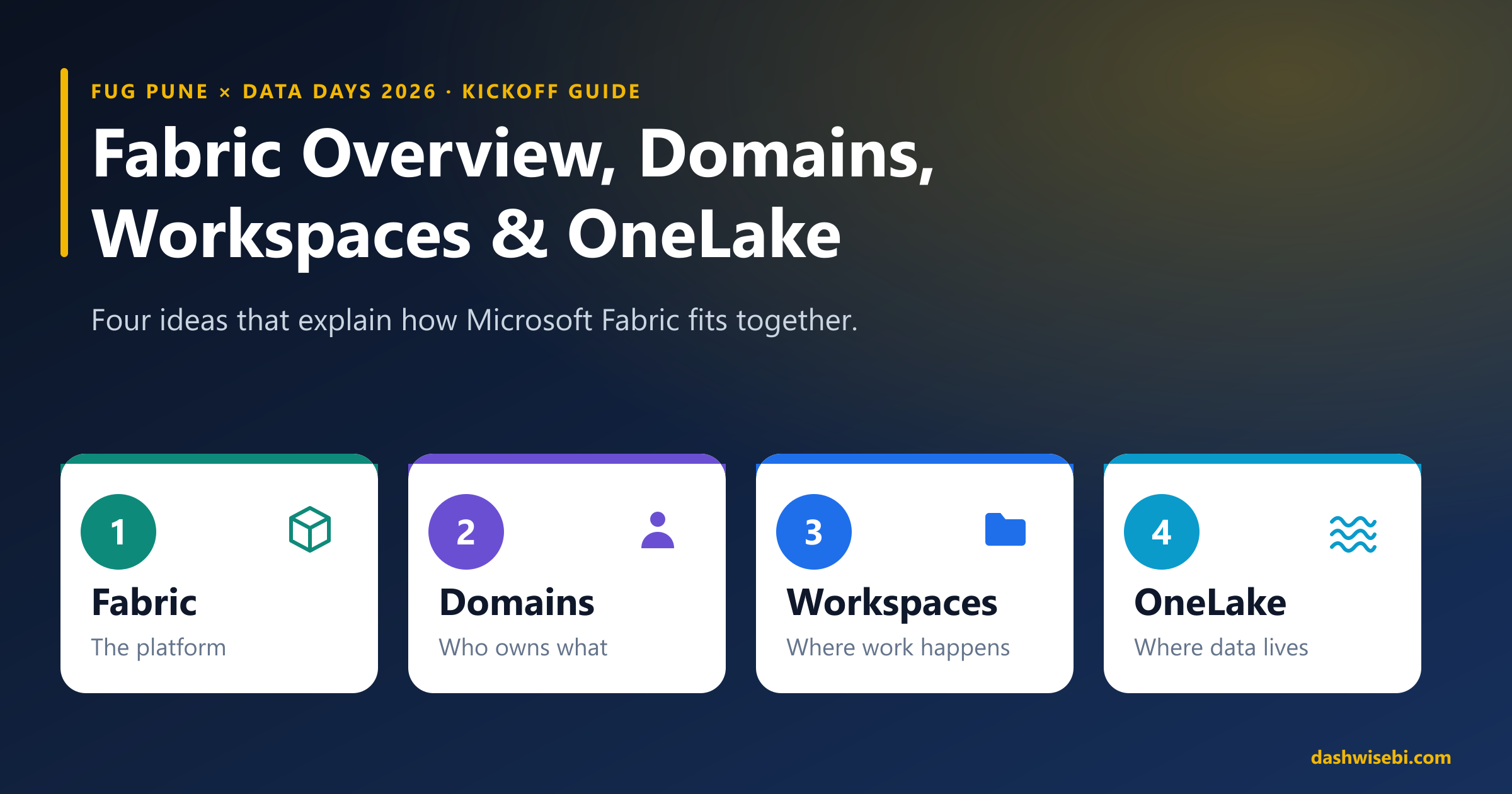
Microsoft Fabric has a lot of moving parts, but the way it is organised comes down to four ideas. Fabric is the platform. Domains say who owns what. Workspaces are where the work happens. OneLake is where the data lives.
Get these four straight and most of the rest, from capacity to permissions to shortcuts, starts to make sense. They are also the first thing people trip over when they set up a tenant, and they show up in the DP-600 and DP-700 exams. This guide walks through them in order, with a diagram for each.
It is also the starting point for the Fabric Data Days study sessions, so if you are following along with the schedule, read this first.
1. Microsoft Fabric: the platform
Fabric is a software-as-a-service analytics platform. There is nothing to install or provision. You sign in with your Microsoft Entra account, and the tools are there. What makes it different from a bundle of separate products is that every experience shares the same storage, the same compute model and the same governance.
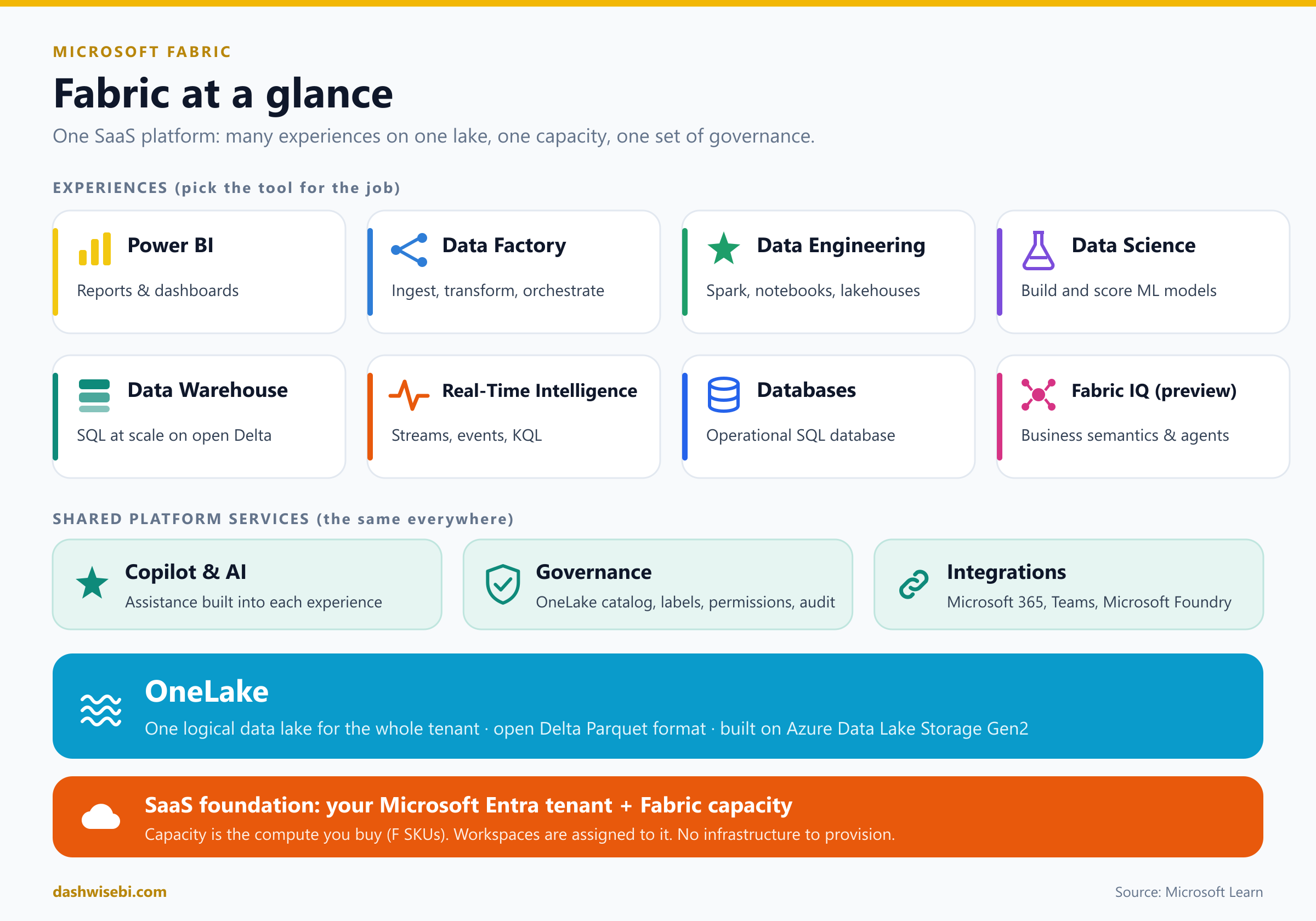
Read the diagram from the top:
Experiences. Each one is a tool for a job: Power BI for reports, Data Factory for moving and orchestrating data, Data Engineering for Spark and lakehouses, Data Warehouse for SQL at scale, Real-Time Intelligence for streaming data, and so on. A single project often uses several.
Shared platform services. Copilot, governance (sensitivity labels, permissions, audit) and integrations with Microsoft 365 and Teams work the same way in every experience.
OneLake. The single lake underneath everything. More on it in section 4.
Foundation. Your Microsoft Entra tenant, plus a capacity. Capacity is the pool of compute you buy (the F SKUs) and every workspace is assigned to one.
The point to hold on to is that capacity is the thing you pay for, and workspaces draw from it. Nothing else in this list has a separate bill to manage.
How the pieces fit together
Before looking at each piece, here is the whole structure in one picture.
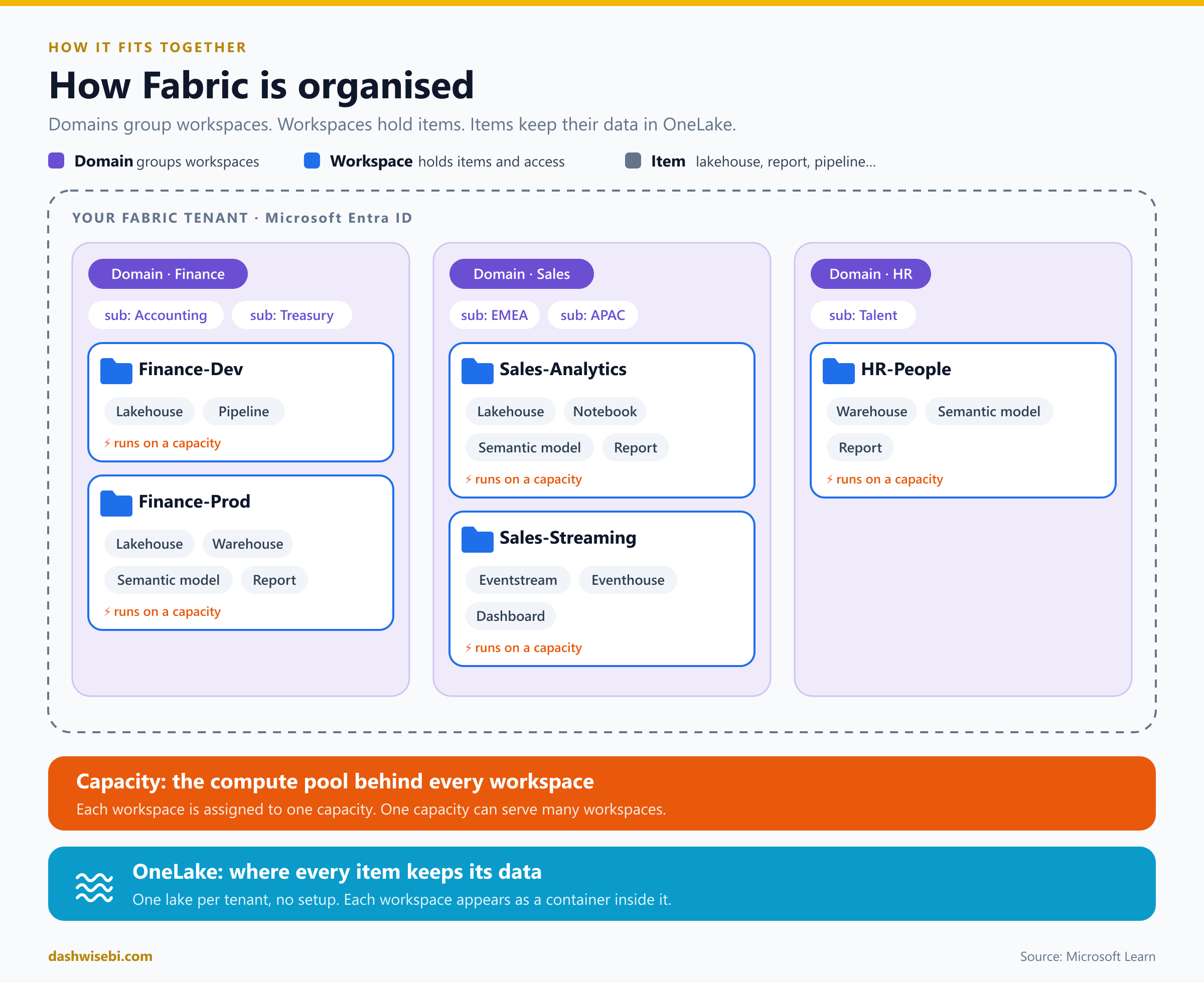
A domain groups workspaces by business area.
A workspace holds items: lakehouses, warehouses, pipelines, notebooks, semantic models, reports.
Every workspace runs on a capacity.
Every item keeps its data in OneLake.
2. Domains: organise by business area
Once a tenant has dozens of workspaces, two questions come up: who owns this, and where do I find the data for Finance? Domains answer both. A domain is a grouping of workspaces that belong to the same business area, such as Finance, Sales or HR. Domains can also have subdomains, for example EMEA and APAC under Sales.
Who does what
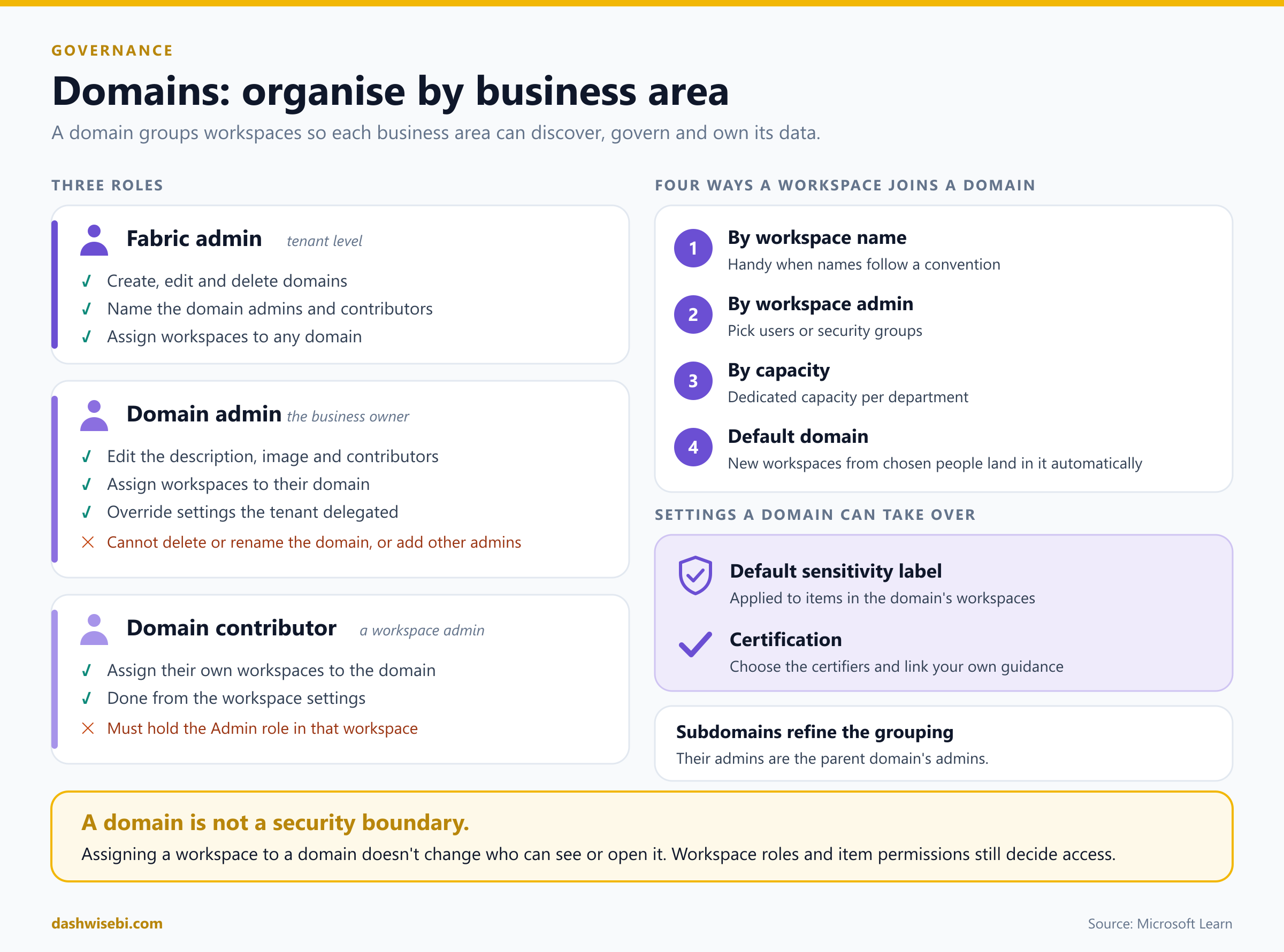
Fabric admin. Works at the tenant level. Creates, edits and deletes domains, and decides who the domain admins and contributors are.
Domain admin. Usually a business owner. Can edit the description and image, manage contributors, assign workspaces and override settings the tenant has delegated. Cannot delete or rename the domain.
Domain contributor. A workspace admin who is allowed to assign their own workspaces to the domain, from the workspace settings.
Four ways a workspace joins a domain
By workspace name, which works well when your names follow a convention.
By workspace admin, picking users or security groups.
By capacity, useful when each department has its own.
Default domain, so that new workspaces from chosen people land in the right place automatically.
What a domain can control
A domain can set a default sensitivity label for the items in its workspaces, and it can take over certification settings, choosing who may certify items and linking to its own guidance. The OneLake catalog can then be filtered by domain, which is how a business user finds "the Finance data" without knowing workspace names.
One thing to remember: a domain is for governance and discovery. Putting a workspace in a domain does not change who can open it. Workspace roles and item permissions still decide access.
3. Workspaces: where the work happens
A workspace is a container for items. It is where people build, share and run things, and it is the unit you secure. Each workspace has its own members, its own settings, a capacity it runs on, and, in OneLake, its own container for data.
A few habits save a lot of trouble later:
Separate development from production, for example Finance-Dev and Finance-Prod, and connect them through Git and deployment pipelines.
Put the people who build in one workspace and the people who only consume in another, or use an app, so consumers never see half-finished work.
Assign roles to Microsoft Entra security groups, not to individuals.
The four workspace roles
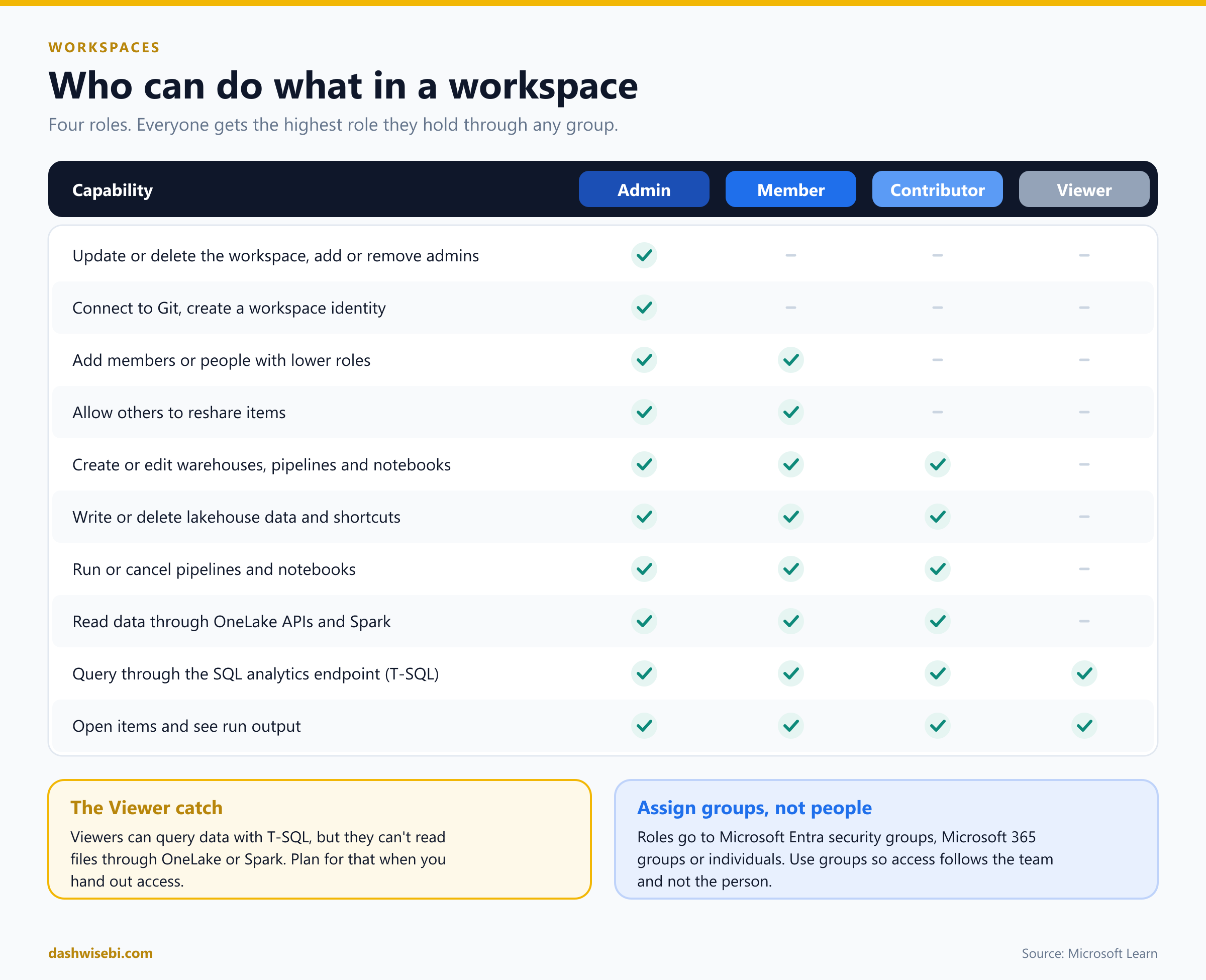
Roles stack up: each role can do everything the one below it can.
Admin manages the workspace itself: updates or deletes it, adds or removes people (including other admins), connects it to Git and creates a workspace identity.
Member can add people with lower roles and let others reshare items, as well as everything a contributor can do.
Contributor builds. They create and edit items, write data, run pipelines and notebooks, and read data through OneLake and Spark.
Viewer consumes. They can open items, see run output and query data through the SQL analytics endpoint.
Two details catch people out. First, if someone is in several groups, they get the highest role among them. Second, a Viewer can run T-SQL against a lakehouse or warehouse but cannot read the underlying files through OneLake APIs or Spark. If you need read-only access to files, the answer is not the Viewer role. Use OneLake security or item-level sharing instead.
4. OneLake: where the data lives
Every Fabric tenant comes with exactly one OneLake. You cannot delete it or create a second one, and there is nothing to provision. It is built on Azure Data Lake Storage Gen2, and it stores tables in open formats: Delta Parquet, with Apache Iceberg supported through metadata virtualization. Any tool that understands those formats can read the data, so you are not locked in.
Structure
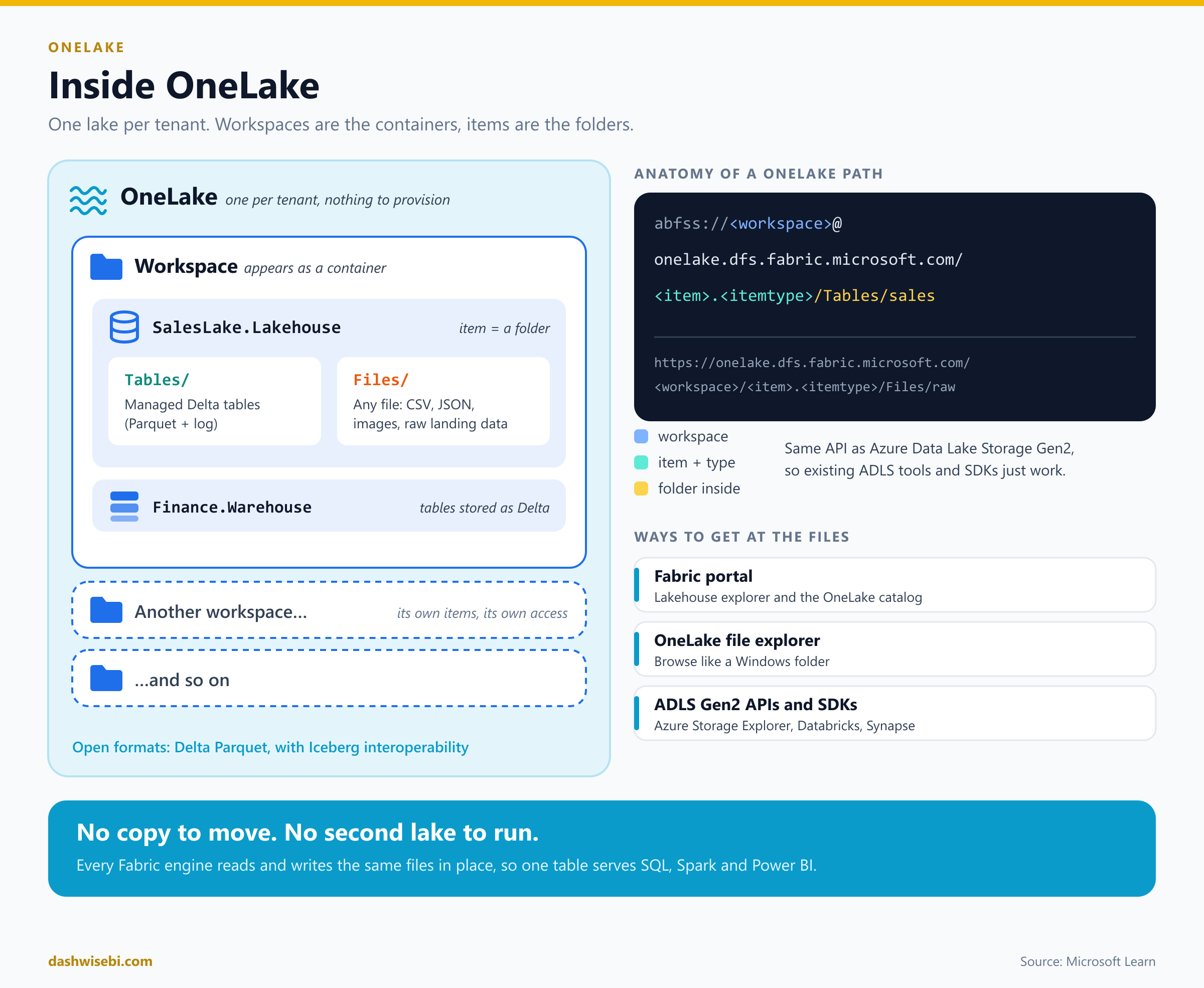
OneLake mirrors the structure you already built. Each workspace appears as a container, and each item appears as a folder inside it. A lakehouse has two top-level folders: Tables for managed Delta tables and Files for anything else, such as CSV, JSON or raw landing data.
Because OneLake speaks the ADLS Gen2 API, an item has an address like this:
abfss://<workspace>@onelake.dfs.fabric.microsoft.com/<item>.<itemtype>/Tables/salesThat means existing tools work as they are: Azure Storage Explorer, Databricks, Synapse, the OneLake file explorer for Windows, or your own code using the ADLS SDK.
One copy, many engines
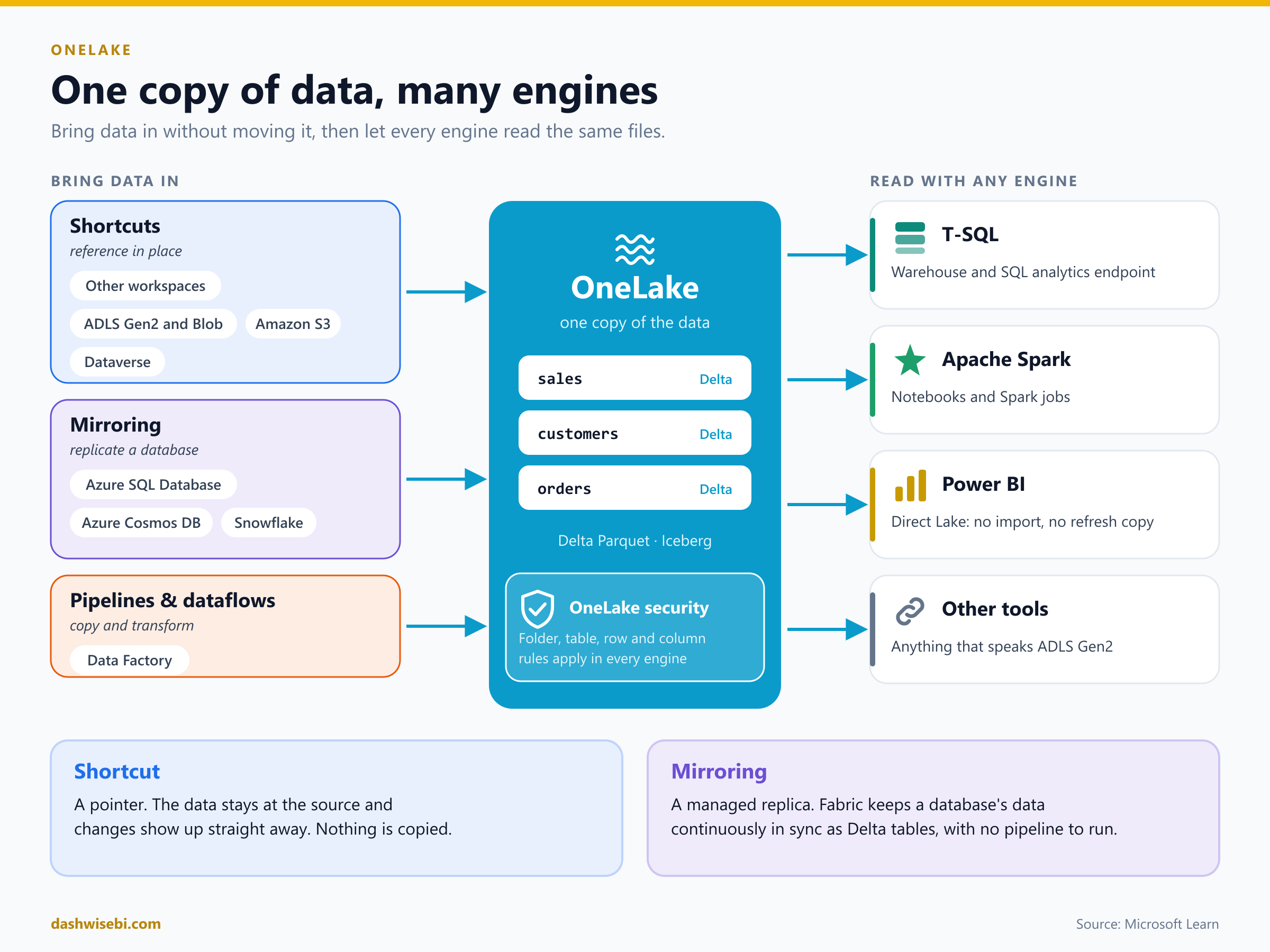
This is the idea that makes Fabric feel different. A SQL engineer builds a table in a warehouse. A data scientist opens a Spark notebook and reads the same table, with no export and no connector. A Power BI report uses Direct Lake mode to read the same files without importing a second copy. All three work on one set of files in OneLake.
You get data into OneLake in three ways:
Shortcuts are references. The data stays where it is, in another workspace, in ADLS Gen2 or Blob storage, in Amazon S3, in Dataverse and more, but it looks as if it were stored locally. When the source changes, you see the change straight away.
Mirroring keeps a copy of an operational database, such as Azure SQL Database, Azure Cosmos DB or Snowflake, continuously in sync as Delta tables, without a pipeline to build and run.
Pipelines and dataflows copy and transform data in the traditional way, when you need to reshape it on the way in.
Security and protection
OneLake security lets you define roles on a data item down to specific folders, tables, rows and columns. OneLake stores those rules and applies them in every engine, so someone limited to Region = "US" sees only those rows whether they use SQL, a Spark notebook or a report. You can also apply sensitivity labels, and OneLake diagnostics can log who accessed what.
For protection, data is replicated across availability zones where the region supports it (locally redundant storage elsewhere), geo-replication can be switched on for a capacity, and soft delete keeps deleted files for seven days.
Finally, the OneLake catalog is where people discover data. They can filter by domain, workspace or item type, and see owners, schema, lineage and endorsements. This is where domains pay off.
The four ideas on one page
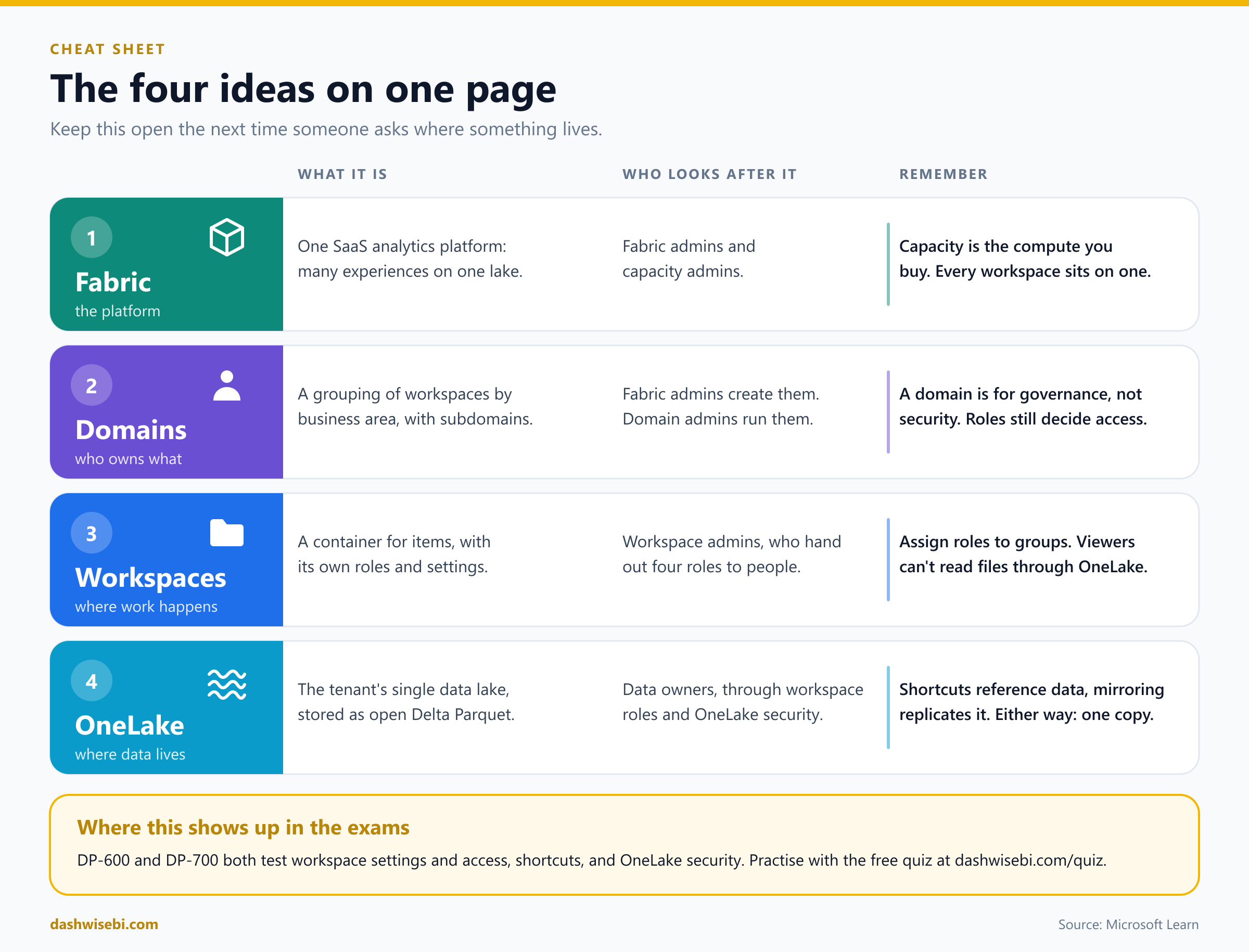
Common mix-ups
"Domains control who can see my data." They do not. Workspace roles, item permissions and OneLake security do.
"Each workspace has its own lake." It does not. There is one OneLake, and each workspace is a container inside it.
"Capacity belongs to a domain." Capacity is assigned to workspaces. A domain can be assigned by capacity, but they are separate things.
"A shortcut copies the data." It does not. A shortcut is a pointer. Mirroring and pipelines are the ones that make a copy.
"Viewer means read-only everywhere." A Viewer can query through the SQL endpoint but cannot read files through OneLake or Spark.
Where to go next
See the live Fabric Data Days schedule and join a session on any of these topics.
Test yourself with the free timed practice exams on the DP-600 and DP-700 quiz pages, which include workspace, access and OneLake questions.
Read the sources: What is Microsoft Fabric?, Domains, Workspaces, Roles in workspaces, OneLake overview and OneLake shortcuts.
Keep reading
DP-700 Episode 3: Security & Governance
DP-700 study guide to Fabric security: workspace and item access, RLS, CLS, OLS, folder access, masking, sensitivity labels, endorsement, audit logs and OneLake security.
From Connection to Confidence: Getting, Connecting & Profiling Data in Power BI
Microsoft Data Days 2026 | PL-300 Certification Series — Part 01